ATRIA Wi-Fi 6 Mesh 3000 (2-пакет)
Не са намерени никакви елементи.
Не са намерени никакви елементи.
Всички въпроси
ATRIA Wi-Fi 6 Mesh 3000 (2-пакет)
Не са намерени никакви елементи.
Не са намерени никакви елементи.
За какво се използват различните портове?
1. Свържете сес Wi-Fi мрежата на устройството
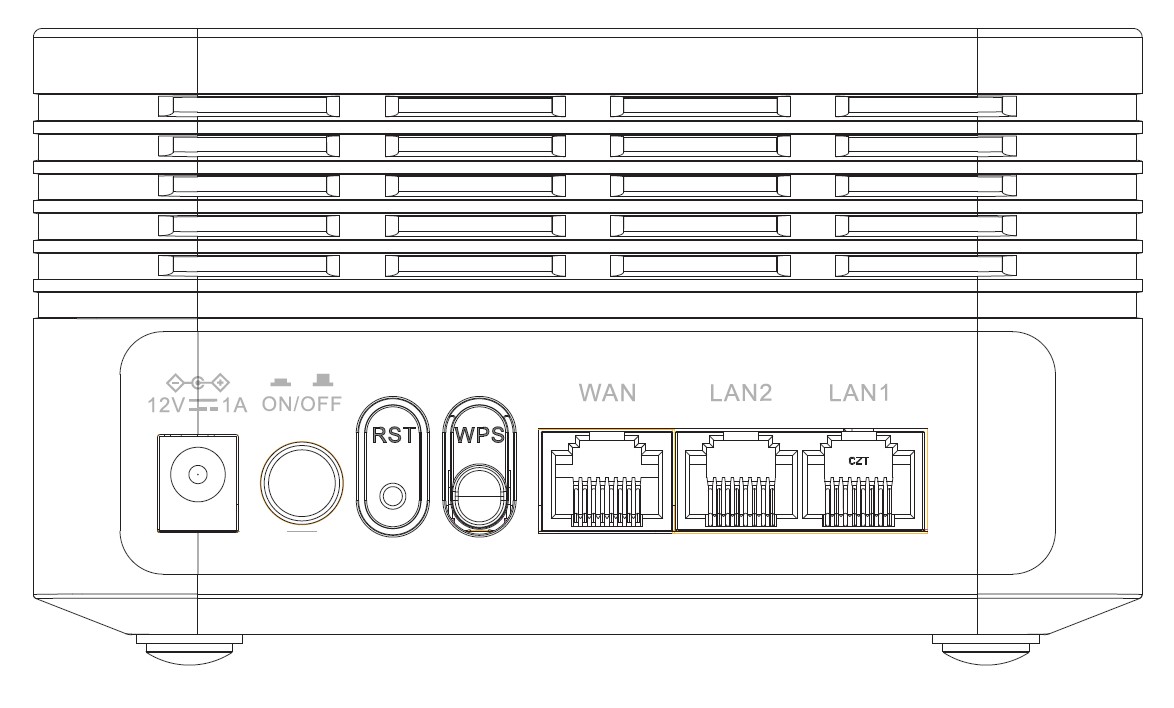
На задната страна на устройството ви има 7 порта:
• 12V1A: Тук се включва захранващият кабел.
• ON/OFF: Можете да включите или изключите устройството си, като просто натиснете този бутон.
• RST: Използва се за възстановяване на фабричните настройки на устройството чрез вкарване на кламер в отвора.
• WPS: Бутонът WPS се използва за свързване на различни устройства помежду им.
• WAN: WAN портът за RJ45 кабел, чрез който устройството се свързва с вашия интернет рутер.
• LAN2: Използва се за свързване на едно от вашите лични устройства към Mesh чрез RJ45, за да се осигури постоянна връзка.
• LAN1: Използва се за свързване на едно от вашите лични устройства към Mesh чрез RJ45, за да се осигури постоянна връзка.