
Repeater 1200
Alle Fragen
Repeater 1200
Wie konfiguriere ich meinen „ repeater “ als Access Point?
TIPPS: Bevor Sie Ihren „ repeater “ konfigurieren, überprüfen Sie bitte anhand der folgenden Anleitung, wo sich Ihr „ repeater “ befindet:
Wo ist der beste Standort für meinen „ repeater “?1Stellen Sie eine Verbindungzur Web-Benutzeroberfläche her.
Befolgen Sie eine der folgenden Anleitungen, um eine Verbindung zur Web-Benutzeroberfläche herzustellen:
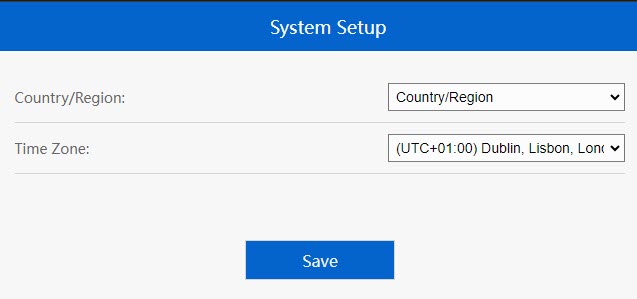
2Zeitzone einstellen
Wählen Sie die Zeitzone aus der Liste aus, falls die automatisch erkannte Zeitzone falsch ist, und klicken Sie auf „Speichern“.
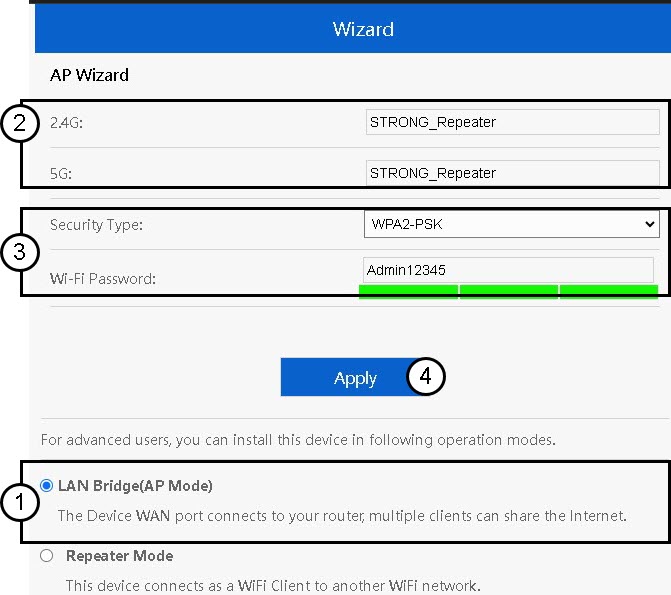
3. Konfigurieren Siedie Einstellungen des Access Points
Der Einrichtungsassistent für „ repeater “ wird geöffnet. Wählen Sie„LAN-Bridge (AP)“ aus. Geben Sie anschließend den Namen für die Access Points ein. Wählen Sie einen Sicherheitstyp aus und geben Sie ein WLAN-Passwort ein, bevor Sie auf „Übernehmen“ klicken.
4Warten Sie, bis die Konfiguration von „ Repeater “ abgeschlossen ist
Bitte warten Sie einen Moment, während der „ repeater “ den Konfigurationsvorgang abschließt.
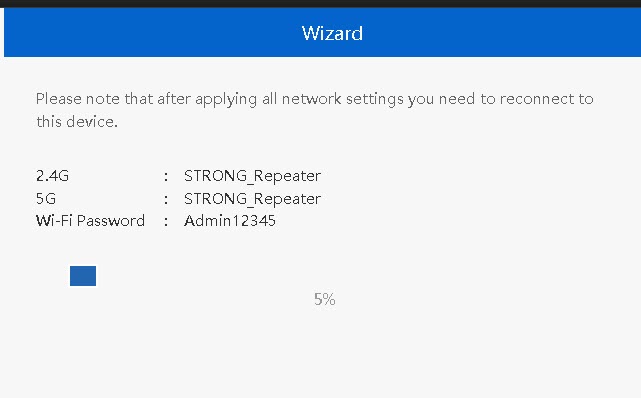

Warnung: Bitte notieren Sie sich die Daten der beiden WLAN-Netzwerke. Sie benötigen diese Angaben, um eine Verbindung zum Netzwerk herzustellen.