ATRIA Wi-Fi 5 Mesh 2100 (add-on)
Keine Artikel gefunden.
Keine Artikel gefunden.
Alle Fragen
ATRIA Wi-Fi 5 Mesh 2100 (add-on)
Keine Artikel gefunden.
Keine Artikel gefunden.
Wie nutze ich die „Atria Mesh “-App?
1Atria„ Mesh “-App
Laden Sie dann die Atria-App „ Mesh “ herunter.

2. Mit dem WLAN verbinden
Verbinden Sie sich dazu mit dem WLAN des „ Mesh “-Geräts, das mit Ihrem Router/Modem verbunden ist.

3Qualifikationen
Geben Sie den Benutzernamen und das Passwort (admin/admin) ein, um eine Verbindung herzustellen.

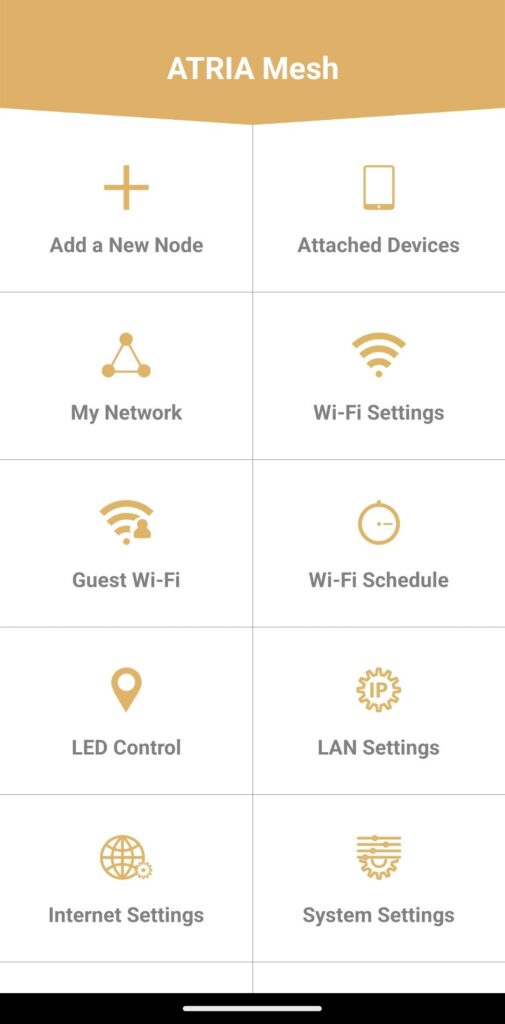
4Startseite
Jetzt befinden Sie sich auf der Startseite.
- Neuen Knoten hinzufügen: Hier können Sie Ihrem „ Mesh “-Netzwerk ein neues „ Mesh “-Gerät hinzufügen.
- Angeschlossene Geräte: Hier können Sie überprüfen, welche Geräte mit Ihrem „ Mesh “-Netzwerk verbunden sind.
- „Mein Netzwerk“: Hier können Sie alle „ Mesh “-Geräte einsehen, die mit Ihrem „ Mesh “-Netzwerk verbunden sind.
- WLAN-Einstellungen: Hier können Sie die SSID (WLAN-Netzwerkname) und das Passwort Ihres WLAN- Mesh -Netzwerks bearbeiten und ändern.
- Gäste-WLAN: Hier können Sie ein Gäste-WLAN im 2,4-GHz- oder 5-GHz-Band einrichten und konfigurieren.
- WLAN-Zeitplan: Hier können Sie festlegen, zu welchen Zeiten Ihr WLAN-Netzwerk aktiviert sein soll.
- LED-Steuerung: Hier können Sie die LEDs Ihres „ Mesh “-Geräts ein- oder ausschalten.
- LAN-Einstellungen: Hier können Sie DHCP aktivieren oder deaktivieren.
- Interneteinstellungen: Hier können Sie eine DHCP-Verbindung, „ Handbuch -DNS“ und PPPoE konfigurieren sowie eine statische IP-Adresse einrichten.
- Systemeinstellungen: Hier können Sie den Benutzernamen und das Passwort des Administrators für den Zugriff auf die App ändern.