
Powerline 1000 Duo Wi-Fi EU V2
Όλες οι ερωτήσεις
Powerline 1000 Duo Wi-Fi EU V2
Μπορώ να απενεργοποιήσω τη λειτουργία Wi-Fi της μονάδας Wi-Fi, ώστε να λειτουργεί ως απλό σύστημα Powerline;
Ναι, είναι δυνατό να απενεργοποιήσετε το Wi-Fi. Για να το κάνετε αυτό, ακολουθήστε τα παρακάτω βήματα.
1. Συνδεθείτεστο δίκτυο Wi-Fi Powerline
Συνδεθείτε στο δίκτυο Wi-Fi του Powerline.
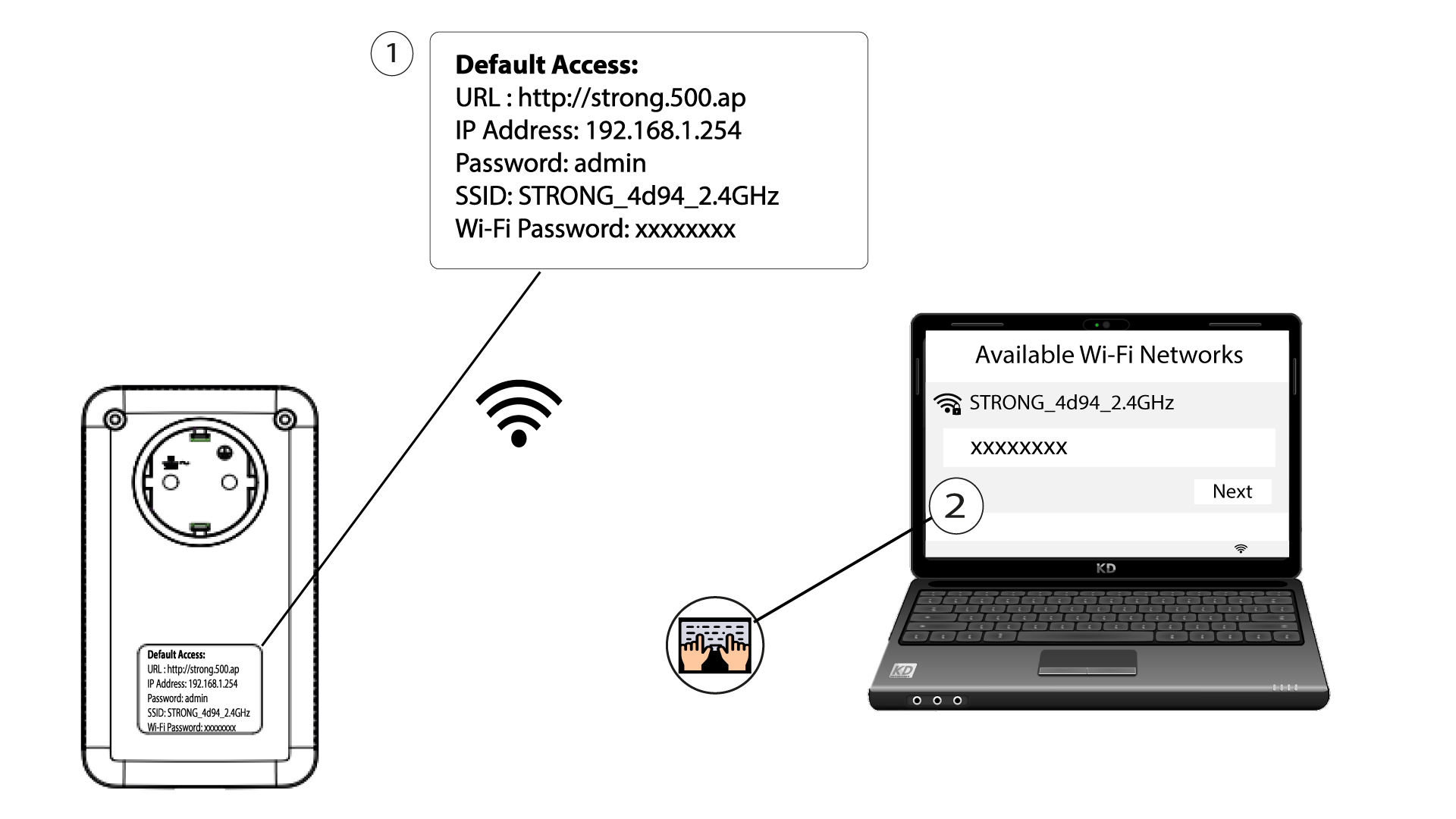
2Μεταβείτεστη διεπαφή χρήστη του ιστού
Συνδεθείτε στη διεπαφή χρήστη της μονάδας Wi-Fi Powerline μέσω Wi-Fi ή πληκτρολογώντας τη διεύθυνση http://strong.500.ap στη γραμμή διευθύνσεων του προγράμματος περιήγησης στο Διαδίκτυο· η διεπαφή θα εμφανιστεί.

3. Εισάγετετα στοιχεία σύνδεσης
Μόλις μπείτε στην αρχική σελίδα, πληκτρολογήστε τον κωδικό πρόσβασης: admin

4. Ρυθμίσεις WLAN
Κάντε κλικ στην επιλογή «Ρυθμίσεις WLAN » και, στη συνέχεια, επιλέξτε «Βασικές ρυθμίσεις».

5. Απενεργοποιήστετο Wi-Fi
Αποεπιλέξτε το πλαίσιο ελέγχου «Ενεργοποίηση» στη γραμμή «Ασύρματο», ανάλογα με τις ανάγκες σας, και κάντε κλικ στο κουμπί «Αποθήκευση».


Παρακαλούμε να λάβετε υπόψη ότι, για να ενεργοποιήσετε ξανά το Wi-Fi μέσω της διεπαφής χρήστη της μονάδας, θα πρέπει να συνδεθείτε μέσω καλωδίου RJ45. Η άλλη λύση για την επανενεργοποίηση του Wi-Fi είναι να κάνετε επαναφορά του Powerline Wi-Fi χρησιμοποιώντας ένα συνδετήρα, μέχρι να αρχίσουν να αναβοσβήνουν οι ενδείξεις LED. Όλες οι συσκευές που ήταν συνδεδεμένες στο δίκτυο Powerline Wi-Fi θα αποσυνδεθούν αυτόματα.