
Mesh ATRIA Wi-Fi 5 Mesh 2100 (add-on)
Όλες οι ερωτήσεις
Mesh ATRIA Wi-Fi 5 Mesh 2100 (add-on)
Πώς μπορώ να αλλάξω το SSID (όνομα δικτύου Wi-Fi) και τον κωδικό πρόσβασης του δικτύου Wi-Fi μου mesh ;

Προειδοποίηση: Λάβετε υπόψη ότι πρέπει να εισαγάγετε έναν κωδικό πρόσβασης μήκους 8 έως 32 χαρακτήρων, ο οποίος να περιέχει
κεφαλαία, πεζά, αριθμούς και τουλάχιστον έναν ειδικό χαρακτήρα (@, $, !, %, *, ?, &)
Για να συνδεθείτε στο Web UI, παρακαλώ ανατρέξτε στην παρακάτω διαδικασία: Πώς μπορώ να αποκτήσω πρόσβαση στο Web UI;
1ΠΕΡΙΠΤΩΣΗ1: Αλλαγή των στοιχείων του δικτύου Wi-Fi μέσω του περιβάλλοντος χρήστη ιστού
Κάντε κλικ στο «WLAN» και στο «WLAN 2.4G». Στη συνέχεια, εισαγάγετε τις παρακάτω πληροφορίες πριν κάνετε κλικ στο «Επιβεβαίωση»:
- SSID: Εισάγετε ένα νέο όνομα δικτύου
- PSK: Εισάγετε έναν νέο κωδικό πρόσβασης.

2. Καταγράψτετις νέες πληροφορίες
Σημειώστε τα νέα στοιχεία δικτύου σε ένα κομμάτι χαρτί.

Για να συνδεθείτε στην εφαρμογή, ακολουθήστε την παρακάτω διαδικασία: Πώς χρησιμοποιώ την εφαρμογή Atria « Mesh »;
1ΠΕΡΙΠΤΩΣΗ2: Αλλαγή των στοιχείων του δικτύου Wi-Fi στην εφαρμογή
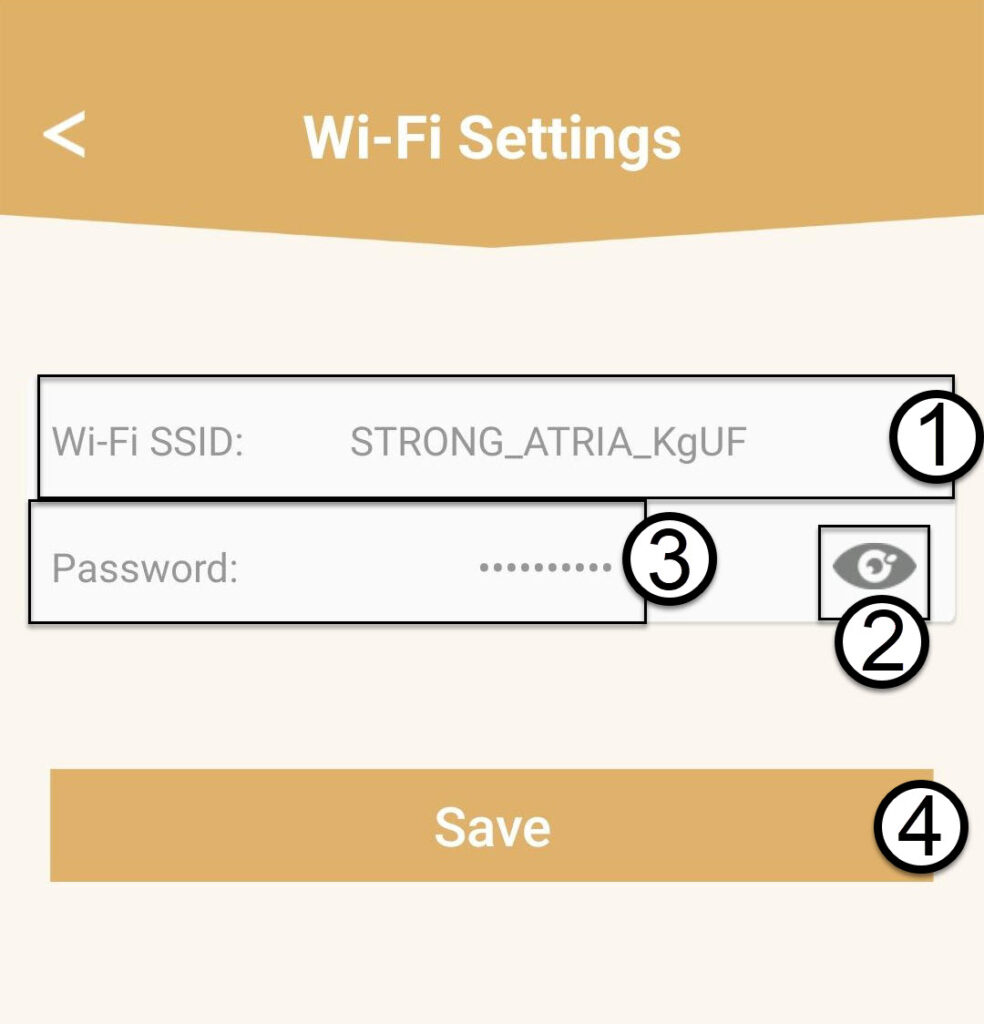
Κάντε κλικ στην επιλογή «Ρυθμίσεις Wi-Fi».

2. Καταγράψτετις νέες πληροφορίες
Εισάγετε ένα νέο SSID Wi-Fi και κάντε κλικ στο εικονίδιο με το μάτι για να εμφανιστεί ο κωδικός πρόσβασης και αλλάξτε τον κωδικό πρόσβασης πριν κάνετε κλικ στο «Αποθήκευση».
3. Καταγράψτετις νέες πληροφορίες
Γράψτε τον κωδικό πρόσβασης σε ένα κομμάτι χαρτί.