
Επαναλήπτης διπλής ζώνης 1200
Όλες οι ερωτήσεις
Επαναλήπτης διπλής ζώνης 1200
Πώς μπορώ να ρυθμίσω τον επαναλήπτη μου ώστε να λειτουργεί ως σημείο πρόσβασης;
ΣΥΜΒΟΥΛΕΣ: Πριν προχωρήσετε στη ρύθμιση του επαναλήπτη σας, παρακαλούμε να ακολουθήσετε την παρακάτω διαδικασία για να προσδιορίσετε τη θέση του επαναλήπτη σας:
Ποια είναι η καλύτερη θέση για τον αναμεταδότη μου;1. Συνδεθείτεστο περιβάλλον χρήστη του Web.
Ακολουθήστε μία από τις παρακάτω διαδικασίες για να συνδεθείτε στο περιβάλλον χρήστη του ιστού:
2. Ρύθμισητης ζώνης ώρας
Επιλέξτε τη ζώνη ώρας από τη λίστα, εάν αυτή που ανιχνεύθηκε αυτόματα είναι λανθασμένη, και κάντε κλικ στο «Αποθήκευση».
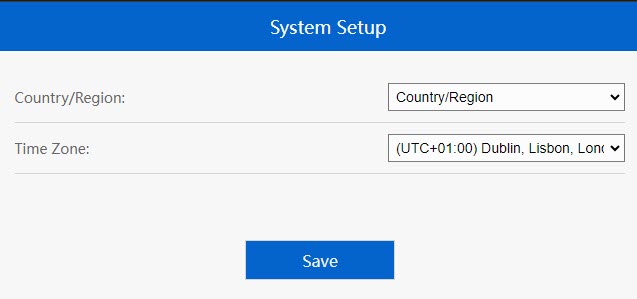
3. Ρύθμισητων παραμέτρων του σημείου πρόσβασης
Θα ανοίξει ο οδηγός ρύθμισης του επαναλήπτη. Επιλέξτε«LAN Bridge (AP)». Στη συνέχεια, πληκτρολογήστε το όνομα για τα σημεία πρόσβασης. Επιλέξτε έναν τύπο ασφάλειας και πληκτρολογήστε έναν κωδικό πρόσβασης Wi-Fi πριν κάνετε κλικ στο «Apply».
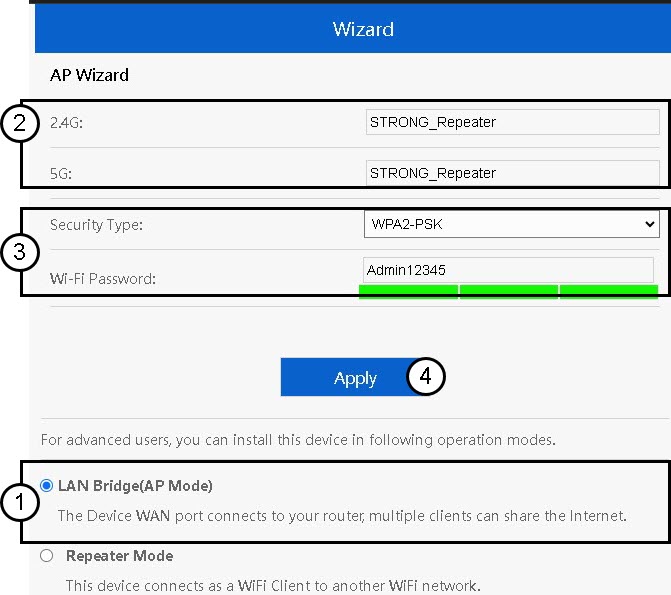
4. Περιμένετεμέχρι να ολοκληρωθεί η διαμόρφωση του επαναλήπτη
Παρακαλώ περιμένετε λίγα λεπτά μέχρι ο επαναλήπτης να ολοκληρώσει τη διαδικασία ρύθμισης.
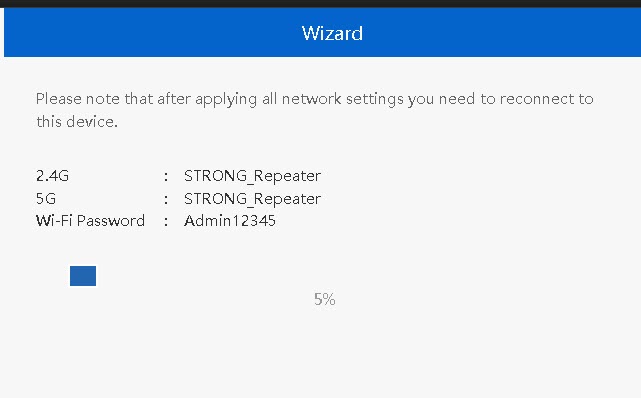

Προειδοποίηση: Παρακαλώ σημειώστε τα στοιχεία για τα δύο δίκτυα Wi-Fi. Θα χρειαστείτε αυτά τα στοιχεία για να συνδεθείτε στο δίκτυο.