
Δεν βρέθηκαν αντικείμενα.
Δεν βρέθηκαν αντικείμενα.
ΚΆΜΕΡΑ BULLET POE 5MP ΔΙΠΛΟΎ ΦΩΤΙΣΜΟΎ
Όλες οι ερωτήσεις
Δεν βρέθηκαν αντικείμενα.
Δεν βρέθηκαν αντικείμενα.
ΚΆΜΕΡΑ BULLET POE 5MP ΔΙΠΛΟΎ ΦΩΤΙΣΜΟΎ
Πώς μπορώ να διαχειριστώ τον κωδικό πρόσβασης της κάμεράς μου στο περιβάλλον χρήστη του ιστού;
Πώς μπορώ να διαχειριστώ τον κωδικό πρόσβασης της κάμεράς μου στο περιβάλλον χρήστη του ιστού;
Μπορείτε να αλλάξετε τον κωδικό πρόσβασης διαχειριστή για το περιβάλλον εργασίας χρήστη (Web UI). Για να το κάνετε αυτό, ακολουθήστε τα παρακάτω βήματα.
1
Άνοιγμα των ρυθμίσεων κωδικού πρόσβασης
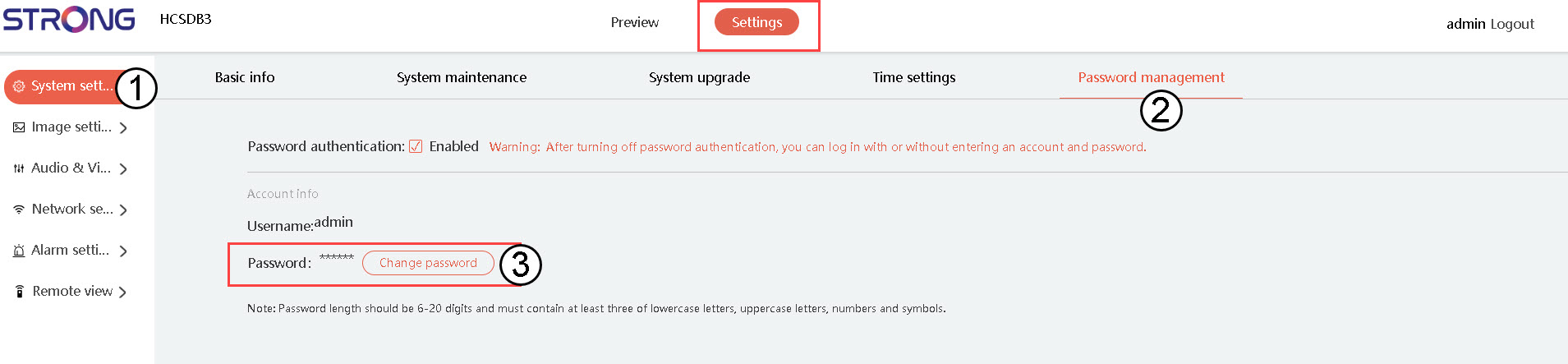
Κάντε κλικ στην επιλογή «Ρυθμίσεις συστήματος» και, στη συνέχεια, κάντε κλικ στην επιλογή «Διαχείριση κωδικών πρόσβασης». Έπειτα, κάντε κλικ στην επιλογή «Αλλαγή κωδικού πρόσβασης».
2
Εισάγετε τα στοιχεία του νέου σας κωδικού πρόσβασης
Συμπληρώστε τα παρακάτω πεδία:
- Τρέχων κωδικός πρόσβασης: Εισάγετε τον κωδικό πρόσβασης που αναγράφεται στη φωτογραφική σας μηχανή.
- Εισαγωγή νέου κωδικού πρόσβασης: Εισάγετε τον νέο κωδικό πρόσβασης.
- Επιβεβαίωση κωδικού πρόσβασης: Πληκτρολογήστε τον κωδικό πρόσβασης που εισάγατε στο προηγούμενο πεδίο.
