Mesh ATRIA Wi-Fi 6 Mesh 3000 UK πακέτο 2 τεμαχίων)
Όλες οι ερωτήσεις
Mesh ATRIA Wi-Fi 6 Mesh 3000 UK πακέτο 2 τεμαχίων)
Σε τι χρησιμεύουν οι διάφορες θύρες;
1. Συνδεθείτεστο Wi-Fi της συσκευής
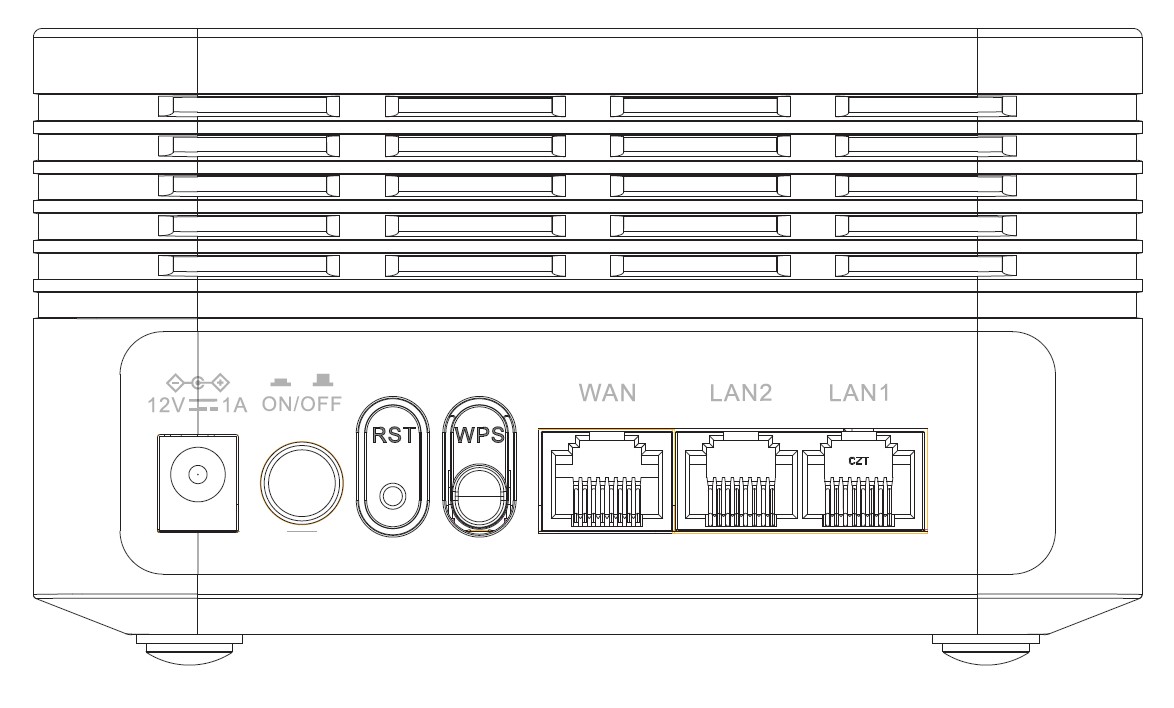
Υπάρχουν 7 θύρες στο πίσω μέρος της συσκευής σας:
• 12V1A: Εδώ συνδέετε το καλώδιο τροφοδοσίας.
• ON/OFF: Μπορείτε να ενεργοποιήσετε ή να απενεργοποιήσετε τη συσκευή σας πατώντας απλά αυτό το κουμπί.
• RST: Χρησιμοποιείται για την επαναφορά της συσκευής σας στις εργοστασιακές ρυθμίσεις, εισάγοντας ένα συνδετήρα χαρτιού στην υποδοχή.
• WPS: Το κουμπί WPS χρησιμοποιείται για τη σύζευξη διαφορετικών συσκευών μεταξύ τους.
• WAN: Η θύρα WAN για καλώδιο RJ45, ώστε να τη συνδέσετε στο δρομολογητή σας.
• LAN2: Χρησιμοποιείται για τη σύνδεση μιας από τις προσωπικές σας συσκευές με το Mesh μέσω RJ45, ώστε να εξασφαλιστεί σταθερή σύνδεση.
• LAN1: Χρησιμοποιείται για τη σύνδεση μιας από τις προσωπικές σας συσκευές με το Mesh μέσω RJ45, ώστε να εξασφαλιστεί σταθερή σύνδεση.