
No items found.
LEAP 41 | 4K Google TV with HDR10+
No items found.
All questions
No items found.
LEAP 41 | 4K Google TV with HDR10+
No items found.
How do I pair my remote control?
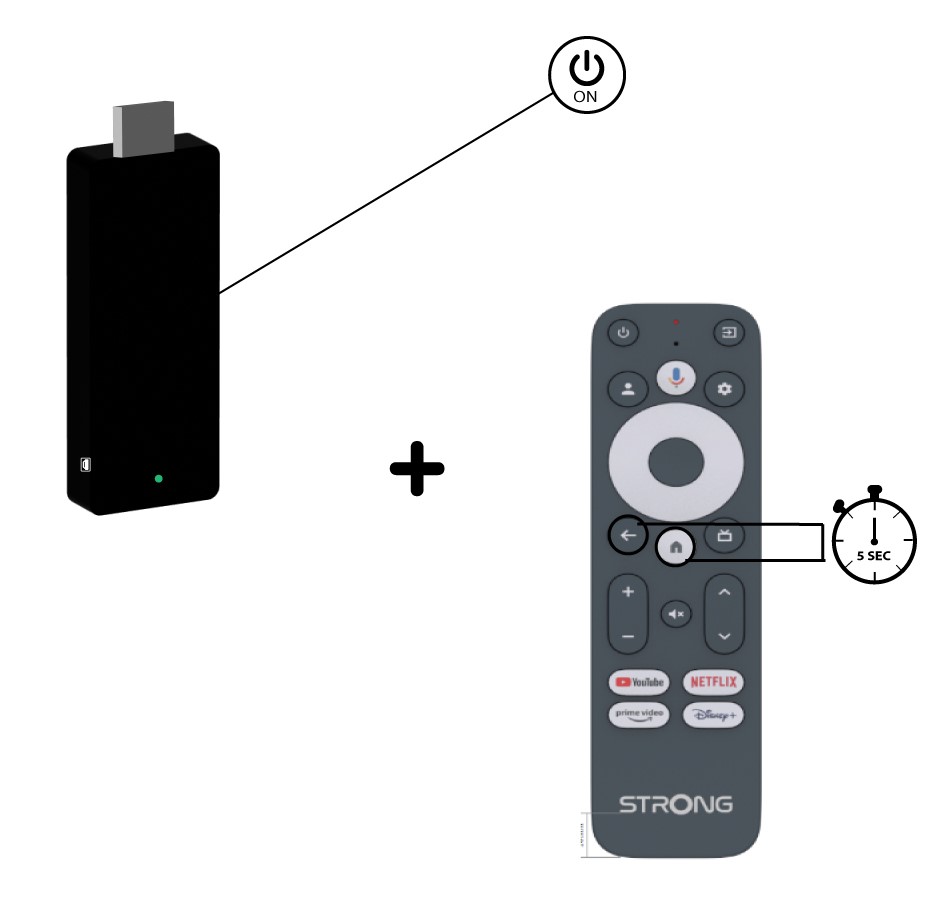
For this model, the remote control is paired during the boot stage of the device. Follow these steps:
1Remove the main power
Unplug the power cable of the device.
2Wait 5 seconds
Wait 5 seconds before reconnecting the power.
3Insert the main power
Plug the power cable back in.
4Wait for the Google logo
The device boots. Wait until the Google logo is shown on the screen.
5Press BACK and HOME
On the remote, press the BACK and HOME buttons at the same time for 5 seconds, until the LED on the remote blinks.
6Confirm the pairing
If the remote is detected, a pairing screen is displayed with a confirmation. The device then goes automatically to the Home screen and can be used.