ATRIA Wi-Fi 6 Mesh System 3000 UK (2-pakning)
Ingen gjenstander funnet.
Ingen gjenstander funnet.
Alle spørsmål
ATRIA Wi-Fi 6 Mesh System 3000 UK (2-pakning)
Ingen gjenstander funnet.
Ingen gjenstander funnet.
Hva brukes de forskjellige portene til?
1 Koble til enhetens Wi-Fi
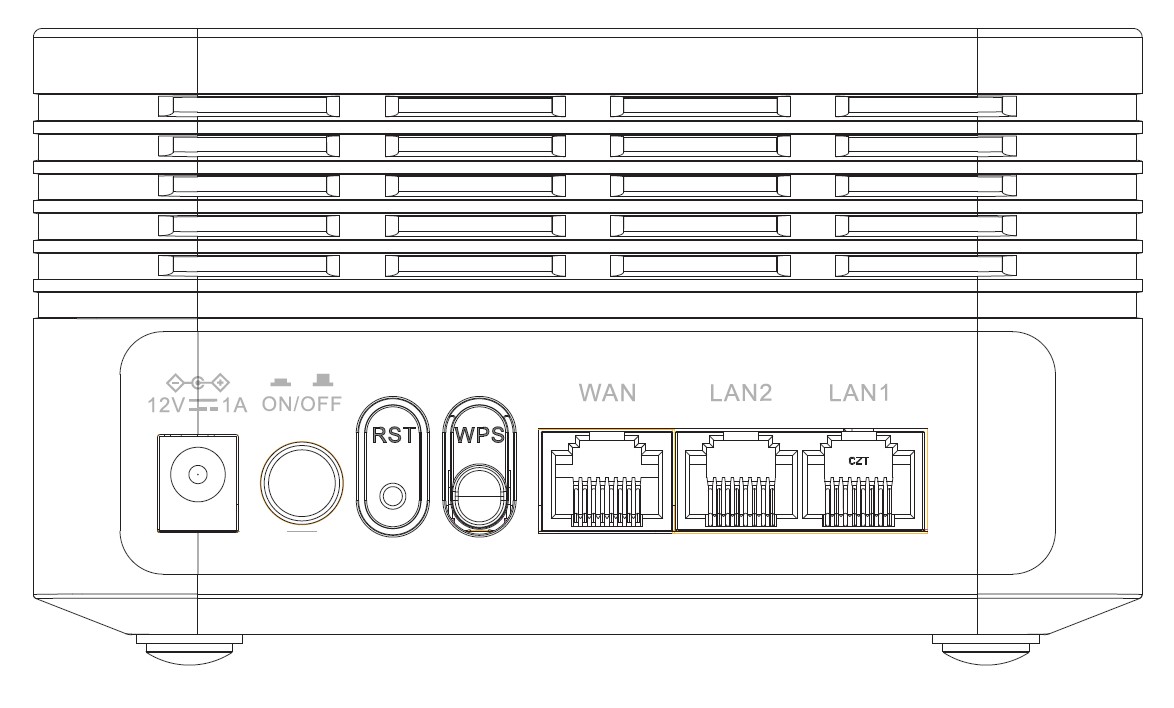
Det er 7 porter bak enheten din:
• 12V1A : Det er der du kobler til strømkabelen.
• PÅ/AV : Du kan slå enheten av eller på ved å trykke på denne knappen.
• RST : Brukes til å tilbakestille enheten til fabrikkinnstillingene ved å sette inn en binders i den.
• WPS : WPS-knappen brukes til å koble sammen forskjellige enheter.
• WAN : WAN-porten for en RJ45-kabel for å koble den til internettboksen din.
• LAN2 : Brukes til å koble en av dine personlige enheter til Mesh via RJ45 for å sikre en konstant forbindelse.
• LAN1: Brukes til å koble en av dine personlige enheter til Mesh via RJ45 for å sikre en konstant forbindelse.