
Mobilne Wi-Fi 4G+ AIRSPOT 510
Nie znaleziono żadnych elementów.
Nie znaleziono żadnych elementów.
Wszystkie pytania
Mobilne Wi-Fi 4G+ AIRSPOT 510
Nie znaleziono żadnych elementów.
Nie znaleziono żadnych elementów.
Jak zarządzać ustawieniami APN w moim urządzeniu?
Czasami po skonfigurowaniu urządzenia i wprowadzeniu kodu PIN mogą wystąpić problemy z mobilną siecią danych. W takim przypadku należy postępować zgodnie z poniższą procedurą, aby sprawdzić ustawienia APN.
1. Wejdź dointerfejsu użytkownika (Web UI)
Aby połączyć się z interfejsem użytkownika w sieci Web, należy postępować zgodnie z poniższą procedurą . Jak uzyskać dostęp do interfejsu użytkownika w sieci Web?
2. Otwórzustawienia APN
Kliknij opcję „Ustawienia internetowe ” i „Konfiguracja APN”. Następnie kliknij opcję „Dodaj APN”.
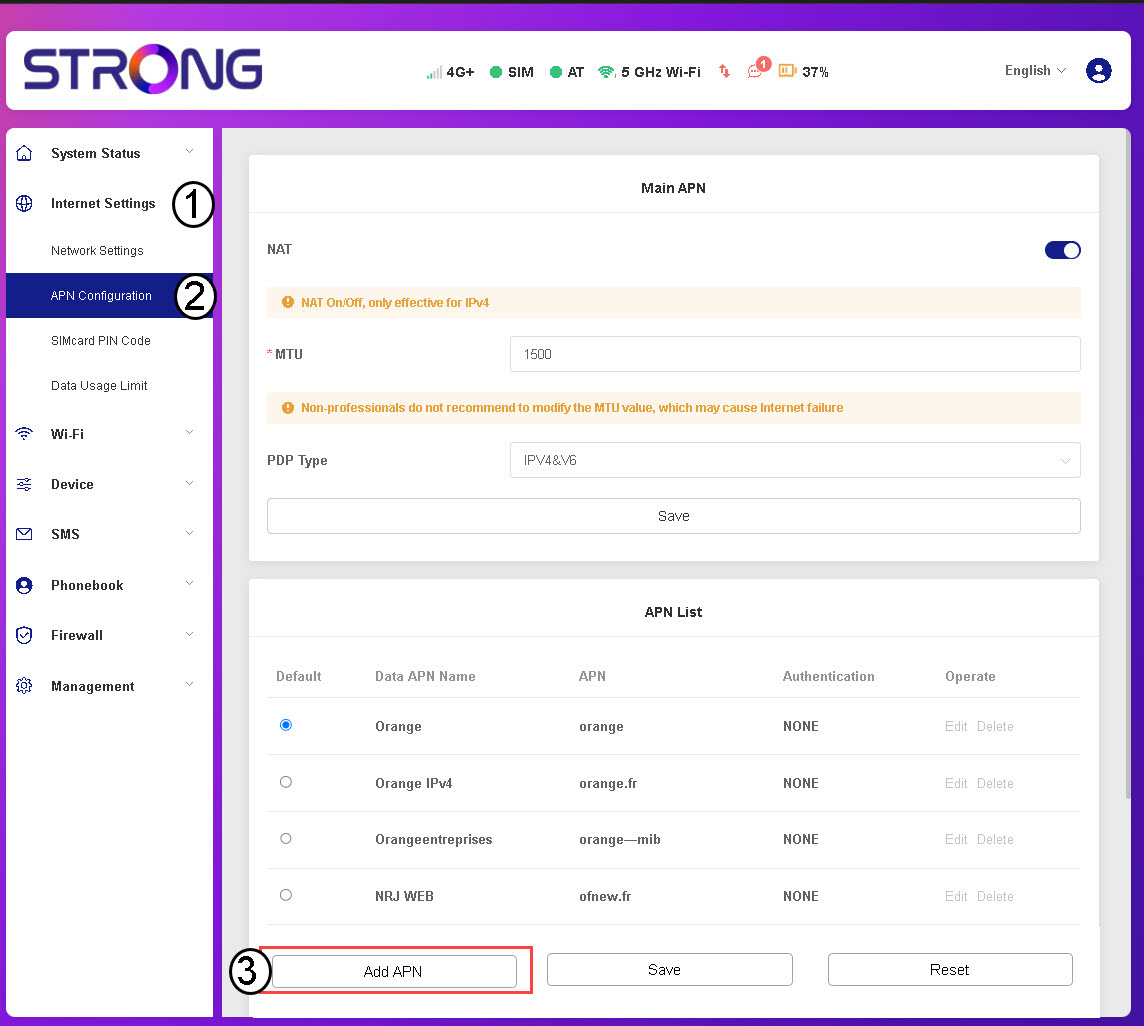
3. Wprowadźi zapisz dane APN
Przed kliknięciem przycisku „Zapisz” wprowadź następujące informacje :
- Nazwa APN: Wprowadź nazwę APN podaną przez operatora.
- APN: Wprowadź nazwę APN podaną przez operatora.
- Uwierzytelnianie: Wybierz typ uwierzytelniania z listy na podstawie informacji przekazanych przez dostawcę usług.