
4G AIRHOME 210 UK zamontowanymi na stałe antenami 4G
Wszystkie pytania
4G AIRHOME 210 UK zamontowanymi na stałe antenami 4G
Jak przywrócić ustawienia fabryczne routera?
Czasami może się zdarzyć, że urządzenie nie działa prawidłowo i nie masz dostępu do Internetu. W takim przypadku zalecamy przywrócenie ustawień fabrycznych urządzenia, a następnie, w razie potrzeby, ponowną aktualizację oprogramowania sprzętowego.
Możesz to zrobić na dwa sposoby: zresetować urządzenie, naciskając przycisk resetowania lub wykonując tę czynność w interfejsie użytkownika sieci Web.
PRZYPADEK 1: Przycisk resetowania
W tym celu należy nacisnąć przycisk „Reset” znajdujący się po prawej stronie routera i przytrzymać go przez dwie sekundy.

1PRZYPADEK2: Resetowanie w interfejsie użytkownika strony internetowej
Aby połączyć się z interfejsem użytkownika, należy postępować zgodnie z instrukcjami zawartymi w artykule: Jak uzyskać dostęp do interfejsu użytkownika?
2. Aktualizacja oprogramowania układowego
Następnie kliknij opcję „Aktualizacja oprogramowania sprzętowego”.

3. Przywróćustawienia fabryczne
Kliknij opcję „Inne”. W sekcji „Ponowne uruchomienie i resetowanie ” kliknij opcję „Przywróć ustawienia fabryczne”.
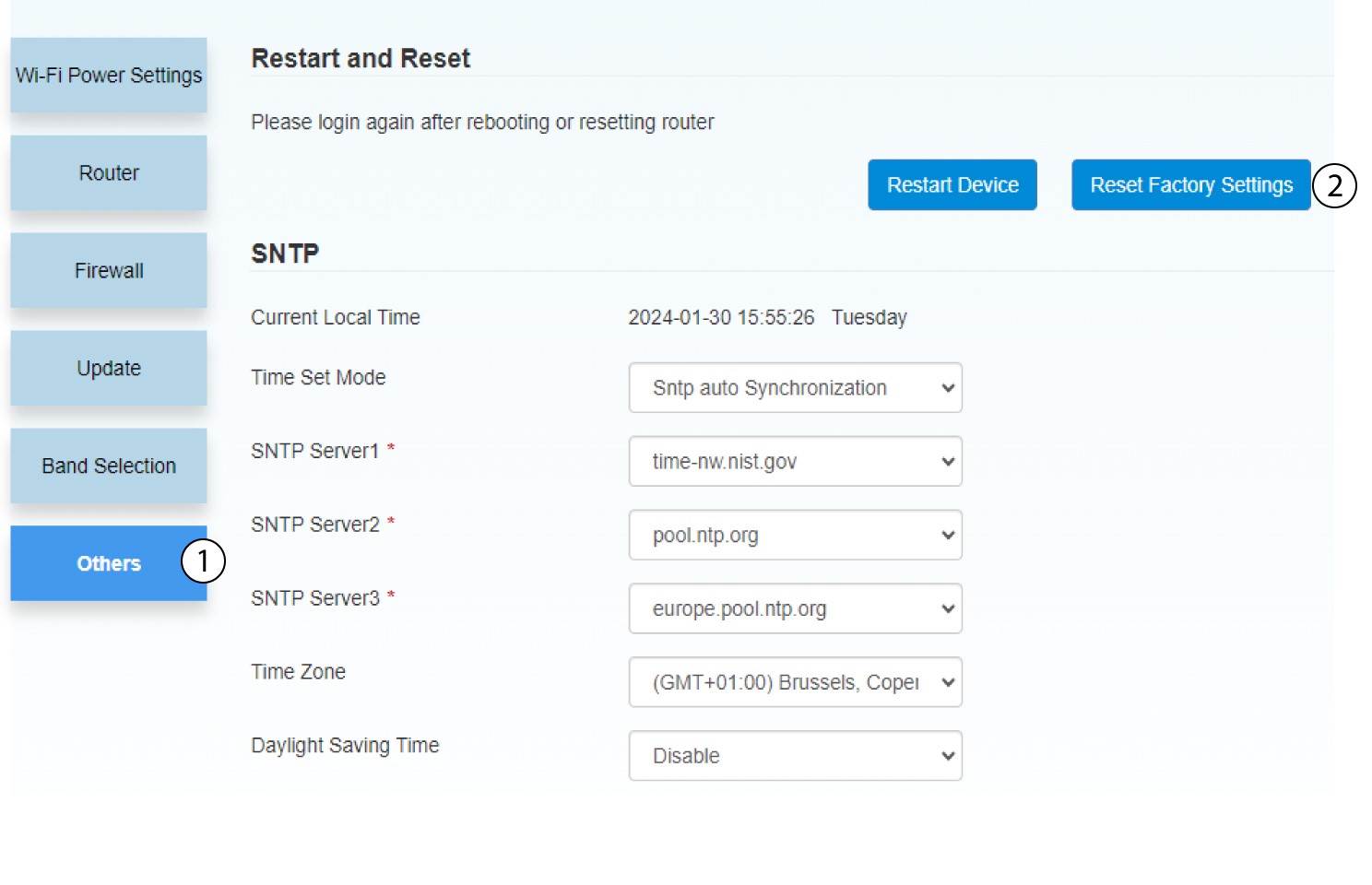
4. Powiadomienie wyskakujące
Kliknij „TAK” w wyskakującym okienku.
