Mesh ATRIA Wi-Fi 6 Mesh 3000 (pakiet 2 szt.)
Nie znaleziono żadnych elementów.
Nie znaleziono żadnych elementów.
Wszystkie pytania
Mesh ATRIA Wi-Fi 6 Mesh 3000 (pakiet 2 szt.)
Nie znaleziono żadnych elementów.
Nie znaleziono żadnych elementów.
Do czego służą poszczególne porty?
1. Połącz sięz siecią Wi-Fi tego urządzenia
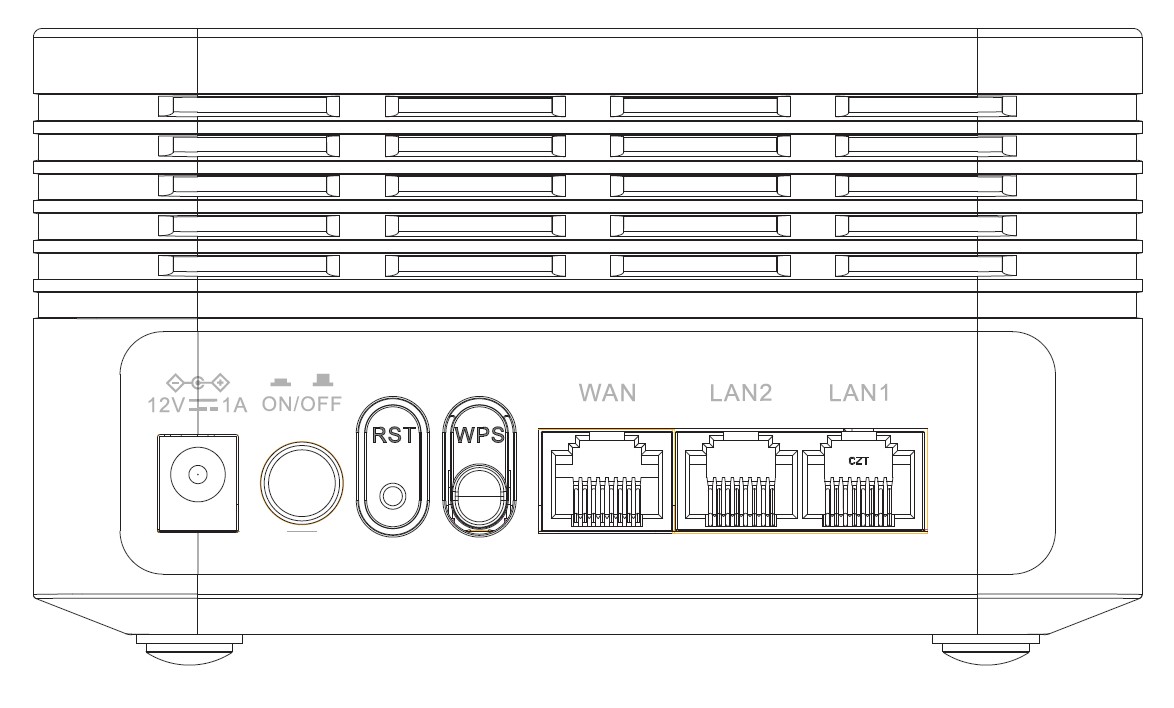
Z tyłu urządzenia znajduje się 7 portów:
• 12V1A: Tutaj podłącza się kabel zasilający.
• ON/OFF: Urządzenie można włączyć lub wyłączyć, po prostu naciskając ten przycisk.
• RST: Służy do przywrócenia ustawień fabrycznych urządzenia poprzez włożenie do niego spinacza biurowego.
• WPS: Przycisk WPS służy do parowania różnych urządzeń.
• WAN: Port WAN przeznaczony do podłączenia kabla RJ45 w celu połączenia z modemem internetowym.
• LAN2: Służy do podłączenia jednego z urządzeń osobistych do Mesh za pomocą kabla RJ45 w celu zapewnienia stałego połączenia.
• LAN1: Służy do podłączenia jednego z urządzeń osobistych do Mesh za pomocą kabla RJ45 w celu zapewnienia stałego połączenia.