
Mesh ATRIA Wi-Fi 5 2100 (add-on)
Todas as perguntas
Mesh ATRIA Wi-Fi 5 2100 (add-on)
Como posso alterar o SSID (nome da rede Wi-Fi) e a palavra-passe da minha rede Wi-Fi mesh ?

Aviso: Tenha em atenção que é necessário introduzir uma palavra-passe com 8 a 32 caracteres, contendo
letras maiúsculas, minúsculas, números e, pelo menos, um carácter especial (@, $, !, %, *, ?, &)
Para aceder à interface de utilizador web, consulte este procedimento: Como posso aceder à interface de utilizador web?
1 CASO1: Alterar as informações da rede Wi-Fi na interface de utilizador web
Clique em «WLAN » e em «WLAN 2,4G». Em seguida, introduza as seguintes informações antes de clicar em «Confirmar»:
- SSID: Introduza um novo nome de rede
- PSK: Introduza uma nova palavra-passe.

2. Anoteas novas informações
Anote as novas informações de rede num pedaço de papel.

Para se ligar à aplicação, consulte este procedimento: Como utilizar a aplicação Atria « Mesh »?
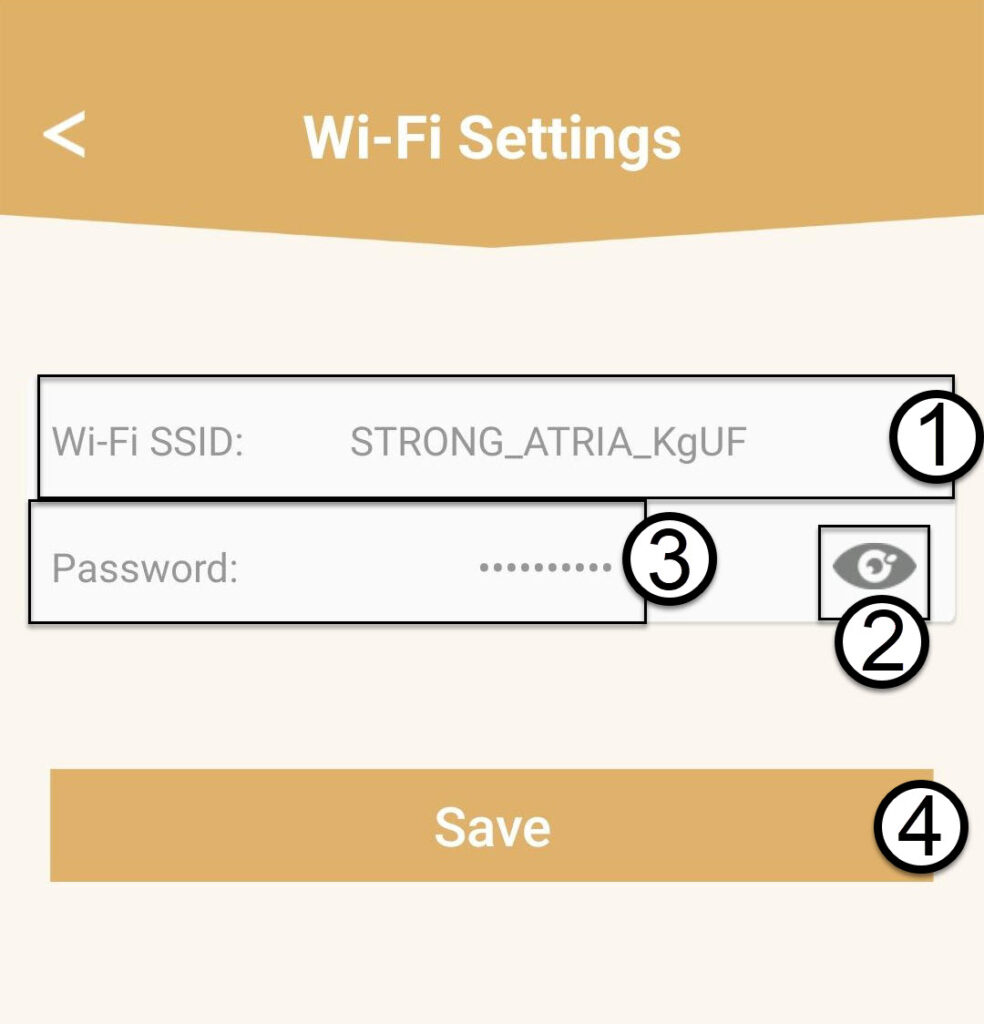
1CASO2: Alterar as informações da rede Wi-Fi na aplicação
Clique em «Definições de Wi-Fi».

2. Anoteas novas informações
Introduza um novo SSID de Wi-Fi e clique no ícone do olho para visualizar a palavra-passe e altere-a antes de clicar em «Guardar».
3. Anoteas novas informações
Anota a palavra-passe num pedaço de papel.