
Wi-Fi 4G+ AIRSPOT 510
Nenhum item encontrado.
Nenhum item encontrado.
Todas as perguntas
Wi-Fi 4G+ AIRSPOT 510
Nenhum item encontrado.
Nenhum item encontrado.
Como posso gerir as definições de APN do meu dispositivo?
Por vezes, podem surgir problemas com a rede de dados móveis após configurar o seu dispositivo e introduzir o seu código PIN. Nesse caso, siga o procedimento abaixo para verificar as suas informações de APN.
1. Acederà interface de utilizador web
Para aceder à interface de utilizador Web, siga este procedimento: Como posso aceder à interface de utilizador Web?
2. Abrira configuração do APN
Clique em «Definições de Internet » e em «Configuração de APN». Em seguida, clique em «Adicionar APN».
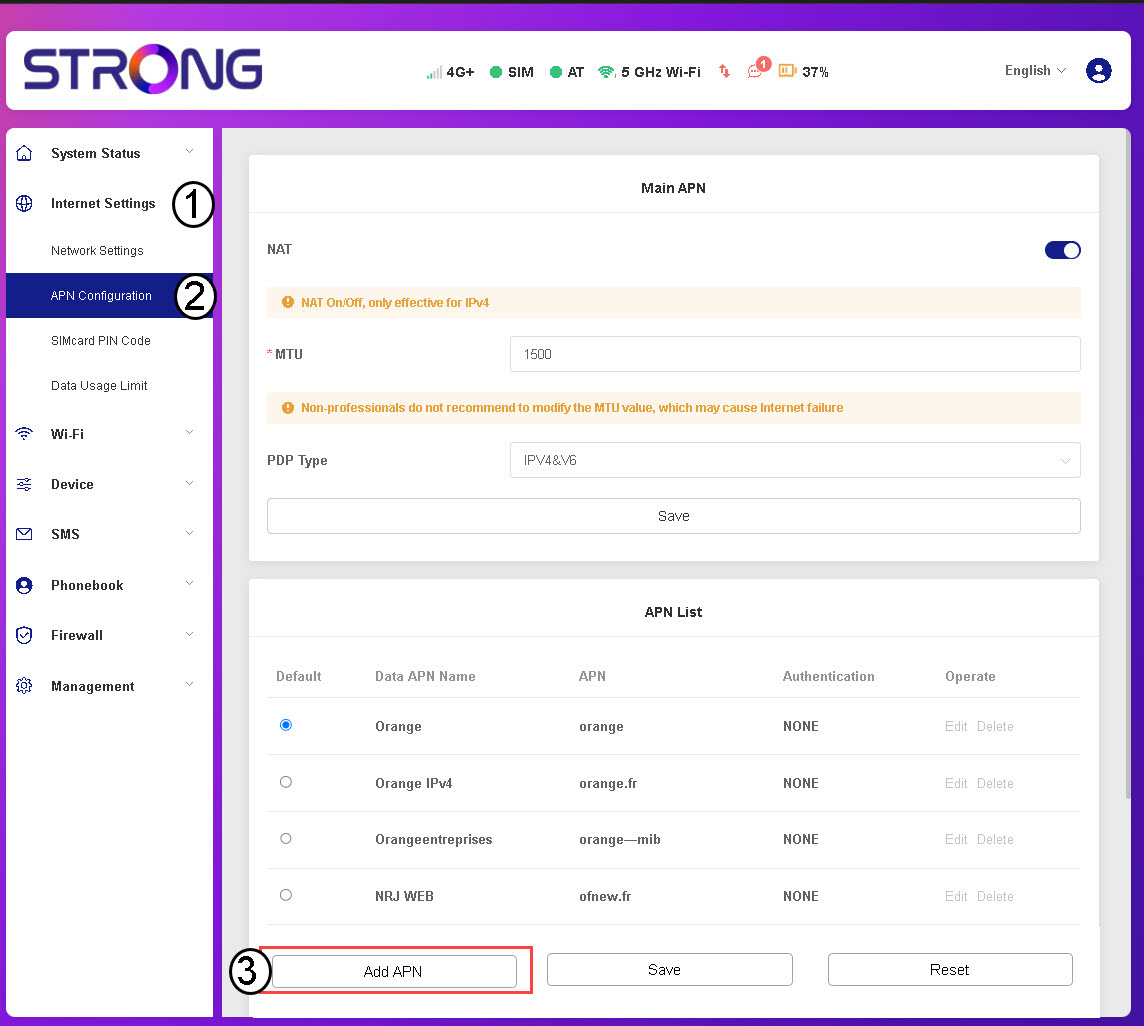
3. Introduzire guardar as informações do APN
Introduza as seguintes informações antes de clicar em «Guardar»:
- Nome do APN de dados: Introduza o nome do APN fornecido pela sua operadora.
- APN: Introduza o APN fornecido pelo seu operador.
- Autenticação: Selecione o tipo de autenticação na lista, com base nas informações fornecidas pelo seu prestador de serviços.