Mesh Wi-Fi 6 ATRIA 3000 UK pacote com 2 unidades)
Nenhum item encontrado.
Nenhum item encontrado.
Todas as perguntas
Mesh Wi-Fi 6 ATRIA 3000 UK pacote com 2 unidades)
Nenhum item encontrado.
Nenhum item encontrado.
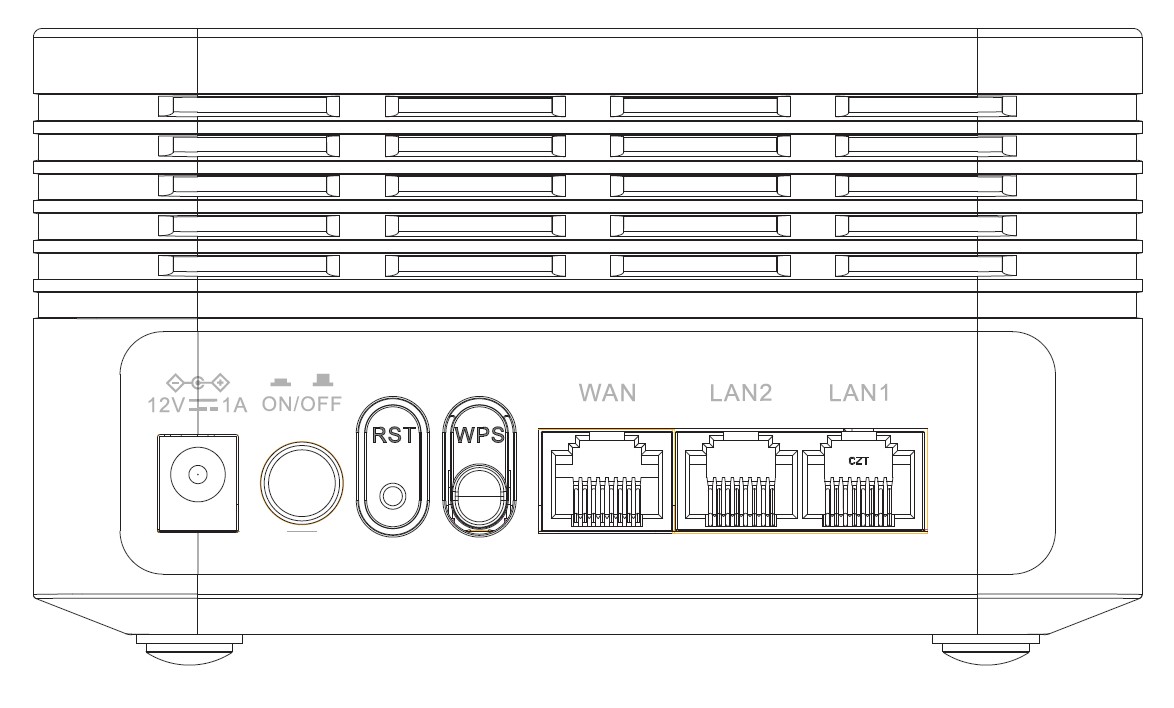
Para que servem as diferentes portas?
1Ligue-seà rede Wi-Fi do dispositivo
Existem 7 portas na parte de trás do seu dispositivo:
• 12V1A: É aqui que se liga o cabo de alimentação.
• ON/OFF: Pode ligar ou desligar o seu dispositivo simplesmente premindo este botão.
• RST: Utiliza-se para repor o dispositivo às definições de fábrica, inserindo um clipe de papel nesta entrada.
• WPS: O botão WPS serve para emparelhar diferentes dispositivos.
• WAN: A porta WAN destina-se à ligação de um cabo RJ45 para ligar o dispositivo à Internet box.
• LAN2: É utilizada para ligar um dos seus dispositivos pessoais à Mesh através de um cabo RJ45, de modo a garantir uma ligação constante.
• LAN1: É utilizada para ligar um dos seus dispositivos pessoais à Mesh através de um cabo RJ45, de modo a garantir uma ligação constante.