
Нема пронађених ставки.
Нема пронађених ставки.
5МП СУПЕР ТАМНА ПОЕ КАМЕРА
Сва питања
Нема пронађених ставки.
Нема пронађених ставки.
5МП СУПЕР ТАМНА ПОЕ КАМЕРА
Како да управљам лозинком за камеру у веб интерфејсу?
Како да управљам лозинком за камеру у веб интерфејсу?
Можете променити администраторску лозинку за веб интерфејс. Да бисте то урадили, пратите кораке у наставку.
1
Отворите подешавања лозинке
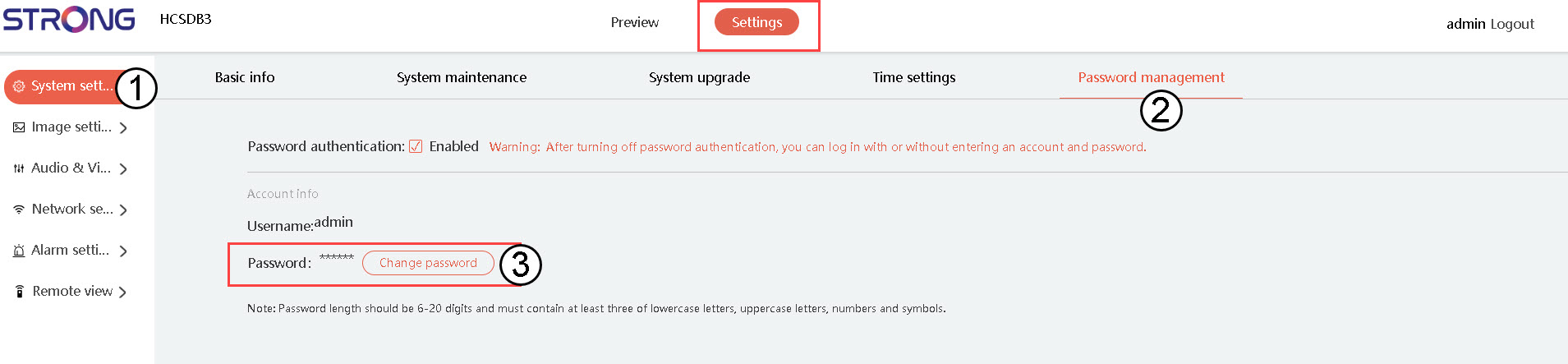
Кликните на Подешавања система , затим кликните на Управљање лозинкама . Након тога кликните на Промени лозинку .
2
Унесите детаље ваше нове лозинке
Попуните следећа поља:
- Тренутна лозинка: Унесите лозинку написану на вашем фотоапарату.
- Унесите нову лозинку: Унесите нову лозинку.
- Потврдите лозинку: Унесите лозинку коју сте унели у претходно поље.
