
Dubbelbandsrepeater 1200
Inga föremål hittades.
Inga föremål hittades.
Alla frågor
Dubbelbandsrepeater 1200
Inga föremål hittades.
Inga föremål hittades.
Hur ställer jag in min repeater som en åtkomstpunkt?
TIPS: Innan du konfigurerar din repeater bör du följa nedanstående anvisningar för att fastställa repeaterns placering:
Var är det bästa stället att placera min repeater?1. Ansluttill webbgränssnittet.
Följ ett av stegen nedan för att ansluta till webbgränssnittet:
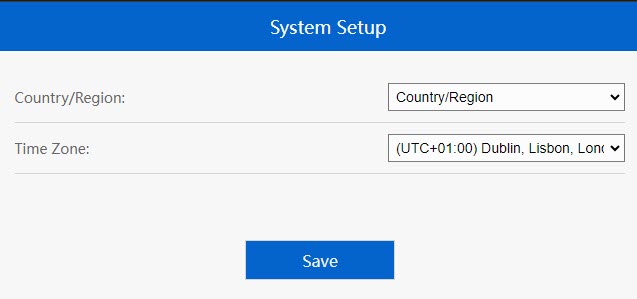
2Ställ intidszonen
Välj tidszon från listan om den som upptäcks automatiskt är felaktig och klicka på Spara.
3. Konfigurerainställningarna för åtkomstpunkten
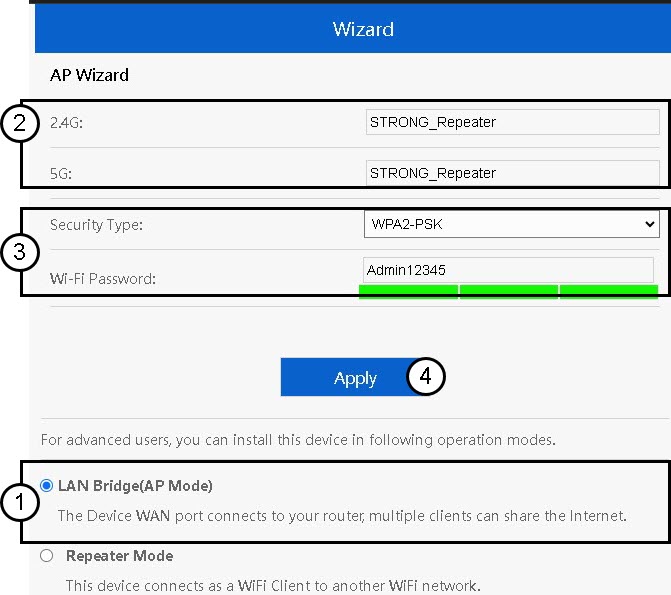
Guiden för inställning av repeatern öppnas. VäljLAN-brygga (AP). Ange sedan namnet på åtkomstpunkterna. Välj en säkerhetstyp och ange ett Wi-Fi-lösenord innan du klickar på ”Apply”.
4. Väntapå att repeaterkonfigurationen ska slutföras
Vänligen vänta ett ögonblick medan repeatern slutför konfigurationsprocessen.
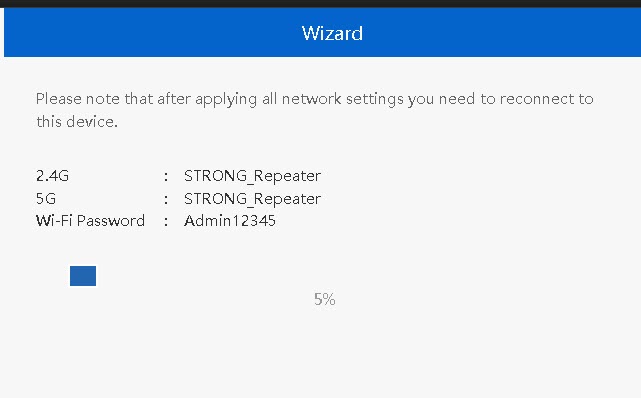

Varning: Se till att anteckna uppgifterna för de två Wi-Fi-nätverken. Du kommer att behöva dessa uppgifter för att kunna ansluta till nätverket.