
Dual Band Повторювач 1200
Нічого не знайдено.
Нічого не знайдено.
Усі питання
Dual Band Повторювач 1200
Нічого не знайдено.
Нічого не знайдено.
Як налаштувати пристрій « Повторювач » як точку доступу?
ПОРАДИ: Перш ніж налаштовувати пристрій « Повторювач », ознайомтеся з наведеною нижче інструкцією, щоб визначити місцезнаходження вашого пристрою « Повторювач »:
Яке місце найкраще підійде для мого « Повторювач »?1. Підключітьсядо веб-інтерфейсу користувача.
Щоб підключитися до веб-інтерфейсу, виконайте одну з наведених нижче процедур:
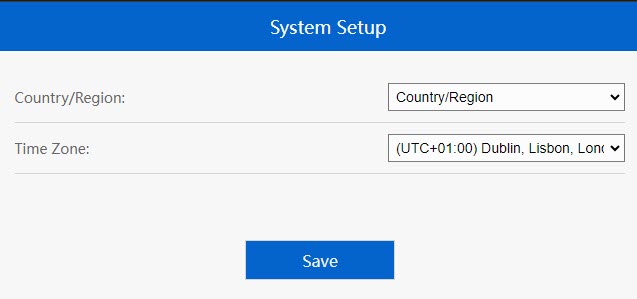
2. Встановитичасовий пояс
Виберіть часовий пояс зі списку, якщо той, що було визначено автоматично, є неправильним, і натисніть «Зберегти».
3. Налаштуванняпараметрів точки доступу
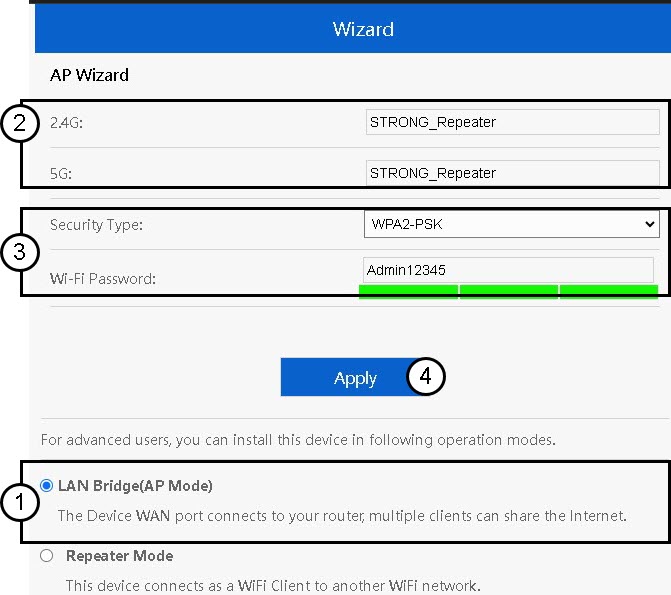
Відкриється майстер налаштування « Повторювач ». Виберіть«LAN Bridge (AP)». Потім введіть назву точки доступу. Виберіть тип захисту та введіть пароль Wi-Fi, після чого натисніть «Застосувати».
4. Дочекайтесязавершення налаштування служби « Повторювач »
Будь ласка, зачекайте кілька хвилин, поки пристрій « Повторювач » завершить процес налаштування.
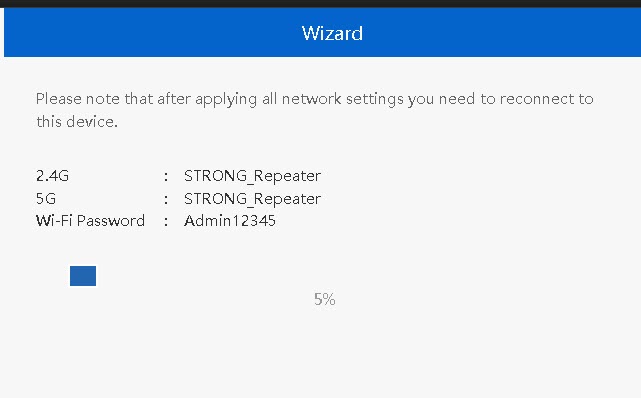

Увага: Будь ласка, запишіть дані двох мереж Wi-Fi. Ця інформація знадобиться вам для підключення до мережі.