
Wi-Fi 4G+ AIRSPOT 510
Нічого не знайдено.
Нічого не знайдено.
Усі питання
Wi-Fi 4G+ AIRSPOT 510
Нічого не знайдено.
Нічого не знайдено.
Як налаштувати параметри APN на моєму пристрої?
Іноді після налаштування пристрою та введення PIN-коду можуть виникнути проблеми з мобільною мережею передачі даних. У такому випадку виконайте наведену нижче процедуру, щоб перевірити параметри APN.
1. Увійтив веб-інтерфейс користувача
Щоб підключитися до веб-інтерфейсу, виконайте наведені нижче дії . Як отримати доступ до веб-інтерфейсу?
2Відкритиналаштування APN
Натисніть «Налаштування Інтернету » та «Налаштування APN». Потім натисніть «Додати APN».
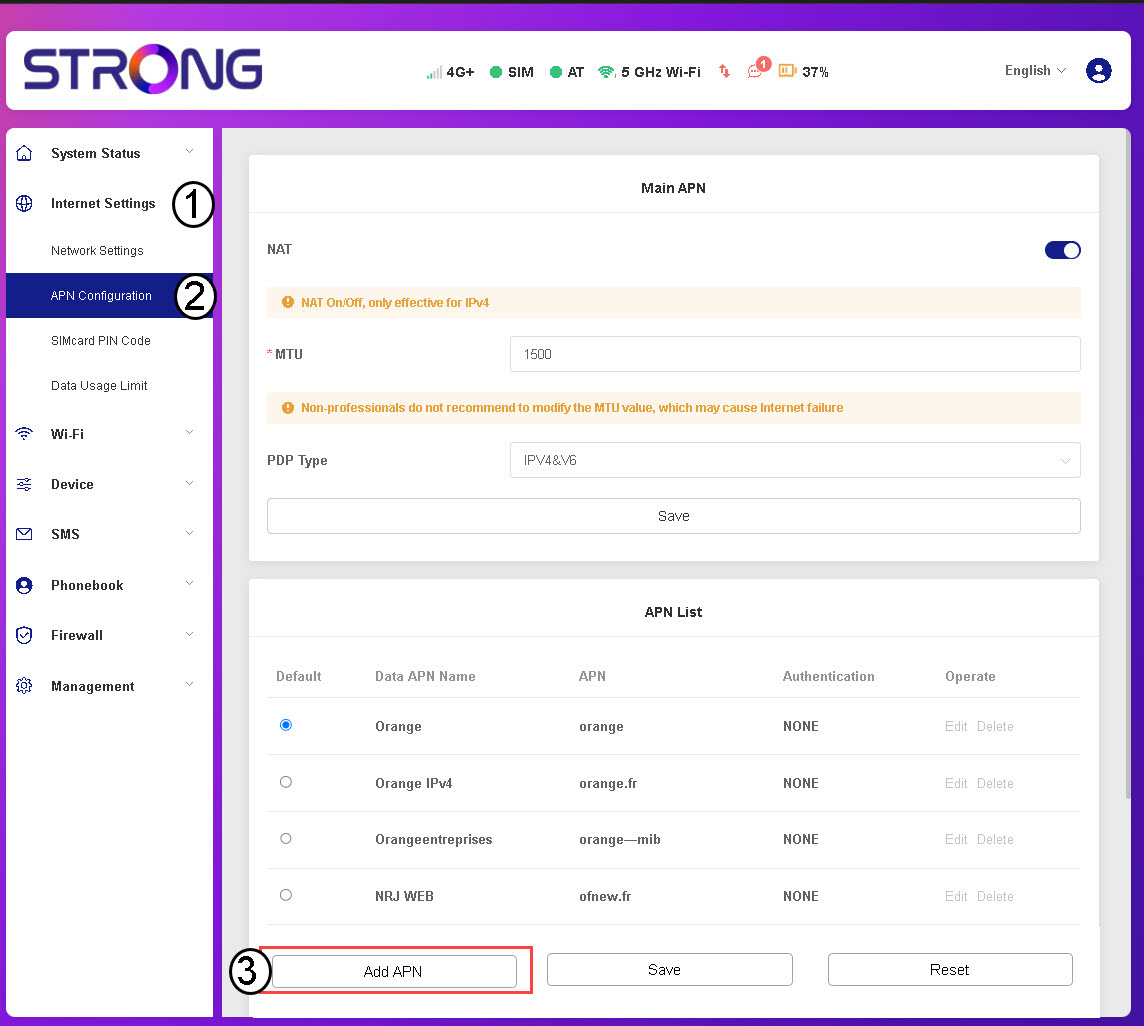
3. Введітьта збережіть дані APN
Перед тим, як натиснути «Зберегти», введіть таку інформацію :
- Назва APN: Введіть назву APN, надану вашим оператором мобільного зв’язку.
- APN: Введіть APN, наданий вашим оператором мобільного зв’язку.
- Аутентифікація: Виберіть тип аутентифікації зі списку, керуючись інформацією, наданою вашим постачальником послуг.