
4G+ AIRSPOT 510 Wi-Fi рутер
Не са намерени никакви елементи.
Не са намерени никакви елементи.
Всички въпроси
4G+ AIRSPOT 510 Wi-Fi рутер
Не са намерени никакви елементи.
Не са намерени никакви елементи.
Как да управлявам настройките за APN на моето устройство?
Понякога може да възникнат проблеми с мобилната мрежа за данни след като настроите устройството си и въведете PIN кода си. В такъв случай следвайте процедурата по-долу, за да проверите информацията за APN.
1. Отворетеуеб интерфейса
За да се свържете с уеб интерфейса, моля, следвайте тази процедура: Как да получа достъп до уеб интерфейса?
2. Отворетеконфигурацията на APN
Кликнете върху „Настройки на интернет “ и „Конфигурация на APN“. След това кликнете върху „Добави APN“.
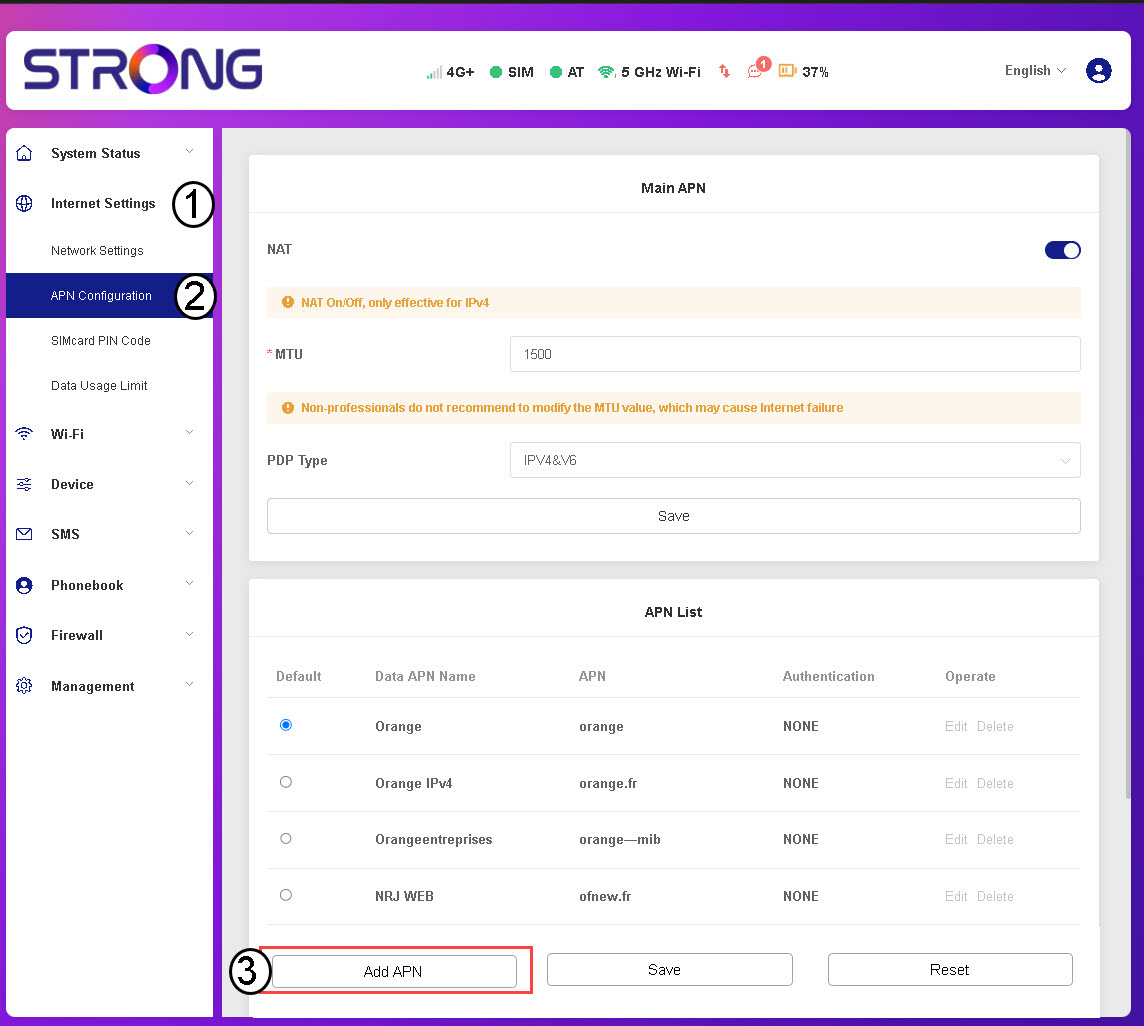
3Въвежданеи запазване на данните за APN
Въведете следната информация, преди да кликнете върху „Запази“:
- Име на APN за данни: Въведете името на APN, предоставено от вашия доставчик на услуги.
- APN: Въведете APN-а, предоставен от вашия доставчик на услуги.
- Удостоверяване: Изберете типа удостоверяване от списъка въз основа на информацията, предоставена от вашия доставчик на услуги.