4G AIRHOME 300 Mini рутер със сменяеми 4G антени
Не са намерени никакви елементи.
Не са намерени никакви елементи.
Всички въпроси
4G AIRHOME 300 Mini рутер със сменяеми 4G антени
Не са намерени никакви елементи.
Не са намерени никакви елементи.
Как да възстановя фабричните настройки на рутера си? (Бутон за възстановяване)
В някои случаи е възможно устройството ви да не работи правилно и да нямате достъп до интернет. В такъв случай ви препоръчваме да възстановите фабричните настройки на устройството и след това, ако е необходимо, да актуализирате отново неговия фърмуер.
Имате два начина да го направите: можете да възстановите фабричните настройки, като натиснете бутона за възстановяване, или да го направите чрез уеб интерфейса.
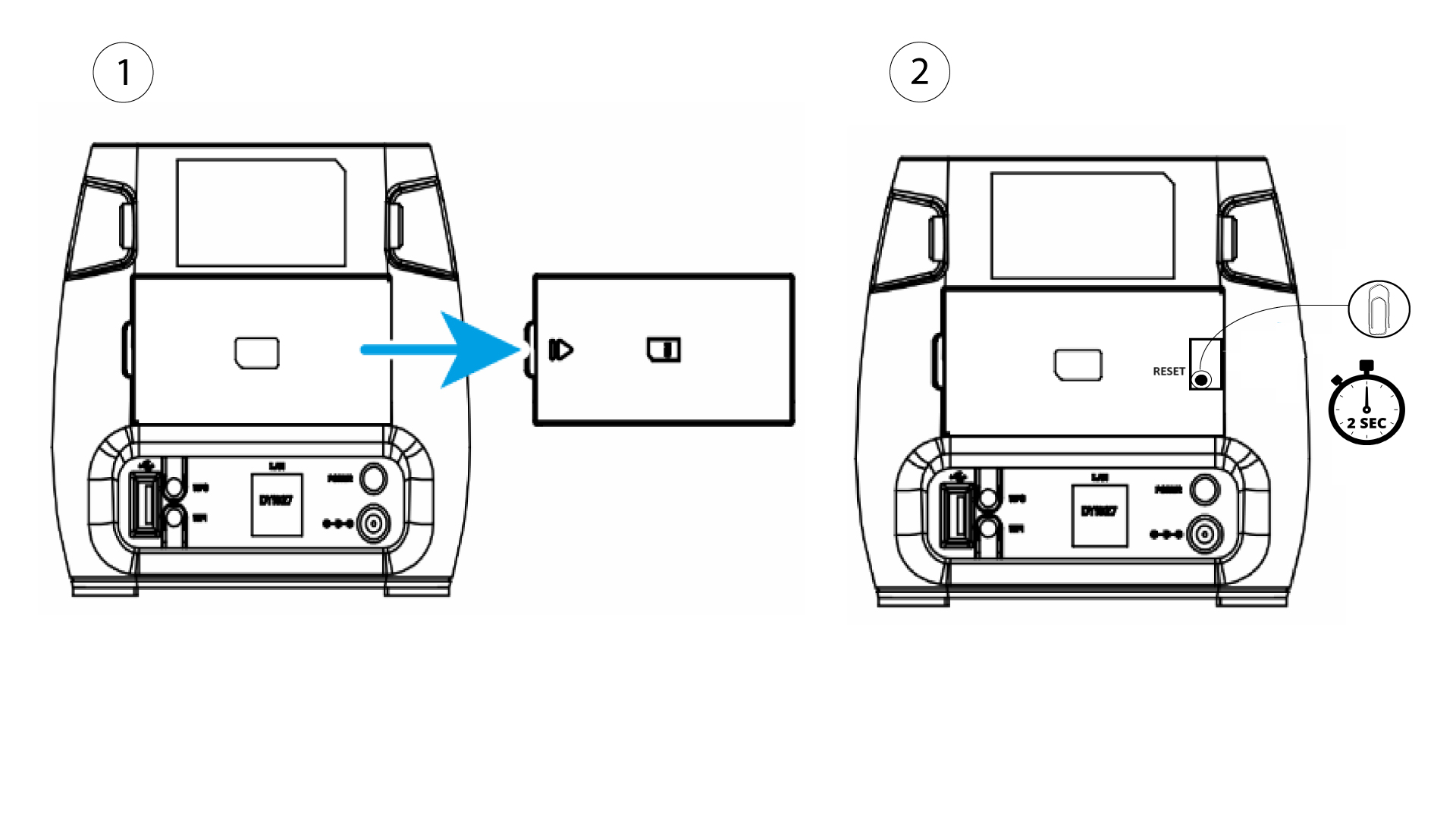
За да направите това, свалете капака от задната страна на рутера и натиснете бутона RESET с кламер за 2 секунди.