
ATRIA Wi-Fi 5 Mesh 2100 (balení po 2 kusech)
Všechny otázky
ATRIA Wi-Fi 5 Mesh 2100 (balení po 2 kusech)
Jak mohu změnit SSID (název sítě Wi-Fi) a heslo své sítě Wi-Fi mesh ?

Upozornění: Vezměte prosím na vědomí, že je nutné zadat heslo o délce 8 až 32 znaků, které musí obsahovat
velká a malá písmena, číslice a alespoň jeden speciální znak (@, $, !, %, *, ?, &).
Chcete-li se připojit k webovému uživatelskému rozhraní, postupujte podle následujících pokynů: Jak se dostanu do webového uživatelského rozhraní?
1 PŘÍPAD1: Změna údajů o síti Wi-Fi v webovém uživatelském rozhraní
Klikněte na položky „WLAN“ a „WLAN 2,4 GHz“. Poté zadejte následující údaje a klikněte na tlačítko „Potvrdit“:
- SSID: Zadejte nový název sítě
- PSK: Zadejte nové heslo.

2. Zapištesi nové informace
Zapište si nové síťové údaje na kus papíru.

Chcete-li se připojit k aplikaci, postupujte podle následujících pokynů: Jak používat aplikaci Atria Mesh ?
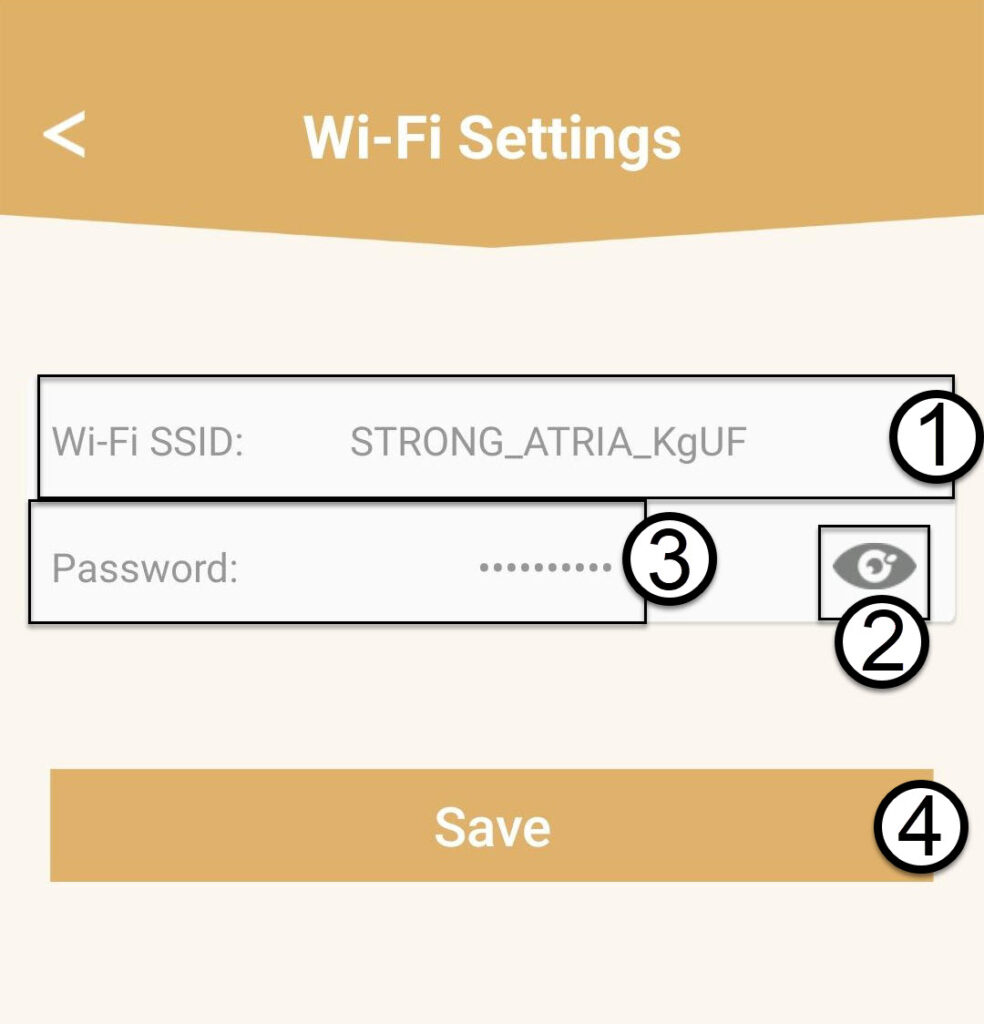
1PŘÍPAD2: Změna údajů o síti Wi-Fi v aplikaci
Klikněte na „Nastavení Wi-Fi“.

2. Zapištesi nové informace
Zadejte nové SSID sítě Wi-Fi a kliknutím na ikonu oka zobrazte heslo. Změňte heslo a poté klikněte na tlačítko Uložit.
3. Zapištesi nové informace
Zapište si heslo na kousek papíru.