
4G+ AIRSPOT 510 Mobil Wi-Fi
Ingen varer fundet.
Ingen varer fundet.
Alle spørgsmål
4G+ AIRSPOT 510 Mobil Wi-Fi
Ingen varer fundet.
Ingen varer fundet.
Hvordan administrerer jeg APN-indstillingerne på min enhed?
Nogle gange kan der opstå problemer med mobildatanetværket, efter at du har konfigureret din enhed og indtastet din PIN-kode. I så fald skal du følge vejledningen nedenfor for at kontrollere dine APN-oplysninger.
1Åbnwebgrænsefladen
Følg denne fremgangsmåde for at oprette forbindelse til webgrænsefladen. Hvordan får jeg adgang til webgrænsefladen?
2. ÅbnAPN-konfigurationen
Klik på »Internetindstillinger« og »APN-konfiguration«. Klik derefter på »Tilføj APN«.
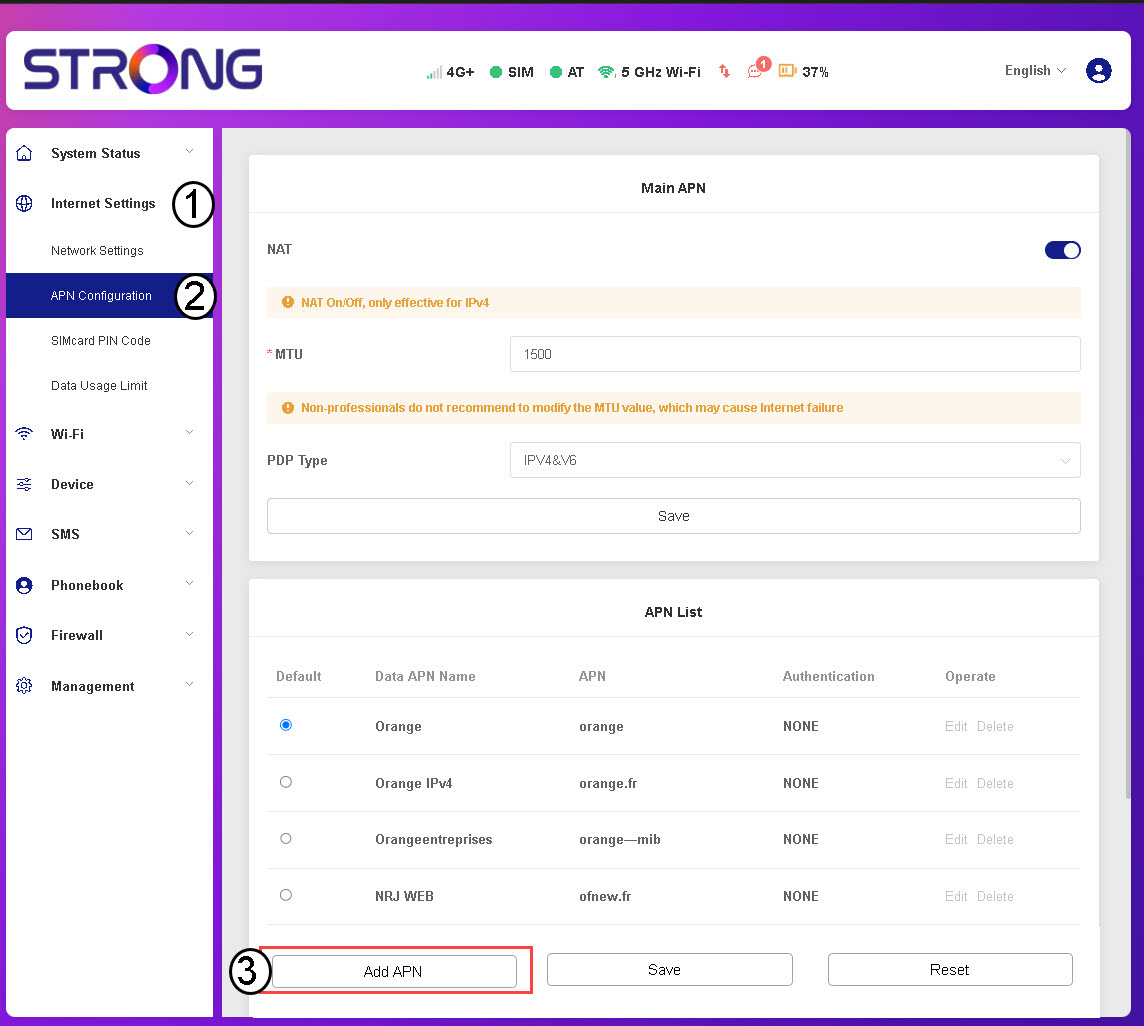
3Indtastog gem APN-oplysninger
Indtast følgende oplysninger, inden du klikker på »Gem«:
- APN-navn: Indtast det APN-navn, du har fået oplyst af din udbyder.
- APN: Indtast den APN, du har fået fra din udbyder.
- Godkendelse: Vælg godkendelsestypen fra listen ud fra de oplysninger, du har modtaget fra din tjenesteudbyder.