
Ingen varer fundet.
Ingen varer fundet.
DOVY BATTERI BABYCAM
Alle spørgsmål
Ingen varer fundet.
Ingen varer fundet.
DOVY BATTERI BABYCAM
Parringen mislykkes / Meddelelsen »Forbindelsen oprettet« vises aldrig
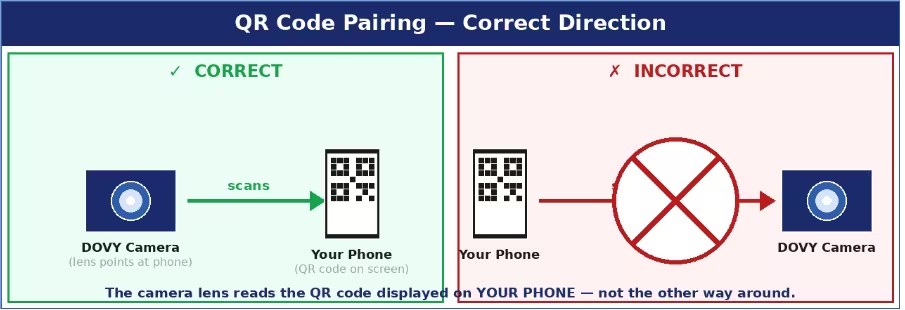
De mest almindelige årsager og løsninger:
- QR-koden kan ikke læses: Sæt lysstyrken på din telefonskærm på maksimum, hold kameralinsen 15–25 cm fra skærmen, og sørg for, at der ikke sidder en beskyttelsesfilm på linsen. Kameraet skal være i parringstilstand (status-LED’en blinker rødt). Du har 2 minutter efter RESET — hvis tiden løber ud, skal du gentage RESET og prøve igen.
- Forkert Wi-Fi-bånd: Du skal vælge et 2,4 GHz-netværk. Hvis din router bruger et kombineret SSID (samme navn for 2,4 GHz og 5 GHz), skal du midlertidigt omdøbe et af båndene i routerindstillingerne for at kunne skelne mellem dem.
- SSID eller adgangskode er for lang: Begge må højst bestå af 24 tegn. Forkort dem om nødvendigt i routerens indstillinger.
- Der mangler tilladelser: Sørg for, at Bluetooth og placering er aktiveret på din telefon under parringen.
- Kameraet er ikke i parringstilstand: Hold RESET-knappen nede i hele 5 sekunder, indtil LED’en blinker langsomt rødt. Hvis LED’en lyser konstant blåt, er kameraet allerede forbundet — tryk på RESET igen for at aktivere parringstilstanden.
Tips: Sørg for, at kameraet og din telefon befinder sig inden for 1–2 meter fra Wi-Fi-routeren under hele parringsprocessen.