ATRIA Wi-Fi 6 Mesh 3000 UK 2-pak)
Ingen varer fundet.
Ingen varer fundet.
Alle spørgsmål
ATRIA Wi-Fi 6 Mesh 3000 UK 2-pak)
Ingen varer fundet.
Ingen varer fundet.
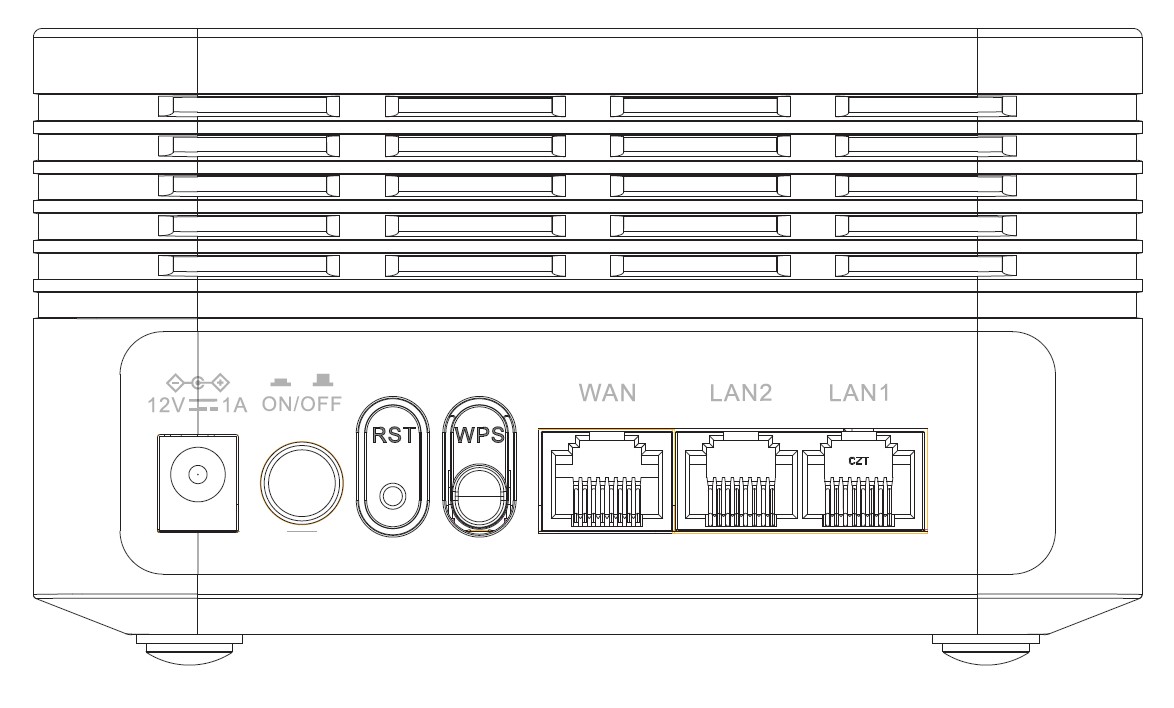
Hvad bruges de forskellige porte til?
1 Opret forbindelsetil enhedens Wi-Fi-netværk
Der er 7 porte på bagsiden af din enhed:
• 12V1A: Her tilslutter du strømkablet.
• ON/OFF: Du kan tænde eller slukke for enheden ved blot at trykke på denne knap.
• RST: Bruges til at nulstille enheden til fabriksindstillingerne ved at indsætte en papirclips i knappen.
• WPS: WPS-knappen bruges til at parre forskellige enheder med hinanden.
• WAN: WAN-porten til et RJ45-kabel, der bruges til at forbinde enheden til din internet boks.
• LAN2: Bruges til at forbinde en af dine personlige enheder til Mesh via RJ45 for at sikre en stabil forbindelse.
• LAN1: Bruges til at forbinde en af dine personlige enheder til Mesh via RJ45 for at sikre en stabil forbindelse.