
4G+ AIRSPOT 510 WLAN-Hotspot
Keine Artikel gefunden.
Keine Artikel gefunden.
Alle Fragen
4G+ AIRSPOT 510 WLAN-Hotspot
Keine Artikel gefunden.
Keine Artikel gefunden.
Wie verwalte ich die APN-Einstellungen meines Geräts?
Manchmal können nach der Konfiguration Ihres Geräts und der Eingabe Ihres PIN-Codes Probleme mit dem Mobilfunknetz auftreten. Befolgen Sie in diesem Fall die nachstehenden Schritte, um Ihre APN-Daten zu überprüfen.
1. Aufdie Web-Benutzeroberfläche zugreifen
Um eine Verbindung zur Web-Benutzeroberfläche herzustellen, befolgen Sie bitte diese Anleitung : Wie greife ich auf die Web-Benutzeroberfläche zu?
2. APN-Konfiguration öffnen
Klicken Sie auf „Internet-Einstellungen “ und „APN-Konfiguration“. Klicken Sie anschließend auf „APN hinzufügen“.
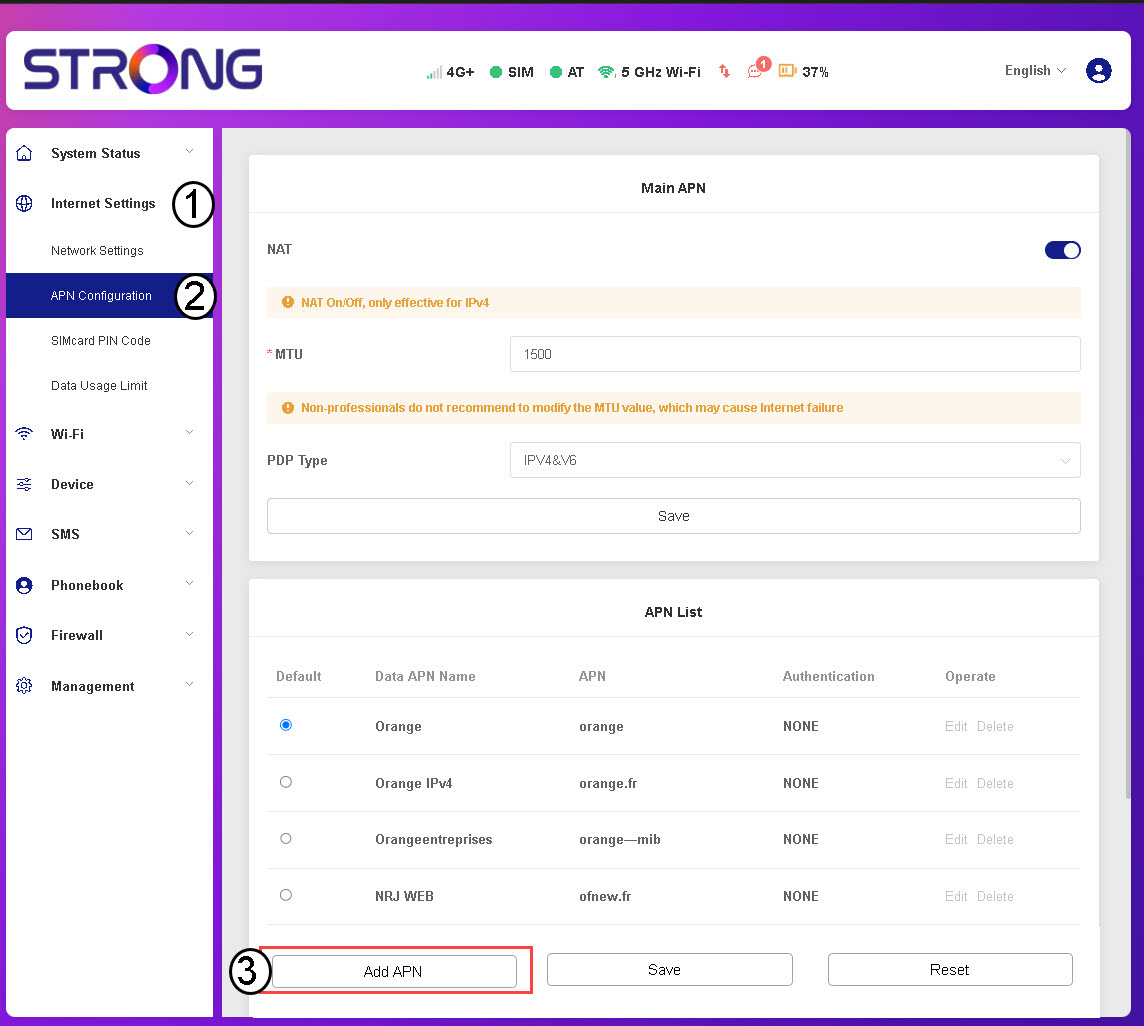
3APN-Daten eingebenund speichern
Geben Sie die folgenden Informationen ein, bevor Sie auf „Speichern“ klicken :
- APN-Name: Geben Sie den von Ihrem Mobilfunkanbieter bereitgestellten APN-Namen ein .
- APN: Geben Sie den von Ihrem Mobilfunkanbieter bereitgestellten APN ein .
- Authentifizierung: Wählen Sie die Authentifizierungsart anhand der Angaben Ihres Dienstanbieters aus der Liste aus .