
4G AIRHOME 210 UK fest installierten 4G-Antennen
Keine Artikel gefunden.
Keine Artikel gefunden.
Alle Fragen
4G AIRHOME 210 UK fest installierten 4G-Antennen
Keine Artikel gefunden.
Keine Artikel gefunden.
Ich habe keine Internetverbindung, nachdem ich meine SIM-Karte in den Router eingelegt habe. Woran liegt das?
Es gibt viele Gründe, warum Ihre Internetverbindung nach dem Einlegen der SIM-Karte möglicherweise nicht funktioniert.
- Als erste Ursache könnte sein, dass die SIM-Karte nicht richtig eingelegt ist. Bitte überprüfen Sie die Position der SIM-Karte anhand der Abbildung, die den Einlegevorgang veranschaulicht.
Fall 1: Micro-SIM-Karte auf SIM-Karte in Standardgröße
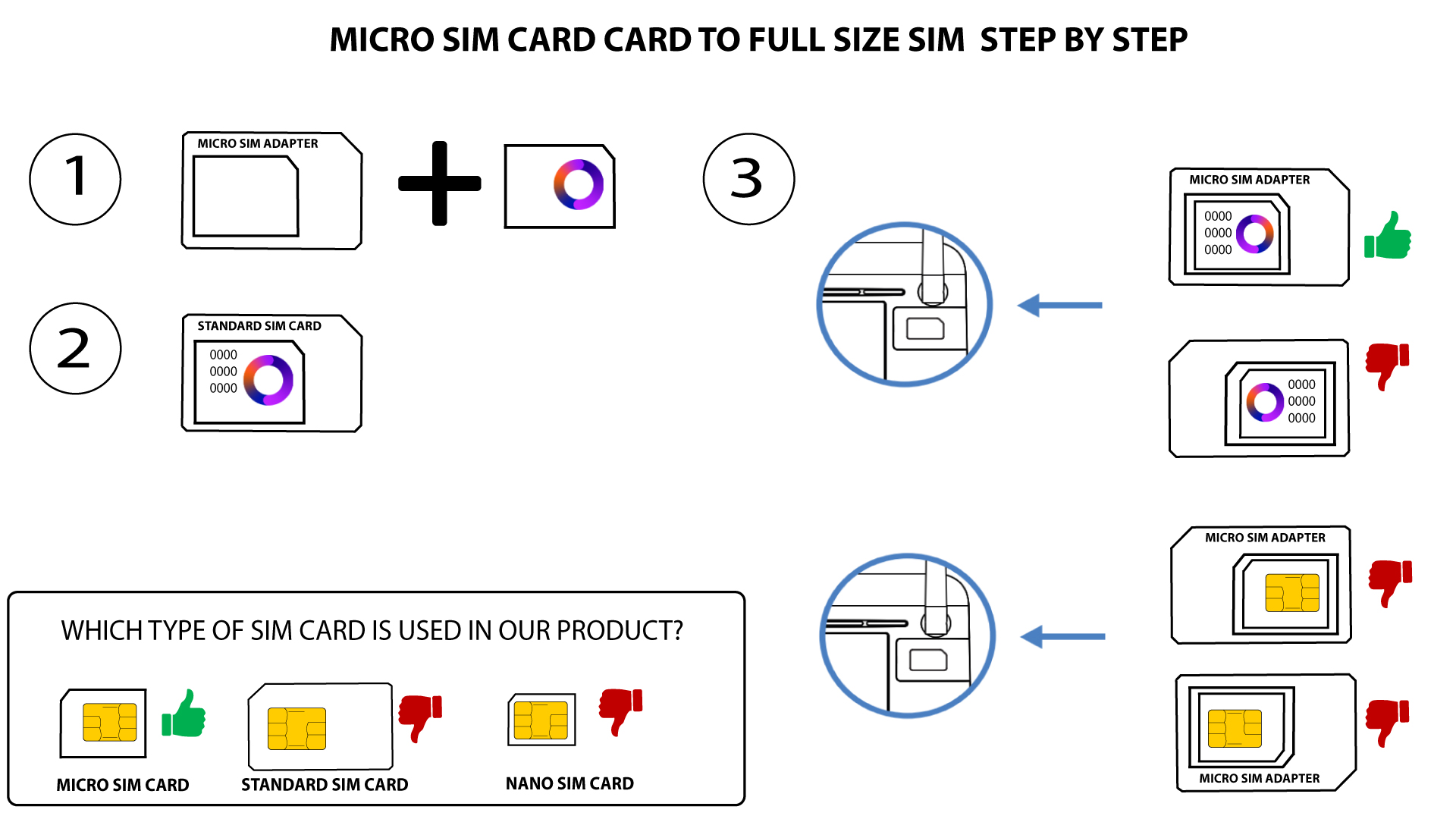
FALL 2: Nano-SIM-Karte auf Standard-SIM-Karte
- Ein weiterer Grund könnte sein, dass Ihre SIM-Karte mit einer PIN gesperrt ist. Um sie zu entsperren, müssen Sie sich bei der Web-Benutzeroberfläche anmelden und die PIN eingeben. Bitte befolgen Sie die im folgenden Abschnitt beschriebenen Schritte: Wie gebe ich meine SIM-PIN ein?
- Schließlich ist es auch möglich, dass Ihre SIM-Karte zwar erkannt, vom Gerät jedoch nicht automatisch identifiziert wird. In diesem Fall müssen Sie sich bei der Web-Benutzeroberfläche anmelden und die APN-Einstellungen Ihres Netzbetreibers überprüfen. Diese Vorgehensweise wird im folgenden Abschnitt erläutert: Wie kann ich die APN-Einstellungen meines Netzbetreibers überprüfen und bearbeiten?