Repeater 750 V2
Keine Artikel gefunden.
Keine Artikel gefunden.
Alle Fragen
Repeater 750 V2
Keine Artikel gefunden.
Keine Artikel gefunden.
Was kann ich in der Web-Benutzeroberfläche tun?
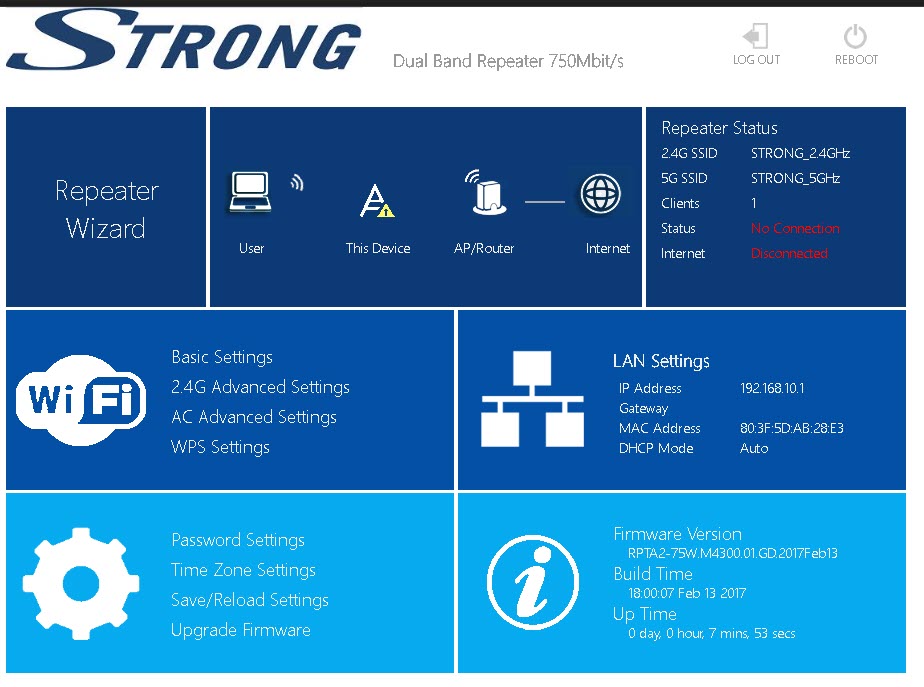
Die Web-Benutzeroberfläche ist in fünf Bereiche unterteilt. Weitere Informationen finden Sie unter:
- Repeater Status: Hier sehen Sie die Liste der verbundenen Geräte („Geräte“), die Informationen zum Host-Netzwerk („Host-Netzwerk“), zum 2,4-GHz-WLAN-Netzwerk („WLAN 2,4 GHz“) und zum 5-GHz-WLAN-Netzwerk („WLAN 5 GHz“),
- WLAN: Hier können Sie die Einstellungen der WLAN-Netzwerke ändern, WPS einrichten usw.
- Repater-Assistent: Hier können Sie den „ repeater “ konfigurieren.
- LAN-Einstellungen: Hier können Sie eine statische IP-Adresse festlegen usw.
- Einstellungen: Hier können Sie das Administratorkennwort ändern, das Gerät zurücksetzen bzw. neu starten, die Software aktualisieren und die Zeitzone ändern.