
4G+ AIRSPOT 510 Wi-Fi
Δεν βρέθηκαν αντικείμενα.
Δεν βρέθηκαν αντικείμενα.
Όλες οι ερωτήσεις
4G+ AIRSPOT 510 Wi-Fi
Δεν βρέθηκαν αντικείμενα.
Δεν βρέθηκαν αντικείμενα.
Πώς μπορώ να διαχειριστώ τις ρυθμίσεις APN της συσκευής μου;
Μερικές φορές, ενδέχεται να αντιμετωπίσετε προβλήματα με το δίκτυο δεδομένων κινητής τηλεφωνίας μετά τη ρύθμιση της συσκευής σας και την εισαγωγή του κωδικού PIN. Σε αυτή την περίπτωση, ακολουθήστε την παρακάτω διαδικασία για να ελέγξετε τις πληροφορίες APN.
1. Πρόσβασηστο περιβάλλον χρήστη του ιστού
Για να συνδεθείτε στο περιβάλλον εργασίας χρήστη μέσω ιστού (Web UI), ακολουθήστε την παρακάτω διαδικασία: Πώς μπορώ να αποκτήσω πρόσβαση στο περιβάλλον εργασίας χρήστη μέσω ιστού;
2. Άνοιγμαρυθμίσεων APN
Κάντε κλικ στην επιλογή «Ρυθμίσεις Internet » και «Διαμόρφωση APN». Στη συνέχεια, κάντε κλικ στην επιλογή «Προσθήκη APN».
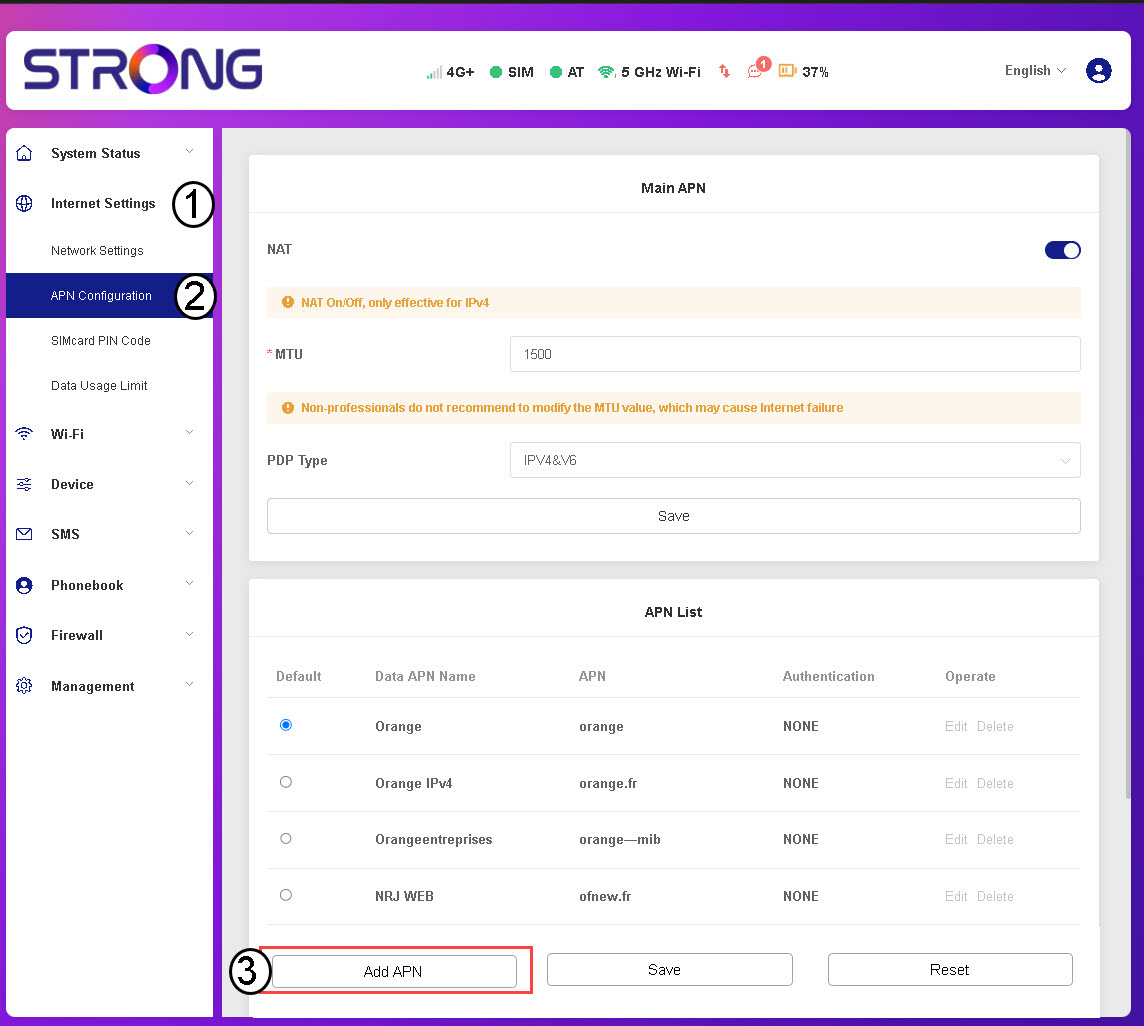
3. Εισαγωγήκαι αποθήκευση στοιχείων APN
Εισάγετε τις παρακάτω πληροφορίες πριν κάνετε κλικ στο «Αποθήκευση»:
- Όνομα APN δεδομένων: Εισάγετε το όνομα APN που σας έχει παράσχει ο πάροχος υπηρεσιών σας.
- APN: Εισάγετε το APN που σας παρέχει ο πάροχος υπηρεσιών σας.
- Πιστοποίηση: Επιλέξτε τον τύπο πιστοποίησης από τη λίστα, σύμφωνα με τις πληροφορίες που σας έχει παράσχει ο πάροχος υπηρεσιών σας.