
Μίνι δρομολογητής 4G AIRHOME 200 με αποσπώμενες κεραίες 4G
Δεν βρέθηκαν αντικείμενα.
Δεν βρέθηκαν αντικείμενα.
Όλες οι ερωτήσεις
Μίνι δρομολογητής 4G AIRHOME 200 με αποσπώμενες κεραίες 4G
Δεν βρέθηκαν αντικείμενα.
Δεν βρέθηκαν αντικείμενα.
Δεν έχω σύνδεση στο διαδίκτυο αφού έβαλα την κάρτα SIM μου στο δρομολογητή. Γιατί;
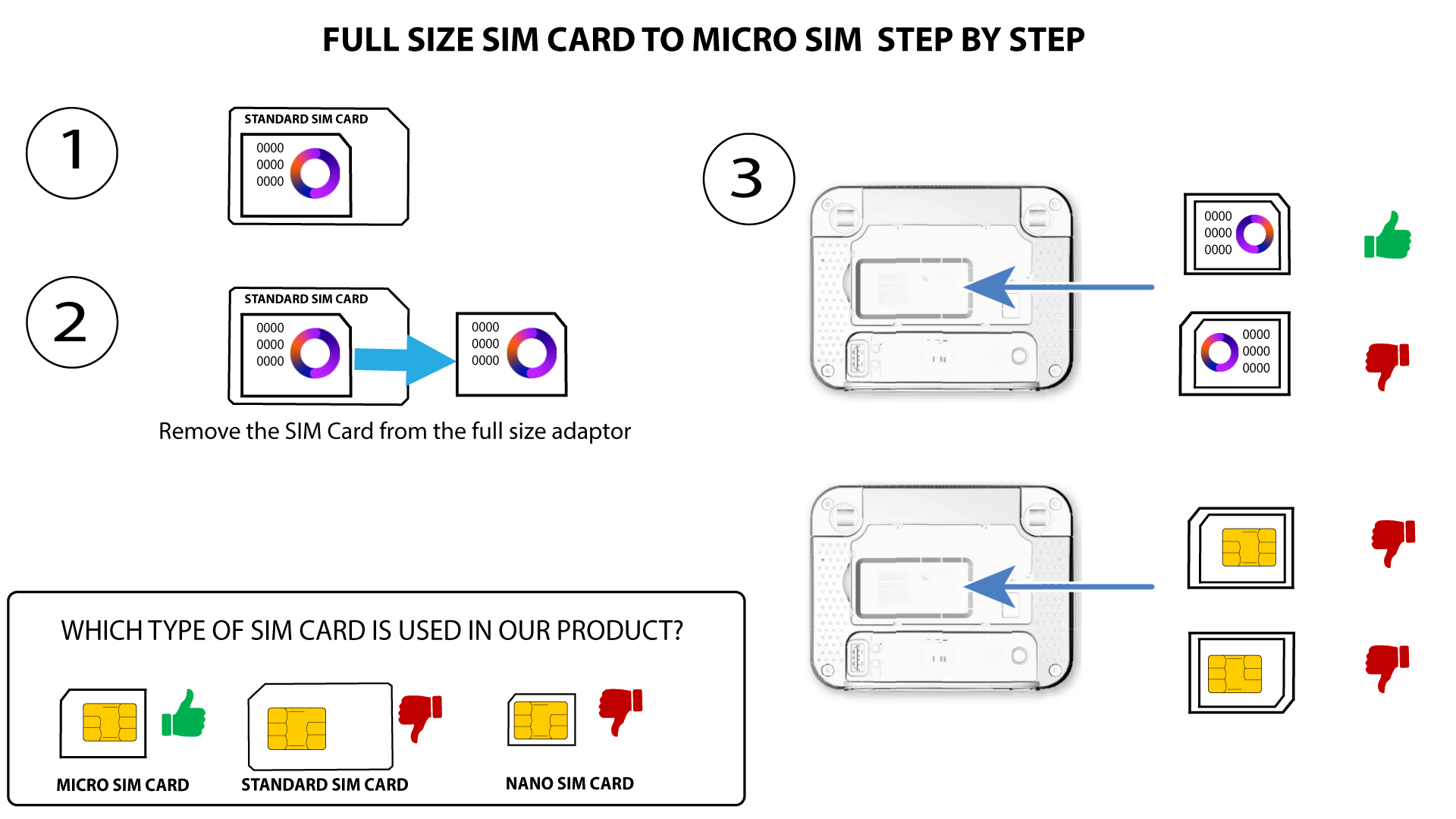
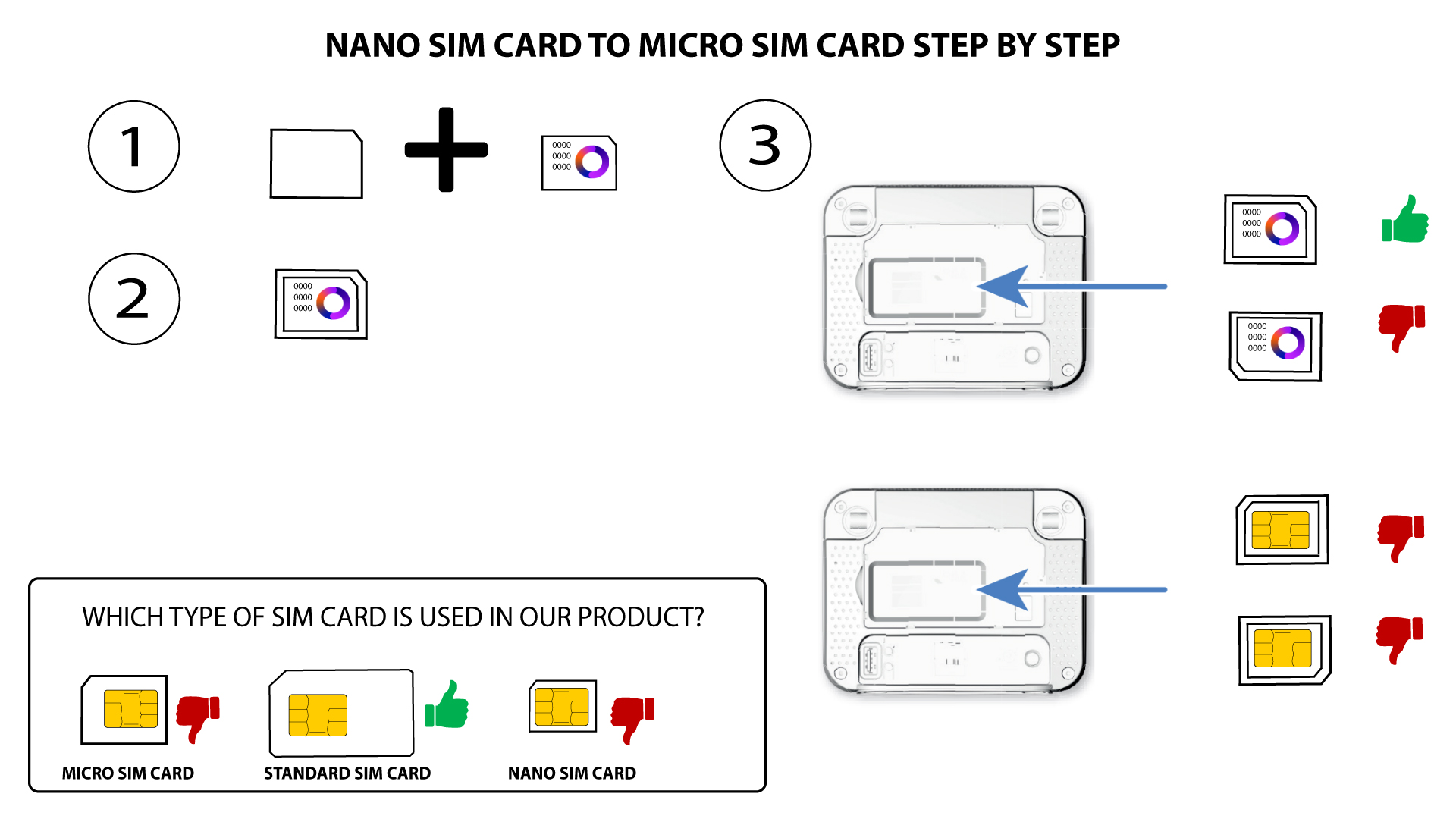
Υπάρχουν πολλοί λόγοι που μπορεί να εξηγούν γιατί η σύνδεσή σας στο διαδίκτυο δεν λειτουργεί μετά την τοποθέτηση της κάρτας SIM. Ο πρώτος λόγος μπορεί να είναι ότι η κάρτα SIM δεν έχει τοποθετηθεί σωστά. Παρακαλούμε ελέγξτε τη θέση της κάρτας SIM ανατρέχοντας στο σχήμα που απεικονίζει τη διαδικασία τοποθέτησης.
Περίπτωση 1: Μετατροπή κάρτας SIM κανονικού μεγέθους σε Micro
ΠΕΡΙΠΤΩΣΗ 2: Μετατροπή κάρτας Nano SIM σε κάρτα Micro SIM
- Ένας άλλος λόγος μπορεί να είναι ότι η κάρτα SIM σας είναι κλειδωμένη με κωδικό PIN. Για να την ξεκλειδώσετε, πρέπει να συνδεθείτε στη διεπαφή χρήστη μέσω διαδικτύου (Web UI) και να εισαγάγετε τον κωδικό PIN. Ακολουθήστε τη διαδικασία που περιγράφεται στην παρακάτω ενότητα:Πώς μπορώ να εισαγάγω τον κωδικό PIN της κάρτας SIM μου;
- Τέλος, είναι επίσης πιθανό η κάρτα SIM σας να ανιχνεύεται, αλλά να μην αναγνωρίζεται αυτόματα από τη συσκευή. Σε αυτή την περίπτωση, πρέπει να συνδεθείτε στο περιβάλλον εργασίας χρήστη μέσω διαδικτύου (Web UI) και να ελέγξετε τις ρυθμίσεις APN του παρόχου υπηρεσιών σας. Αυτή η διαδικασία εξηγείται στην ακόλουθη ενότητα: Πώς μπορώ να ελέγξω και να επεξεργαστώ τις ρυθμίσεις APN του παρόχου υπηρεσιών μου;