ATRIA Wi-Fi 5 Mesh 2100 (add-on)
Ei löytynyt kohteita.
Ei löytynyt kohteita.
Kaikki kysymykset
ATRIA Wi-Fi 5 Mesh 2100 (add-on)
Ei löytynyt kohteita.
Ei löytynyt kohteita.
Miten Atria- Mesh -sovellusta käytetään?
1Atria Mesh -sovellus
Lataa sitten Atria-sovellus osoitteesta Mesh .

2. YhdistäWi-Fi-verkkoon
Tätä varten muodosta yhteys reitittimeesi tai modeemiisi kytketyn ” Mesh ”-laitteen Wi-Fi-verkkoon.

3. Todistukset
Syötä käyttäjätunnus ja salasana (admin/admin) yhteyden muodostamiseksi.

4Etusivu
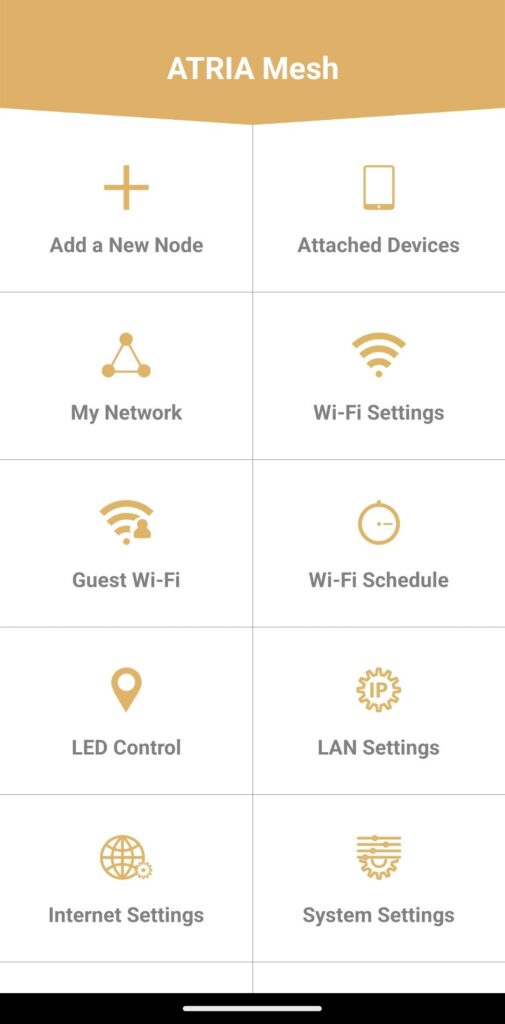
Nyt olet pääsivulla.
- Lisää uusi solmu: Täältä voit lisätä uuden Mesh -laitteen Mesh -verkkoosi.
- Liitetyt laitteet: Täältä voit tarkistaa, mitkä laitteet on liitetty Mesh -verkkoon.
- Oma verkko: Täältä voit tarkistaa kaikki Mesh -laitteet, jotka on liitetty Mesh -verkkoosi.
- Wi-Fi-asetukset: Täällä voit muokata ja muuttaa Wi-Fi- Mesh -verkon SSID-tunnusta (Wi-Fi-verkon nimeä) ja salasanaa.
- Vieraskäyttöön tarkoitettu Wi-Fi: Täällä voit ottaa käyttöön ja määrittää 2,4 GHz:n tai 5 GHz:n vieraskäyttöön tarkoitetun Wi-Fi-verkon.
- Wi-Fi-aikataulu: Täällä voit määrittää ajanjakson, jolloin Wi-Fi-verkko on käytössä.
- LED-ohjaus: Täältä voit kytkeä Mesh -laitteen LED-valot päälle tai pois päältä.
- LAN-asetukset: Täällä voit ottaa DHCP:n käyttöön tai poistaa sen käytöstä.
- Internet-asetukset: Täällä voit määrittää DHCP-yhteyden, manuaalisen DNS-asetuksen, PPPoE-yhteyden sekä asettaa staattisen IP-osoitteen.
- Järjestelmäasetukset: Täällä voit muokata järjestelmänvalvojan käyttäjätunnusta ja salasanaa sovellukseen kirjautumista varten.