
Ei löytynyt kohteita.
Ei löytynyt kohteita.
DOVY AKKUKÄYTTÖINEN VAUVAKAMERA
Kaikki kysymykset
Ei löytynyt kohteita.
Ei löytynyt kohteita.
DOVY AKKUKÄYTTÖINEN VAUVAKAMERA
Yhdistämisessä ilmenee virhe / ”Yhteys muodostettu” -ilmoitusta ei tule näkyviin
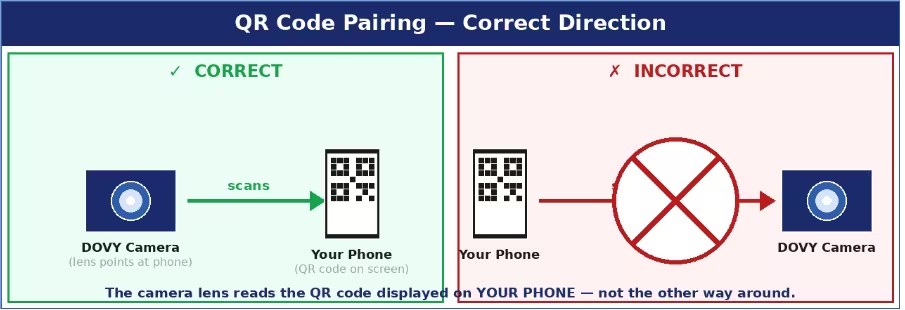
Yleisimmät syyt ja ratkaisut:
- QR-koodia ei luettu: lisää puhelimen näytön kirkkautta maksimiin, pidä kameran linssiä 15–25 cm:n päässä näytöstä ja varmista, ettei linssissä ole suojakalvoa. Kameran on oltava pariliitostilassa (tila-LED vilkkuu punaisena). Sinulla on 2 minuuttia aikaa RESET-toiminnon jälkeen – jos aika loppuu, toista RESET-toiminto ja yritä uudelleen.
- Väärä Wi-Fi-taajuusalue: sinun on valittava 2,4 GHz:n verkko. Jos reitittimesi käyttää yhdistettyä SSID-tunnusta (sama nimi sekä 2,4 GHz:n että 5 GHz:n taajuusalueille), nimeä väliaikaisesti toinen taajuusalueista uudelleen reitittimen asetuksissa, jotta ne voidaan erottaa toisistaan.
- SSID tai salasana on liian pitkä: molempien pituus saa olla enintään 24 merkkiä. Lyhennä niitä tarvittaessa reitittimen asetuksissa.
- Oikeudet puuttuvat: varmista, että Bluetooth ja sijaintipalvelut ovat käytössä puhelimessasi pariliitoksen muodostamisen aikana.
- Kamera ei ole pariliitostilassa: pidä RESET-painiketta painettuna tasan 5 sekuntia, kunnes LED-merkkivalo vilkkuu hitaasti punaisena. Jos LED-merkkivalo palaa tasaisesti sinisenä, kamera on jo yhdistetty — paina RESET-painiketta uudelleen, jotta kamera siirtyy pariliitostilaan.
Vinkkejä: Pidä kamera ja puhelimesi 1–2 metrin etäisyydellä Wi-Fi-reitittimestä koko pariliitoksen muodostamisen ajan.