
Répéteur Dual Band 1200
Toutes les questions
Répéteur Dual Band 1200
Comment configurer mon répéteur en tant que point d'accès ?
CONSEILS : Avant de configurer votre répéteur, veuillez suivre la procédure ci-dessous pour déterminer son emplacement :
Quel est le meilleur emplacement pour mon répéteur ?1. Connectez-vousà l'interface utilisateur Web.
Suivez l'une des procédures ci-dessous pour vous connecter à l'interface utilisateur Web :
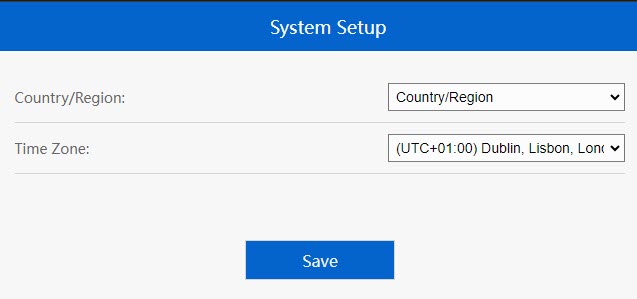
2. Définirle fuseau horaire
Sélectionnez le fuseau horaire dans la liste si celui qui a été détecté automatiquement est incorrect, puis cliquez sur « Enregistrer ».
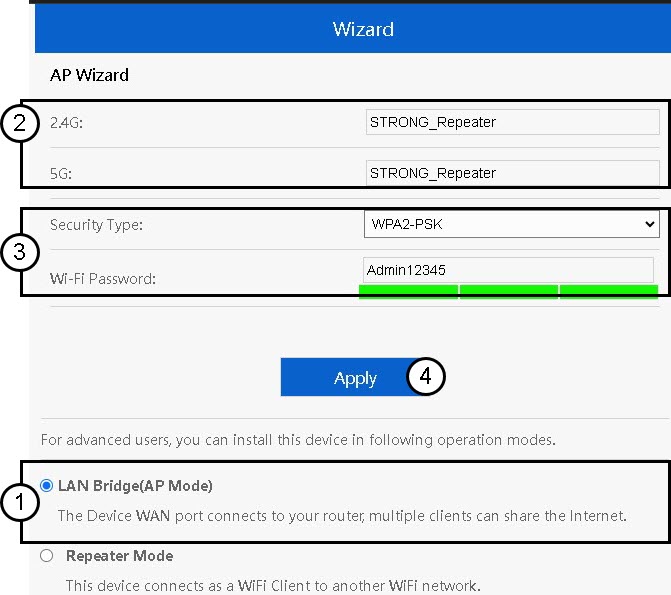
3. Configurerles paramètres du point d'accès
L'assistant de configuration du répéteur s'ouvre. Sélectionnez «Pont LAN (AP) ». Saisissez ensuite le nom des points d'accès. Choisissez un type de sécurité et saisissez un mot de passe Wi-Fi avant de cliquer sur « Appliquer ».
4. Attendezque la configuration du répéteur soit terminée
Veuillez patienter quelques instants le temps que le répéteur termine le processus de configuration.
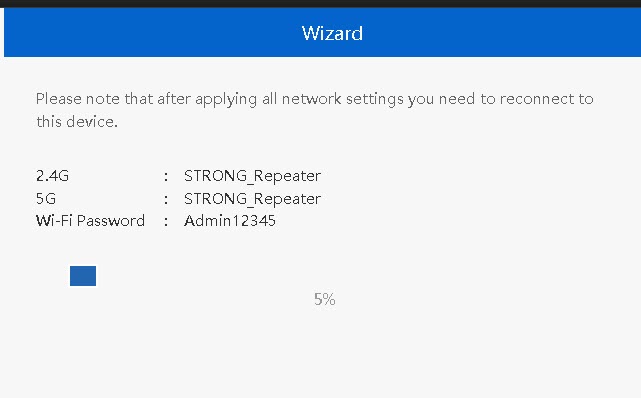

Avertissement : veuillez noter les informations relatives aux deux réseaux Wi-Fi. Vous en aurez besoin pour vous connecter au réseau.