ATRIA Wi-Fi 6 Mesh Sustav 3000 (pakiranje od 2 komada)
Sva pitanja
ATRIA Wi-Fi 6 Mesh Sustav 3000 (pakiranje od 2 komada)
Kako se koristi Atria Mesh Aplikacija?
Kako se koristi aplikacija AtriaMesh?
1 Atrija Mesh Aplikacija
Download the application for smartphone "ATRIA MESH" on the App Store or the Google Play Store.

2 vjerodajnice
Zatim se morate spojiti na Wi-Fi mrežu Mesh sa svojim pametnim telefonom, a zatim se prijavite u aplikaciju sa svojim vjerodajnicama koje bi trebale biti " admin " i " admin " ako ih niste promijenili.

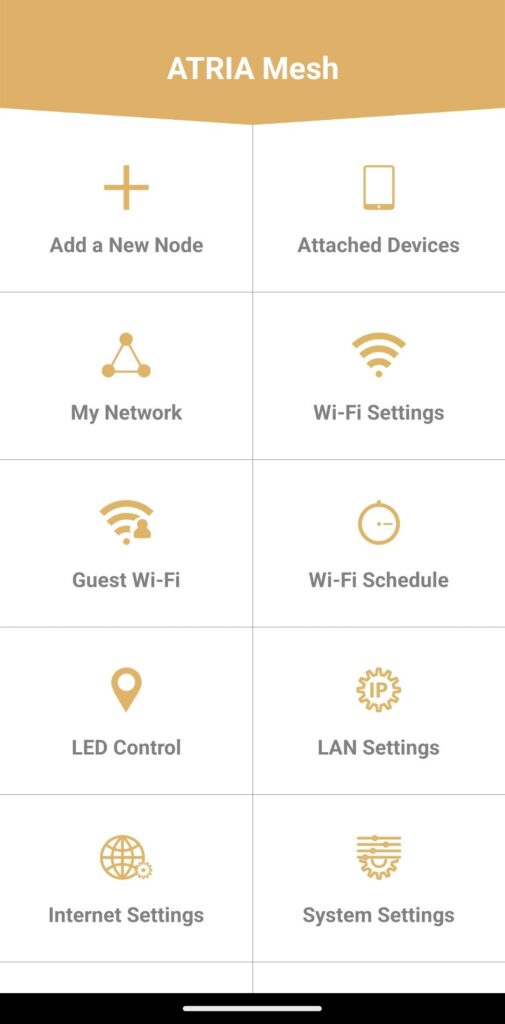
3 Glavni izbornik
Sada ste na glavnoj stranici.
• Dodaj novi čvor: Gdje možete dodati novi Mesh jedinica na vašu Mesh Mreža.
• Priključeni uređaji: Gdje možete provjeriti koji su uređaji povezani s vašim Mesh Mreža.
• Moja mreža: Gdje možete provjeriti sve Mesh jedinice povezane s vašim Mesh Mreža.
• Postavke Wi-Fi mreže: Gdje možete urediti i izmijeniti SSID (naziv Wi-Fi mreže) i lozinku svoje Wi-Fi mreže Mesh Mreža.
• Gostujući Wi-Fi: Gdje možete postaviti i konfigurirati gostujući Wi-Fi od 2,4 GHz ili 5 GHz.
• Raspored Wi-Fi mreže: Gdje možete zakazati vremensko razdoblje aktivacije za svoju Wi-Fi mrežu.
• LED kontrola: Gdje možete UKLJUČITI ili ISKLJUČITI LED diode vašeg Mesh jedinica.
• Postavke LAN-a: Gdje možete omogućiti ili onemogućiti DHCP.
• Internetske postavke: Gdje možete konfigurirati DHCP vezu, ručni DNS, PPPoE i postaviti statičku IP adresu.
• Postavke sustava: Gdje možete promijeniti korisničko ime i lozinku za administratora za pristup aplikaciji.