
Powerline 1000 Duo Wi-Fi FR V2
Minden kérdés
Powerline 1000 Duo Wi-Fi FR V2
Hogyan módosíthatom a Powerline 1000 Wi-Fi-hálózat SSID-nevét és jelszavát?
1. Csatlakozzona Powerline Wi-Fi-hálózathoz
Csatlakozz a Powerline 1000 Wi-Fi-hálózatához.
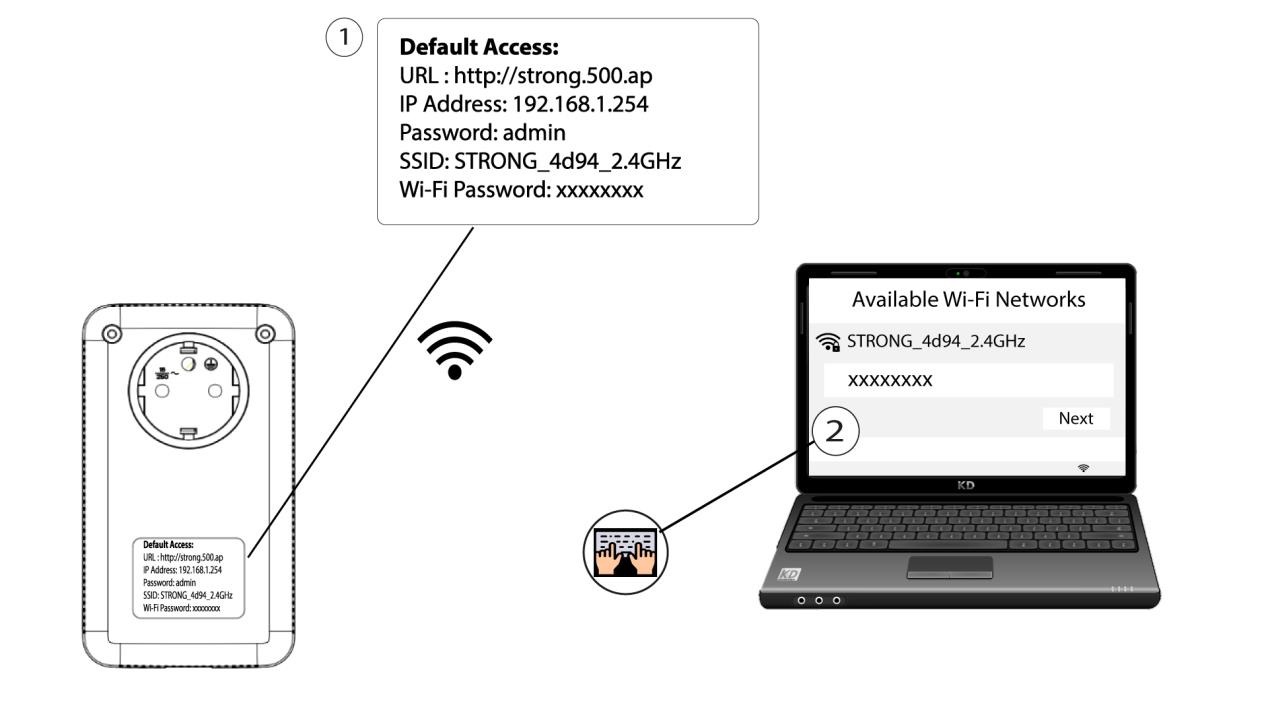
2. Keressemeg a webes felhasználói felület IP-címét
A felhasználói felületet úgy érheti el, hogy az internetböngésző címsorába beírja a következő URL-címet: http://strong.500.ap.

3. Adja mega bejelentkezési adatokat
Ezután írja be a jelszót: admin

4. Gyorsbeállítás
Nyissa meg a menüt, válassza a „Gyorsbeállítás” menüpontot, majd kattintson az „Hozzáférési pont (AP) ” elemre, és kattintson a „Tovább” gombra.

5. Adja megaz új hálózati adatokat
Szerkessze az SSID-t és a jelszót. Az új jelszó megadásakor kérjük, kerülje a nagybetűs „I” és a kisbetűs „l” használatát, mivel ezeket könnyen összetéveszthetik. Javasoljuk továbbá, hogy olyan jelszót hozzon létre, amely nagy- és kisbetűkből, valamint számokból váltakozva áll. A szerkesztés befejezése után kattintson a „NEXT” gombra a mentéshez.

6. Írjale az új hálózati adatokat
Kérjük, írja le az új SSID-t és jelszót egy papírra, majd az új beállítások használatával csatlakoztassa újra az összes eszközét a Powerline 1000 Wi-Fi hálózathoz.
