
Nem találtunk tárgyakat.
Nem találtunk tárgyakat.
DOVY AKKUMULÁTOROS BABAKAMERA
Minden kérdés
Nem találtunk tárgyakat.
Nem találtunk tárgyakat.
DOVY AKKUMULÁTOROS BABAKAMERA
A párosítás nem sikerül / a „Csatlakozás sikeres” üzenet soha nem jelenik meg
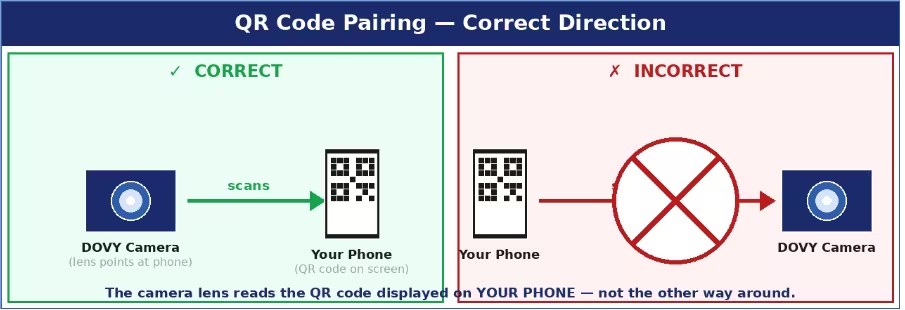
A leggyakoribb okok és megoldások:
- A QR-kód nem olvasható: állítsa a telefon képernyőjének fényerejét a legmagasabb szintre, tartsa az kamera lencsét 15–25 cm-re a képernyőtől, és győződjön meg arról, hogy a lencsén nincs védőfólia. Az kamera -nak párosítási módban kell lennie (az állapot-LED pirosan villog). A RESET gomb megnyomása után 2 perce van – ha az idő lejár, ismételje meg a RESET műveletet, és próbálja meg újra.
- Helytelen Wi-Fi-sáv: 2,4 GHz-es hálózatot kell kiválasztania. Ha az útválasztója kombinált SSID-t használ (ugyanaz a név a 2,4 GHz-es és az 5 GHz-es sávra), akkor az útválasztó beállításaiban ideiglenesen nevezze át az egyik sávot, hogy megkülönböztethesse őket.
- Az SSID vagy a jelszó túl hosszú: mindkettő hossza legfeljebb 24 karakter lehet. Szükség esetén rövidítse meg őket az útválasztó beállításaiban.
- Hiányzó engedélyek: győződjön meg arról, hogy a párosítás során a telefonján engedélyezve van-e a Bluetooth és a helymeghatározás.
- kamera ha nincs párosítási módban: tartsa lenyomva a RESET gombot teljes 5 másodpercig, amíg a LED lassan pirosan nem villog. Ha a LED folyamatosan kék színnel világít, az „ kamera ” már csatlakozik – nyomja meg újra a RESET gombot a párosítási mód kényszerítéséhez.
Tippek: Az egész párosítási folyamat során tartsa az „ kamera ” készüléket és a telefonját 1–2 méteres távolságon belül a Wi-Fi-routertől.