
Mesh Wi-Fi 5 ATRIA 2100 (confezione da 2)
Tutte le domande
Mesh Wi-Fi 5 ATRIA 2100 (confezione da 2)
Come posso modificare l'SSID (nome della rete Wi-Fi) e la password della mia rete Wi-Fi mesh ?

Avviso: si prega di notare che è necessario inserire una password composta da un numero di caratteri compreso tra 8 e 32, contenente
lettere maiuscole, minuscole, numeri e almeno un carattere speciale (@, $, !, %, *, ?, &)
Per collegarsi all'interfaccia utente web, si prega di fare riferimento a questa procedura: Come posso accedere all'interfaccia utente web?
1 CASO1: Modifica delle informazioni sulla rete Wi-Fi nell’interfaccia utente web
Fai clic su WLAN e WLAN 2,4 G. Quindi, inserisci le seguenti informazioni prima di fare clic su Conferma:
- SSID: Inserisci un nuovo nome per la rete
- PSK: Inserisci una nuova password.

2. Annotale nuove informazioni
Annota le nuove informazioni di rete su un foglio di carta.

Per collegarti all'app, segui questa procedura: Come si usa l'app Atria " Mesh "?
1 CASO2: Modifica delle informazioni sulla rete Wi-Fi nell'app
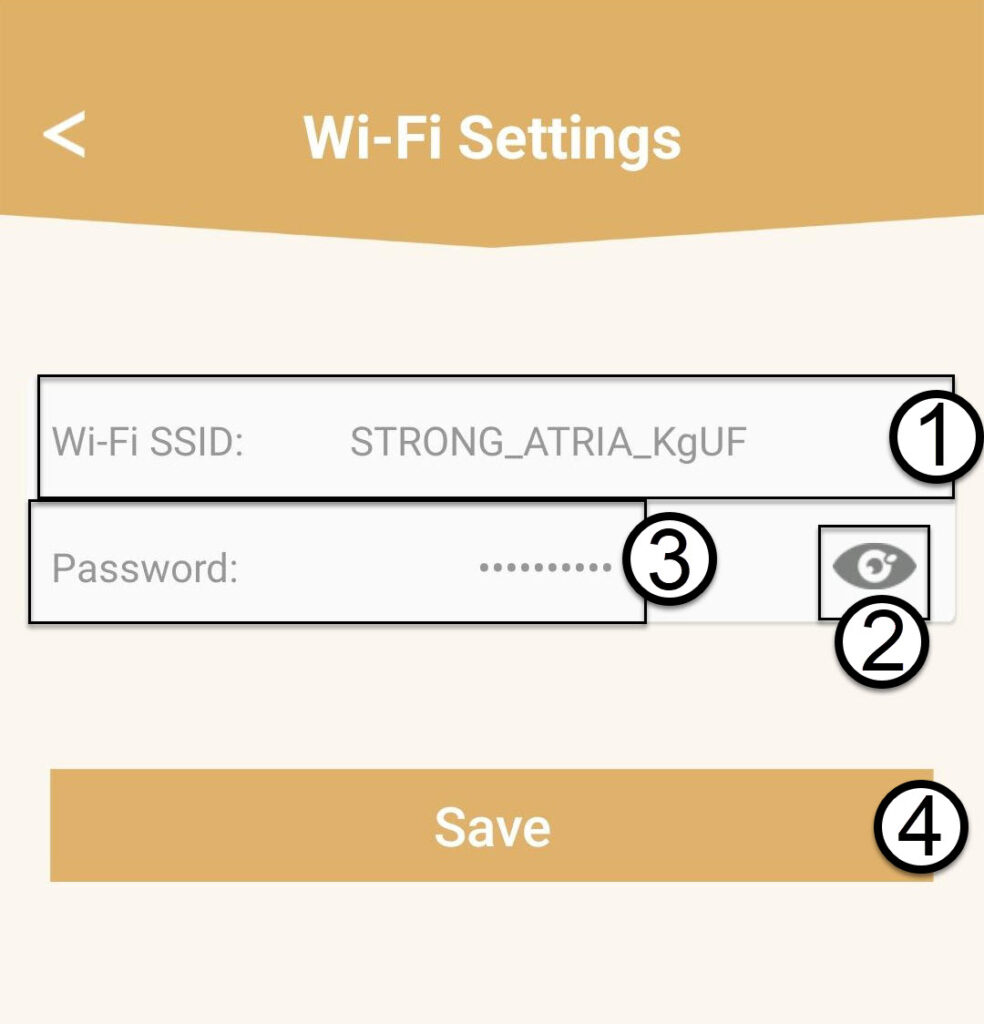
Fai clic su " Impostazioni Wi-Fi".

2. Annotale nuove informazioni
Inserisci un nuovo SSID Wi-Fi e fai clic sull'icona a forma di occhio per visualizzare la password; modifica la password prima di fare clic su "Salva".
3. Annotale nuove informazioni
Annota la password su un foglio di carta.