
Wi-Fi 4G+ AIRSPOT 510
Nessun articolo trovato.
Nessun articolo trovato.
Tutte le domande
Wi-Fi 4G+ AIRSPOT 510
Nessun articolo trovato.
Nessun articolo trovato.
Come posso gestire le impostazioni APN del mio dispositivo?
A volte, dopo aver configurato il dispositivo e inserito il codice PIN, potrebbero verificarsi dei problemi con la rete dati mobile. In tal caso, segui la procedura riportata di seguito per verificare le informazioni relative all'APN.
1. Accedereall'interfaccia utente web
Per connettersi all'interfaccia utente web, seguire questa procedura. Come si accede all'interfaccia utente web?
2. Aprila configurazione APN
Fare clic su “Impostazioni Internet ” e “Configurazione APN”. Quindi, fare clic su “Aggiungi APN”.
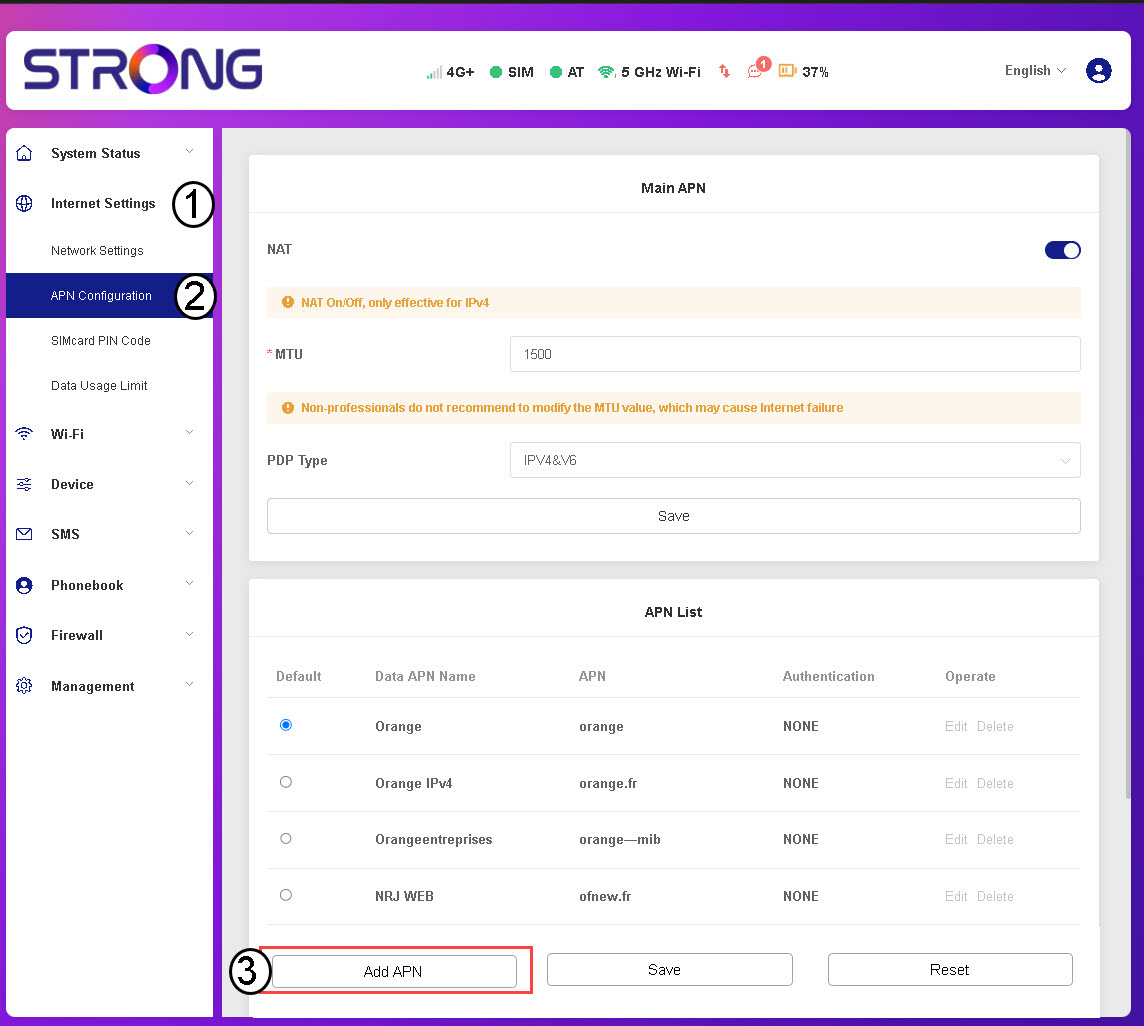
3. Inseriscie salva le informazioni APN
Inserisci le seguenti informazioni prima di fare clic su “Salva”:
- Nome APN dati: inserisci il nome APN fornito dal tuo operatore.
- APN: Inserisci l'APN fornito dal tuo operatore.
- Autenticazione: selezionare il tipo di autenticazione dall'elenco in base alle informazioni fornite dal proprio fornitore di servizi.