
4G+ AIRSPOT 510 Mobil Wi-Fi
Ingen gjenstander funnet.
Ingen gjenstander funnet.
Alle spørsmål
4G+ AIRSPOT 510 Mobil Wi-Fi
Ingen gjenstander funnet.
Ingen gjenstander funnet.
Hvordan administrerer jeg APN-innstillingene på enheten min?
Noen ganger kan du støte på problemer med mobildatanettverket etter at du har konfigurert enheten og tastet inn PIN-koden. I så fall følger du prosedyren nedenfor for å sjekke APN-informasjonen din.
1 Få tilgang til nettgrensesnittet
For å koble til webgrensesnittet, følg denne prosedyren. Hvordan får jeg tilgang til webgrensesnittet?
2 Åpne APN-konfigurasjon
Klikk på Internett-innstillinger og APN-konfigurasjon . Klikk deretter på Legg til APN.
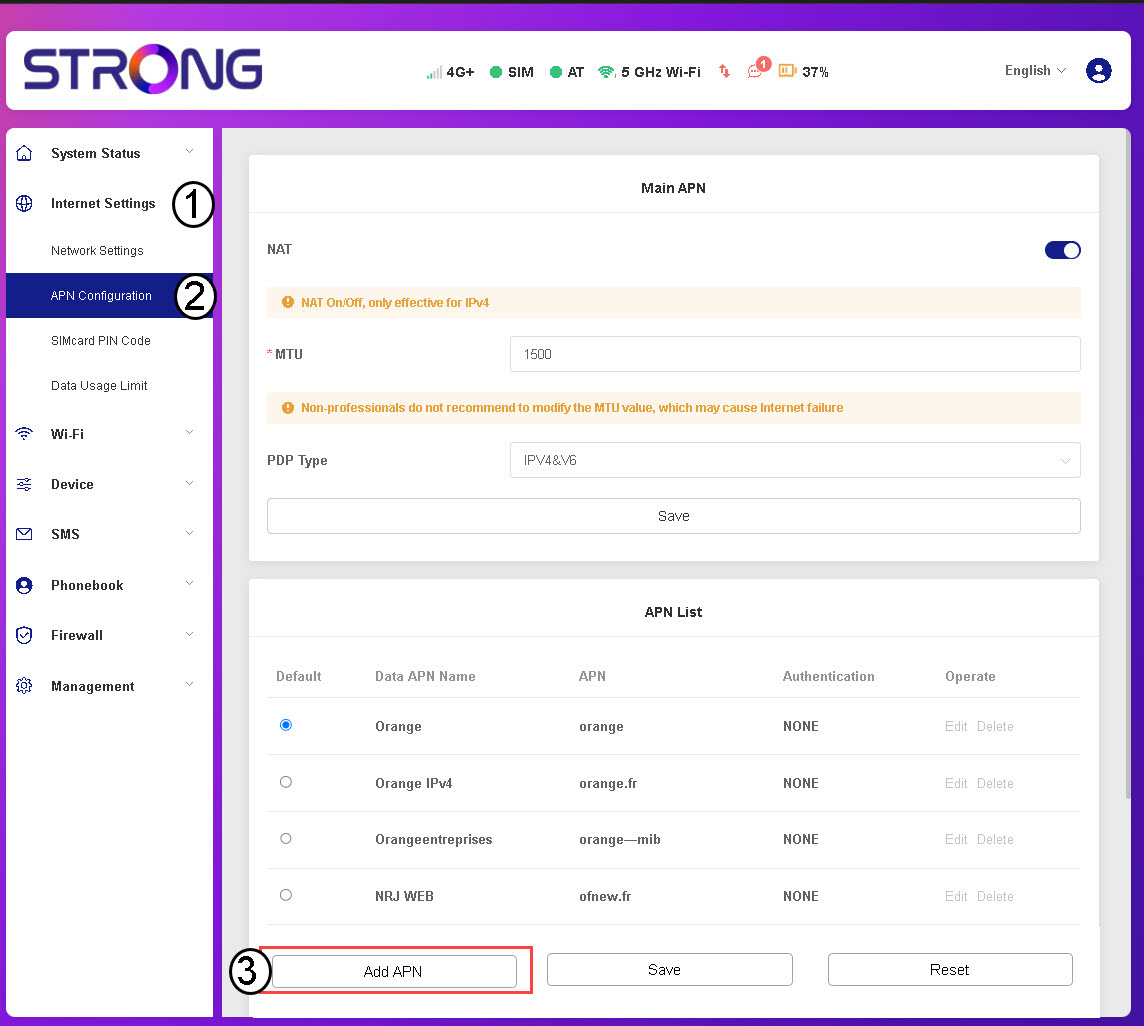
3 Skriv inn og lagre APN-informasjon
Skriv inn følgende informasjon før du klikker på Lagre:
- Data APN-navn: Skriv inn APN-navnet du har fått av tjenesteleverandøren din.
- APN: Skriv inn APN-en som er oppgitt av tjenesteleverandøren din.
- Autentisering: Velg autentiseringstypen fra listen basert på informasjonen du har fått fra tjenesteleverandøren din.