
Powerline 1000 Duo Wi-Fi FR V2
Wszystkie pytania
Powerline 1000 Duo Wi-Fi FR V2
Czy mogę wyłączyć funkcję Wi-Fi w module Wi-Fi, aby działał on jako zwykły Powerline?
Tak, można wyłączyć Wi-Fi. Aby to zrobić, wykonaj poniższe czynności.
1. Połącz sięz siecią Wi-Fi „ powerline ”
Połącz się z siecią Wi-Fi „ Powerline ”.
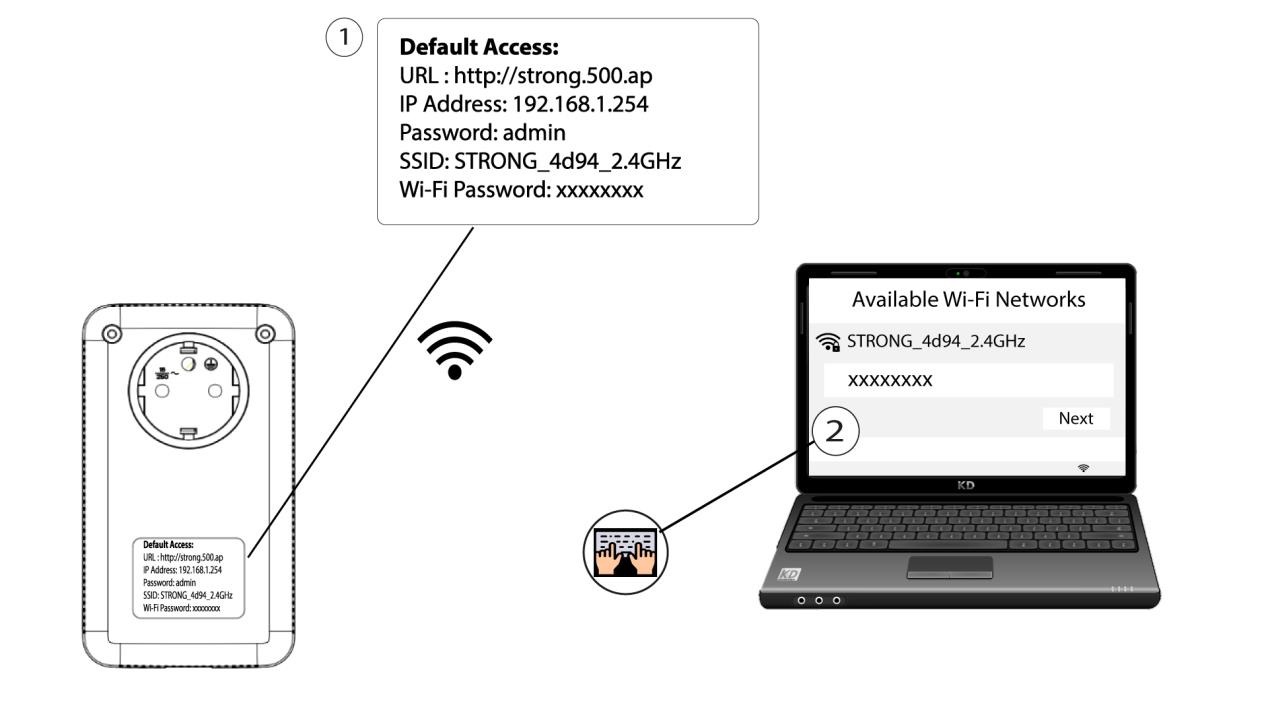
2. Wprowadźadres IP interfejsu użytkownika (Web UI)
Połącz się z interfejsem użytkownika modułu Wi-Fi „ Powerline ” za pośrednictwem sieci Wi-Fi lub wpisując adres http://strong.500.ap w pasku adresu przeglądarki internetowej – powinien pojawić się interfejs.

3. Wprowadźdane uwierzytelniające
Po przejściu na stronę główną wprowadź hasło: admin

4. Ustawienia sieci WLAN
Kliknij opcję „Ustawienia sieci WLAN ”, a następnie wybierz „Ustawienia podstawowe”.

5. WyłączWi-Fi
W razie potrzeby odznacz pole wyboru „Włącz ” w wierszu „Sieć bezprzewodowa” i kliknij „Zapisz”.


Należy pamiętać, że aby ponownie włączyć Wi-Fi za pomocą interfejsu użytkownika modułu, konieczne będzie podłączenie go za pomocą kabla RJ45. Innym sposobem na ponowne włączenie Wi-Fi jest zresetowanie sieci Wi-Fi „ Powerline ” za pomocą spinacza biurowego, aż diody LED zaczną migać. Wszystkie urządzenia, które były podłączone do sieci Wi-Fi „ powerline ”, zostaną automatycznie odłączone.