
Dvojpásmový opakovač 1200
Nenašli sa žiadne položky.
Nenašli sa žiadne položky.
Všetky otázky
Dvojpásmový opakovač 1200
Nenašli sa žiadne položky.
Nenašli sa žiadne položky.
Ako nastavím svoj opakovač ako prístupový bod?
TIPY: Pred nastavením opakovača si prosím prečítajte nasledujúci postup, aby ste určili umiestnenie vášho opakovača:
Kde je najlepšie umiestniť môj opakovač?1. Pripojte sak webovému používateľskému rozhraniu.
Na pripojenie k webovému používateľskému rozhraniu postupujte podľa jedného z nasledujúcich postupov:
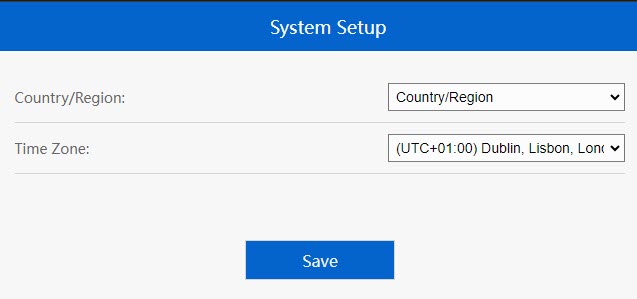
2Nastavtečasové pásmo
Ak je automaticky zistené časové pásmo nesprávne, vyberte správne časové pásmo zo zoznamu a kliknite na Uložiť.
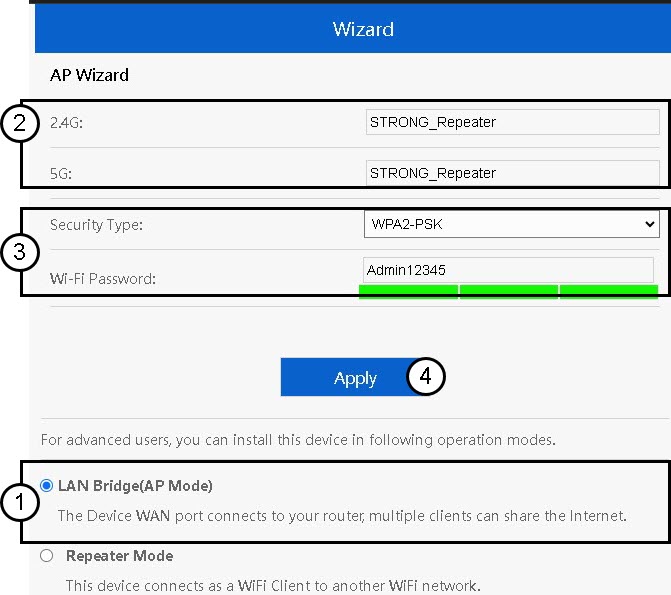
3.Nastavenie prístupového bodu
Otvorí sa sprievodca nastavením opakovača. Vyberte možnosťLAN Bridge (AP). Následne zadajte názov prístupového bodu. Vyberte typ zabezpečenia a zadajte heslo pre Wi-Fi, potom kliknite na tlačidlo „Apply“.
4Počkajtena konfiguráciu opakovača
Prosím, počkajte chvíľu, kým opakovač dokončí proces konfigurácie.
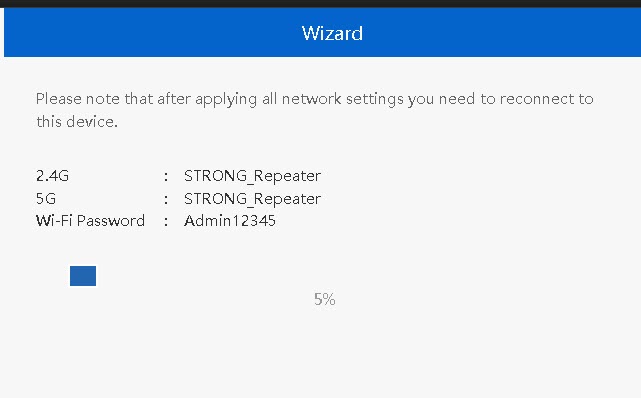

Upozornenie: Zapíšte si prosím údaje o týchto dvoch sieťach Wi-Fi. Tieto údaje budete potrebovať na pripojenie k sieti.