
ATRIA Wi-Fi 5 Mesh 2100 (2-pack)
Inga föremål hittades.
Inga föremål hittades.
Alla frågor
ATRIA Wi-Fi 5 Mesh 2100 (2-pack)
Inga föremål hittades.
Inga föremål hittades.
Hur ändrar jag SSID (Wi-Fi-nätverksnamnet) och lösenordet för mitt Wi-Fi- mesh -nätverk?

Varning: Observera att du måste ange ett lösenord på mellan 8 och 32 tecken som innehåller
stora bokstäver, små bokstäver, siffror och minst ett specialtecken (@, $, !, %, *, ?, &)
För att ansluta till webbgränssnittet, se följande anvisningar: Hur kommer jag åt webbgränssnittet?
1FALL1: Ändra Wi-Fi-nätverksuppgifterna i webbgränssnittet
Klicka på WLAN och WLAN 2,4 GHz. Ange sedan följande uppgifter innan du klickar på Bekräfta:
- SSID: Ange ett nytt nätverksnamn
- PSK: Ange ett nytt lösenord.

2. Skrivner den nya informationen
Skriv ner de nya nätverksuppgifterna på ett papper.

För att ansluta till appen, följ denna beskrivning: Hur använder jag Atria-appen ” Mesh ”?
1FALL2: Ändra Wi-Fi-nätverksuppgifterna i appen
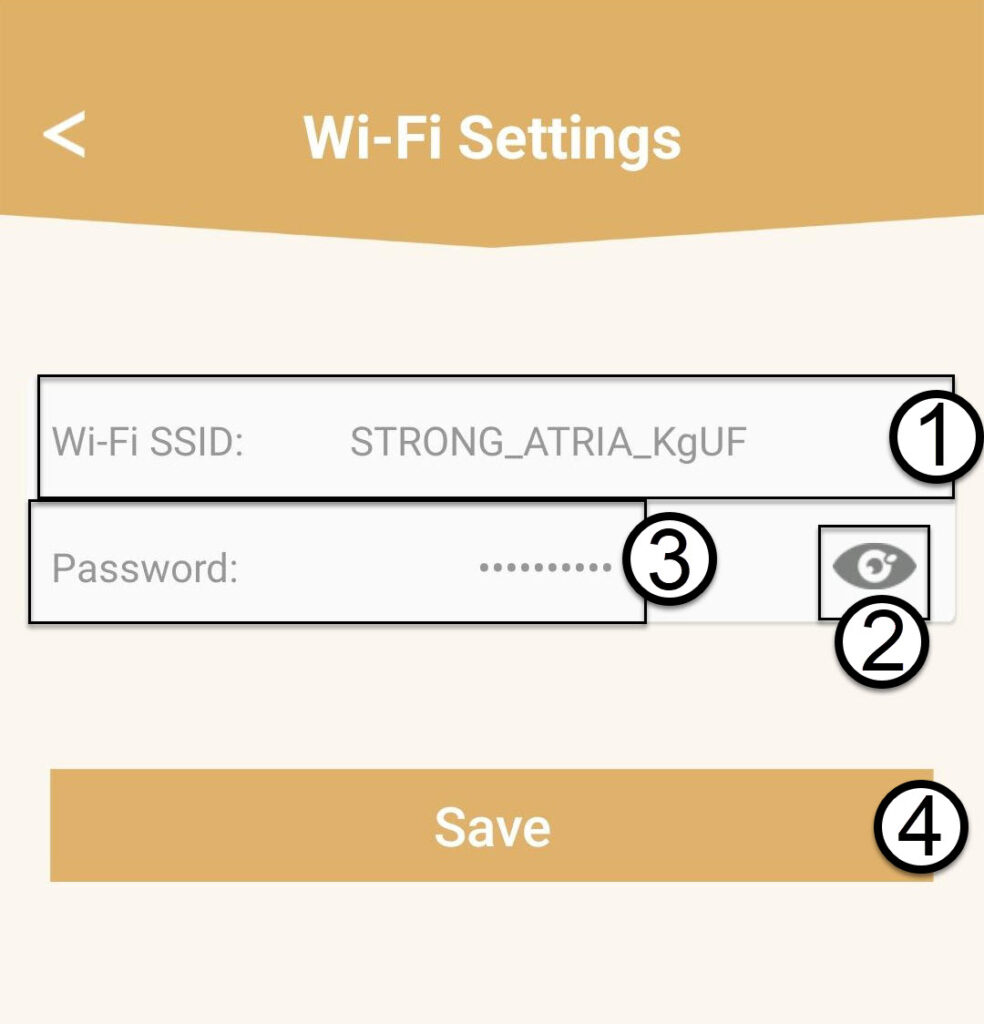
Klicka på ”Wi-Fi-inställningar”.

2. Skrivner den nya informationen
Ange ett nytt Wi-Fi-SSID och klicka på ögonikonen för att visa lösenordet och ändra det innan du klickar på Spara.
3. Skrivner den nya informationen
Skriv ner lösenordet på ett papper.