
4G+ AIRSPOT 510 Wi-Fi
Inga föremål hittades.
Inga föremål hittades.
Alla frågor
4G+ AIRSPOT 510 Wi-Fi
Inga föremål hittades.
Inga föremål hittades.
Hur hanterar jag APN-inställningarna på min enhet?
Ibland kan det uppstå problem med mobildatanätverket efter att du har konfigurerat enheten och angett din PIN-kod. I så fall ska du följa anvisningarna nedan för att kontrollera dina APN-uppgifter.
1Öppnawebbgränssnittet
Följ dessa anvisningar för att ansluta till webbgränssnittet. Hur kommer jag åt webbgränssnittet?
2ÖppnaAPN-konfigurationen
Klicka på ”Internetinställningar ” och ”APN-konfiguration”. Klicka sedan på ”Lägg till APN”.
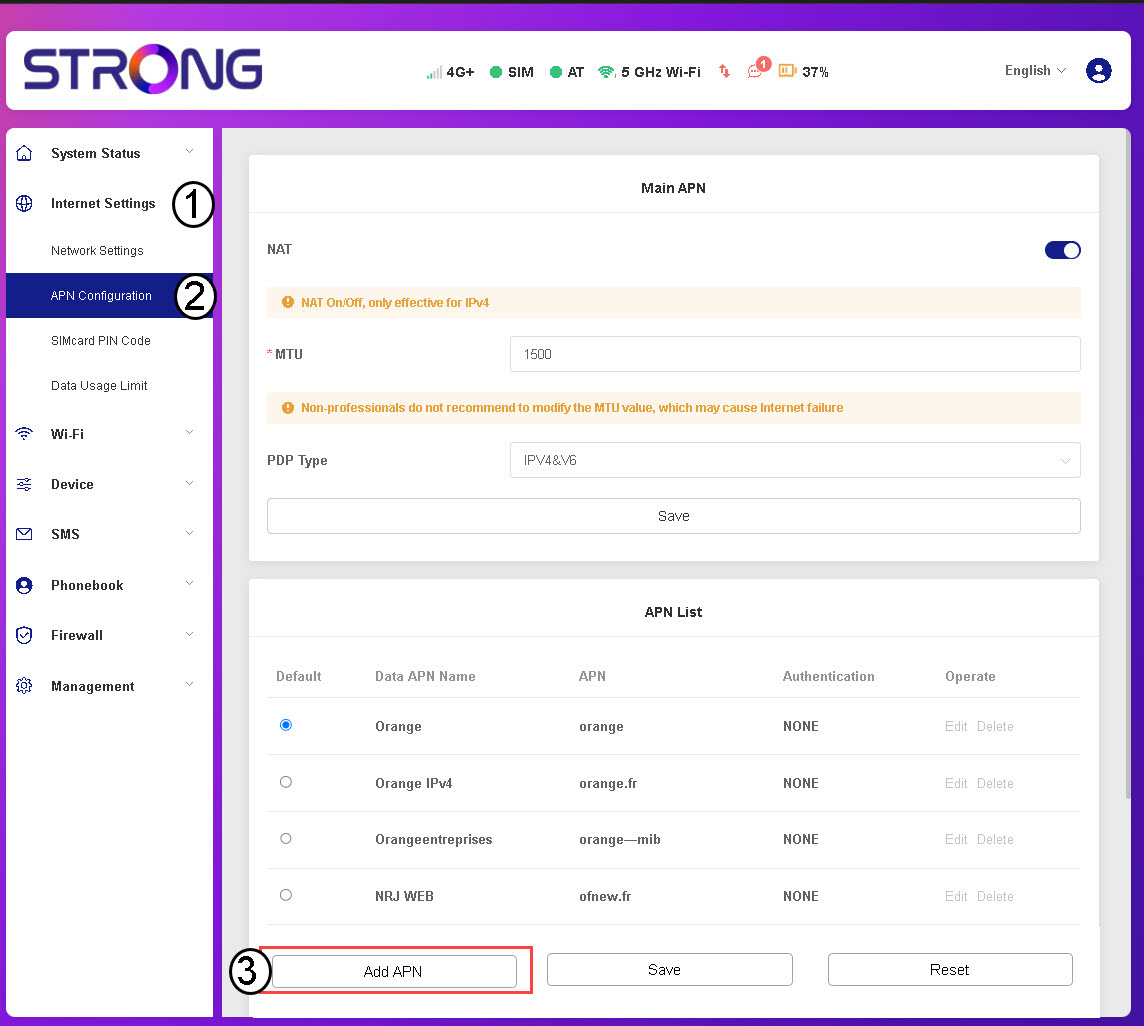
3Angeoch spara APN-uppgifter
Ange följande uppgifter innan du klickar på Spara:
- APN-namn: Ange det APN-namn som du har fått av din operatör.
- APN: Ange den APN som du har fått av din operatör.
- Autentisering: Välj autentiseringstyp från listan utifrån de uppgifter du fått från din tjänsteleverantör.