
Powerline 1000 Duo Wi-Fi FR V2
Усі питання
Powerline 1000 Duo Wi-Fi FR V2
Чи можна вимкнути функцію Wi-Fi у модулі Wi-Fi, щоб він працював як звичайний Powerline?
Так, Wi-Fi можна вимкнути. Для цього, будь ласка, виконайте наведені нижче дії.
1. Підключітьсядо мережі Wi-Fi « powerline »
Підключіться до мережі Wi-Fi « Powerline ».
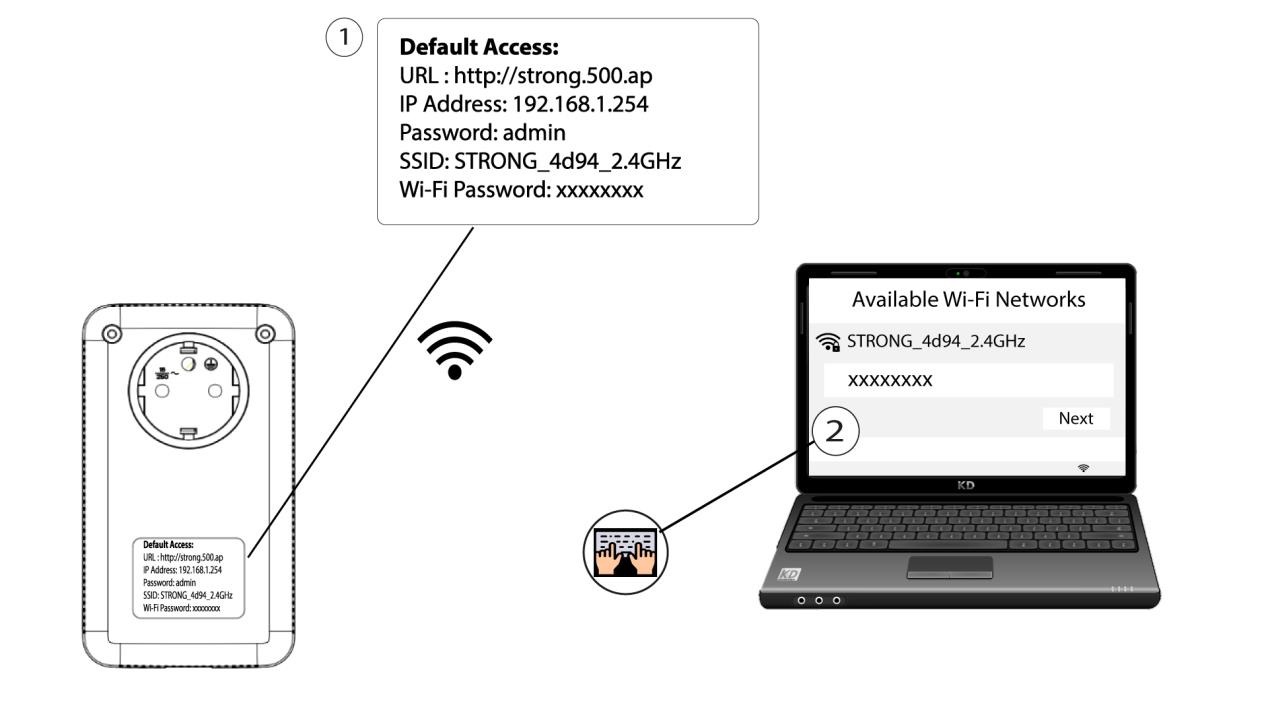
2. ВведітьIP-адресу веб-інтерфейсу користувача
Підключіться до інтерфейсу користувача Wi-Fi-модуля « Powerline » через Wi-Fi або ввівши адресу http://strong.500.ap в адресному рядку веб-браузера — інтерфейс має з’явитися.

3. Введітьоблікові дані
Перейшовши на головну сторінку, введіть пароль: admin

4. Налаштування Wi-Fi
Натисніть «Налаштування WLAN », а потім виберіть «Основні налаштування».

5. ВимкнітьWi-Fi
Зніміть галочку біля пункту «Увімкнути» у рядку «Бездротовий зв’язок» відповідно до ваших потреб і натисніть «Зберегти».


Зверніть увагу, що для повторного увімкнення Wi-Fi через інтерфейс користувача модуля вам доведеться підключитись за допомогою кабелю RJ45. Інший спосіб повторного увімкнення Wi-Fi — виконати скидання налаштувань мережі Wi-Fi « Powerline » за допомогою скріпки, доки світлодіоди не почнуть блимати. Усі пристрої, що були підключені до мережі Wi-Fi « powerline », будуть автоматично від’єднані.