
ATRIA Wi-Fi 5 Mesh 2100 (2-пакет)
Усі питання
ATRIA Wi-Fi 5 Mesh 2100 (2-пакет)
Як змінити SSID (ім’я мережі Wi-Fi) та пароль моєї мережі Wi-Fi mesh ?

Увага: Зверніть увагу, що пароль повинен містити від 8 до 32 символів, включаючи великі та малі літери
, цифри та принаймні один спеціальний символ (@, $, !, %, *, ?, &)
Щоб підключитися до веб-інтерфейсу користувача, ознайомтеся з цією інструкцією: Як отримати доступ до веб-інтерфейсу користувача?
1ВИПАДОК1: Зміна даних мережі Wi-Fi у веб-інтерфейсі користувача
Натисніть «WLAN » і «WLAN 2.4G». Потім введіть наведену нижче інформацію, після чого натисніть «Підтвердити»:
- SSID: Введіть нову назву мережі
- PSK: Введіть новий пароль.

2. Запишітьнову інформацію
Запишіть нові дані про мережу на аркуші паперу.

Щоб підключитися до додатка, ознайомтеся з цією інструкцією: «Як користуватися додатком Atria Mesh ?»
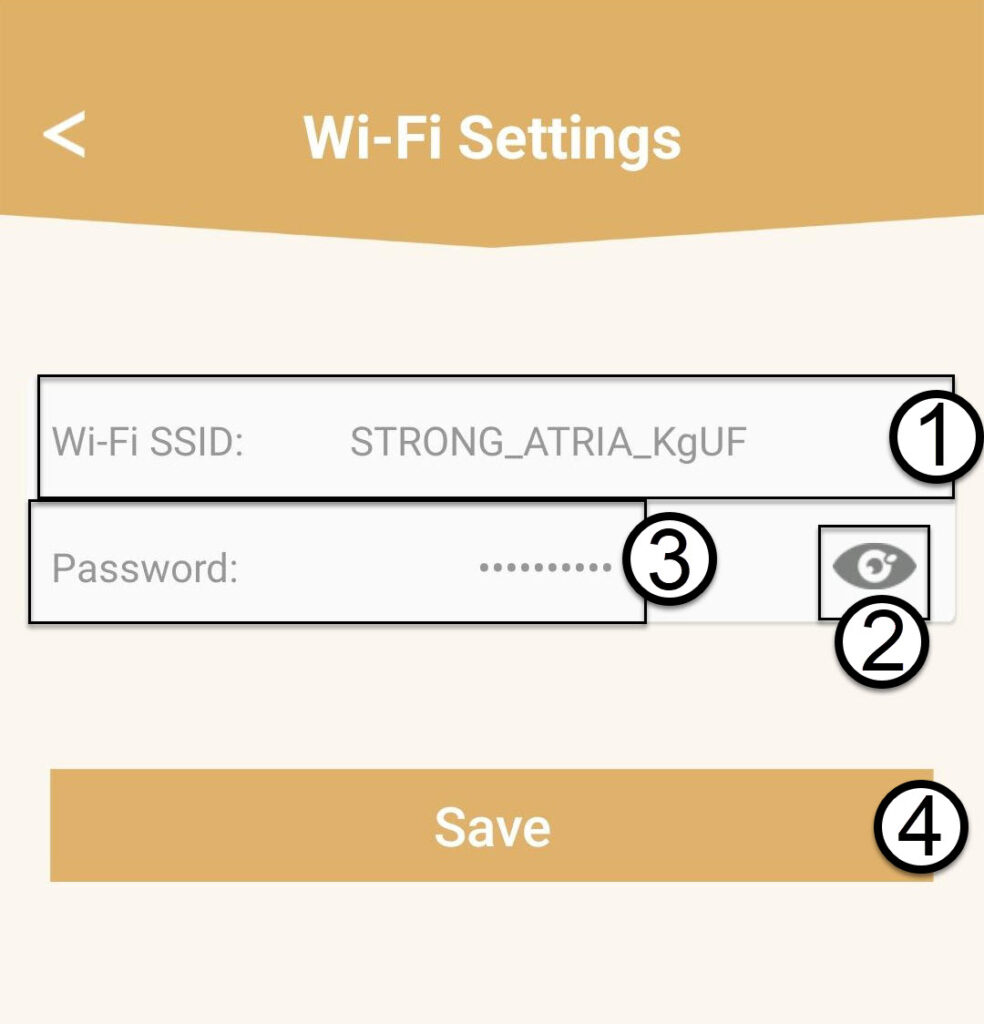
1ВИПАДОК2: Зміна даних про мережу Wi-Fi в додатку
Натисніть «Налаштування Wi-Fi».

2. Запишітьнову інформацію
Введіть новий SSID мережі Wi-Fi та натисніть на піктограму у вигляді ока, щоб відобразити пароль і змінити його, а потім натисніть «Зберегти».
3. Запишітьнову інформацію
Запишіть пароль на аркуші паперу.