
Нічого не знайдено.
Нічого не знайдено.
DOVY АКУМУЛЯТОРНА ВІДЕОКАМЕРА ДЛЯ ДИТИН
Усі питання
Нічого не знайдено.
Нічого не знайдено.
DOVY АКУМУЛЯТОРНА ВІДЕОКАМЕРА ДЛЯ ДИТИН
Не вдається встановити з'єднання / Повідомлення «З'єднання встановлено» не з'являється
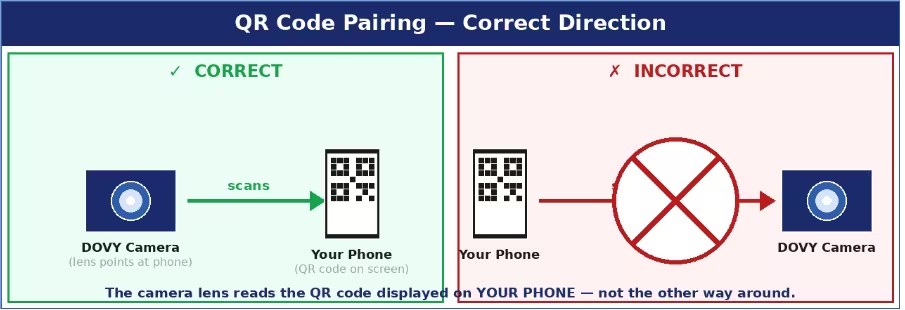
Найпоширеніші причини та способи усунення:
- QR-код не зчитується: збільште яскравість екрана телефону, тримайте об'єктив камери на відстані 15–25 см від екрана та переконайтеся, що на об'єктиві немає захисної плівки. Камера має перебувати в режимі сполучення (індикатор стану блимає червоним). У вас є 2 хвилини після натискання кнопки RESET — якщо час закінчився, повторіть натискання кнопки RESET і спробуйте ще раз.
- Неправильний діапазон Wi-Fi: необхідно вибрати мережу 2,4 ГГц. Якщо ваш маршрутизатор маршрутизатор використовує об’єднаний SSID (одне й те саме ім’я для діапазонів 2,4 ГГц і 5 ГГц), тимчасово перейменуйте один із діапазонів у налаштуваннях маршрутизатор , щоб їх можна було розрізнити.
- SSID або пароль занадто довгі: обидва повинні містити не більше 24 символів. За необхідності скоротіть їх у налаштуваннях маршрутизатор .
- Відсутні дозволи: переконайтеся, що під час сполучення на вашому телефоні увімкнені функції Bluetooth та визначення місцезнаходження.
- Камера не перебуває в режимі сполучення: утримуйте кнопку RESET протягом 5 секунд, доки світлодіод не почне повільно блимати червоним. Якщо світлодіод світиться рівним синім світлом, це означає, що камера вже підключена — натисніть кнопку RESET ще раз, щоб примусово увімкнути режим сполучення.
Поради: Протягом усього процесу сполучення тримайте камеру та телефон на відстані 1–2 метри від точки доступу Wi-Fi маршрутизатор .