ATRIA Wi-Fi 6 Mesh 3000 UK 2-пакет)
Всички въпроси
ATRIA Wi-Fi 6 Mesh 3000 UK 2-пакет)
Мога ли да настроя мрежа за гости в мрежата си „ Mesh “? (Случай 2: приложението Atria)
За да получите достъп до уеб интерфейса, трябва да сте свързани към Wi-Fi мрежата на устройството си, след като сте включили RJ45 кабела в WLAN порта на устройството си и на интернет рутера.
1Пример2: Приложението „Atria“
Изтеглете приложението за смартфон „ATRIA MESH “ от App Store или Google Play Store.

2Въведетеданните си за вход
След това трябва да се свържете със смартфона си към Wi-Fi мрежата на устройството „ Mesh “ и да влезете в приложението с данните си за достъп, които би трябвало да са „admin“ и„admin“, ако не сте ги променили.

3Wi-Fi за гости
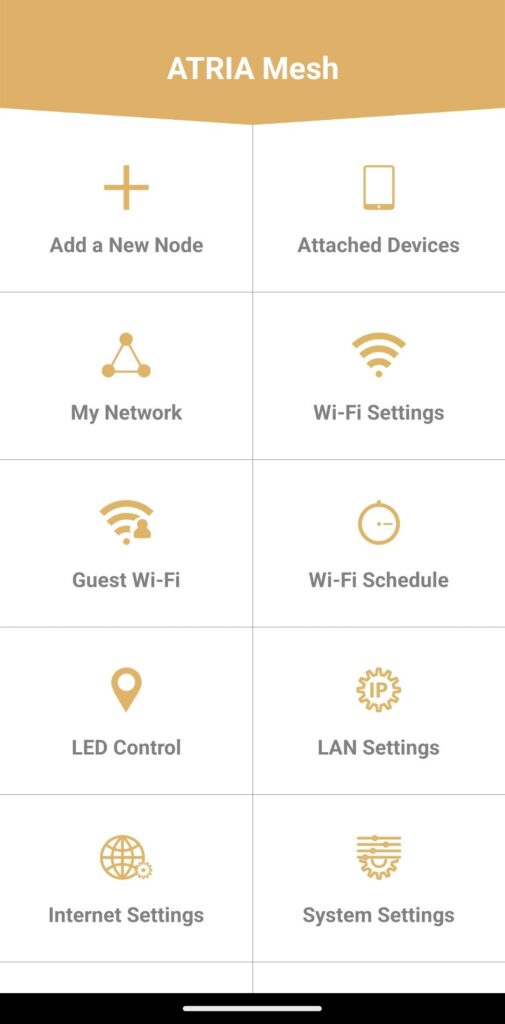
Сега, когато сте на главната страница, кликнете върху „Гост Wi-Fi“.
4. Настройкана Wi-Fi мрежа за гости
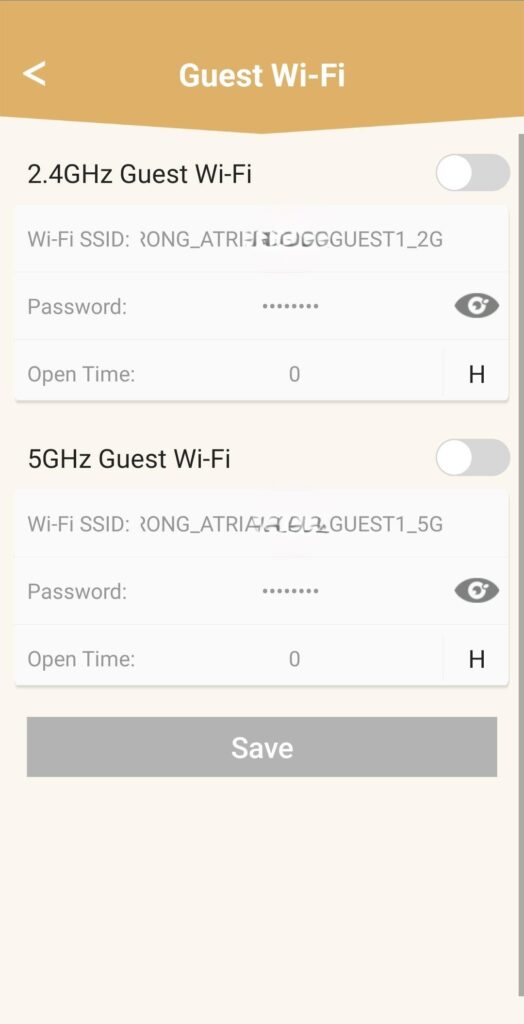
Тук можете да добавите гостуваща Wi-Fi мрежа на честота 2,4 GHz или 5 GHz.
• Натиснете бутона за включване/изключване на желаната мрежа.
• Задайте уникален SSID (име на Wi-Fi мрежата) и уникална парола.
• След това можете да изберете график, в който да определите кога гостуващата Wi-Fi мрежа да бъде активна или неактивна в раздела „Време на достъп“.
• Кликнете върху „Запази“.
5. Проверетеновата Wi-Fi мрежа
Новата мрежа за гости вече се показва в списъка с Wi-Fi мрежи на вашите устройства.