5G AIRHOME 1050 | Wi-Fi 6
Всички въпроси
5G AIRHOME 1050 | Wi-Fi 6
Как да избера типа на мрежата?

Вашият рутер разполага с една Wi-Fi мрежа и две мобилни мрежи – 4G или 5G. Първо трябва да имате една SIM-карта, за да активирате мобилните мрежи.
1Свържете сес устройството
За да получите достъп до типовете мрежи, трябва да се свържете с уеб интерфейса. За целта въведете SSID (името на Wi-Fi мрежата) и паролата за Wi-Fi на рутера на вашето устройство:

2. Достъпдо уеб интерфейса
След това въведете следния IP адрес в браузъра си: 192.168.0.1.

3Вход
Трябва да въведете потребителското име и след това да кликнете върху „Вход“. За повече информация относно влизането в системата, моля, вижте процедурата за вход.

4. Конфигурация на връзката
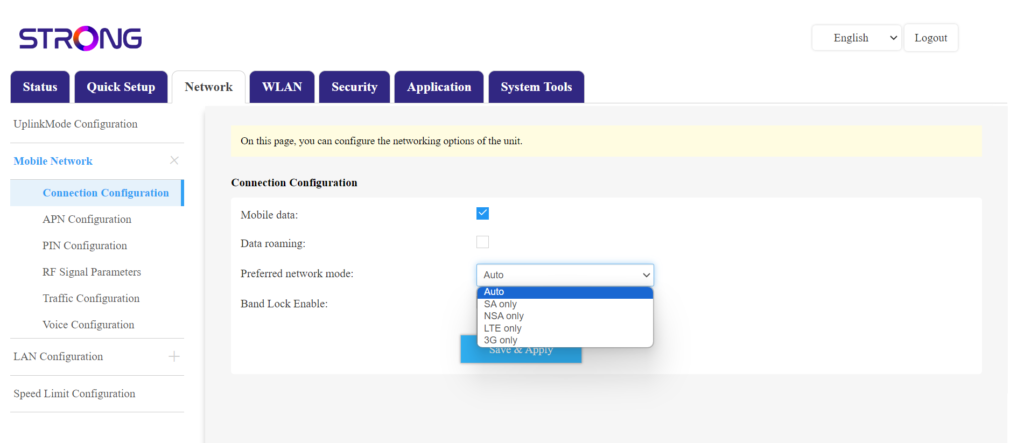
Кликнете върху „Мрежа “ и изберете „Конфигурация на връзката“.
След това в списъка с предпочитани мрежи изберете или NSA (за 5G мрежа), или LTE (за 4G мрежа) – това ще предотврати превключването на мрежата ви между различните видове мрежи. За да изберете подходящата мрежа, моля, разгледайте картата с покритието на антените във вашия район, за да видите коя е най-добрата налична мрежа.