
Nebyly nalezeny žádné položky.
Nebyly nalezeny žádné položky.
DOVY BATTERY BABYCAM
Všechny otázky
Nebyly nalezeny žádné položky.
Nebyly nalezeny žádné položky.
DOVY BATTERY BABYCAM
Spárování se nezdaří / Nikdy se nezobrazí hlášení „Připojení bylo úspěšné“
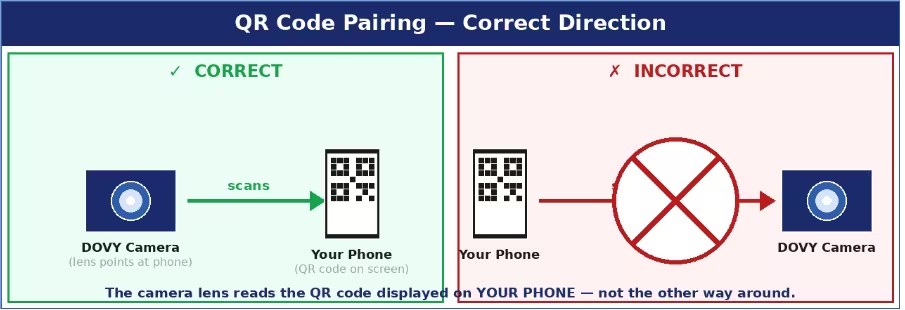
Nejčastější příčiny a řešení:
- QR kód se nepodařilo načíst: nastavte maximální jas displeje telefonu, držte objektiv kamera ve vzdálenosti 15–25 cm od displeje a ujistěte se, že na objektivu není žádná ochranná fólie. kamera musí být v režimu párování (stavová LED bliká červeně). Po provedení RESETu máte 2 minuty – pokud čas vyprší, proveďte RESET znovu a zkuste to ještě jednou.
- Nesprávné Wi-Fi pásmo: musíte vybrat síť v pásmu 2,4 GHz. Pokud váš router používá kombinované SSID (stejný název pro pásma 2,4 GHz i 5 GHz), dočasně přejmenujte jedno z pásem v nastavení routeru, abyste je mohli od sebe odlišit.
- SSID nebo heslo je příliš dlouhé: obě hodnoty musí mít maximálně 24 znaků. V případě potřeby je zkraťte v nastavení routeru.
- Chybějící oprávnění: ujistěte se, že jsou během párování v telefonu povoleny funkce Bluetooth a určování polohy.
- kamera není v režimu párování: podržte tlačítko RESET po dobu celých 5 sekund, dokud LED nezačne pomalu blikat červeně. Pokud LED svítí modře, je zařízení „ kamera “ již připojeno – stiskněte tlačítko RESET znovu, abyste režim párování aktivovali.
Tipy: Během celého procesu párování udržujte zařízení „ kamera “ a svůj telefon ve vzdálenosti 1–2 metry od Wi-Fi routeru.